What it is
YOLO finds every object in an image in one pass, with a box and a label for each
Computer vision has a few different jobs, and YOLO does one of them:
- Image classification puts one label on the whole image, like "contains a car".
- Object detection, which is YOLO's job, finds each object and draws a box around it, so a street photo becomes a list like 7 people and 1 car, each with a position.
- Segmentation marks the exact pixels of each object. YOLO26 has a segmentation variant for this, and SAM is the specialist model for it.
For each object, a detector returns four numbers for the box (usually the top-left and bottom-right corners, in pixels), a class from its fixed list of classes, and a confidence score between 0 and 1. Your code keeps the detections above a threshold you choose.
Before YOLO, the best detectors ran a classifier over many candidate regions of the image, one region at a time. Redmon et al. (2015) framed detection as one prediction over the whole image, "a regression problem to spatially separated bounding boxes and associated class probabilities". Their base model ran at 45 frames per second, and every YOLO since has kept the idea of predicting all the boxes in one pass.
Where it shows up
It fits jobs that need to know where things are, fast and often on small hardware
Counting and tracking
A camera over a shop entrance counts people, and a camera over a road counts cars and bikes. YOLO finds the objects in each frame, and a tracker, a separate algorithm like ByteTrack, links the same object across frames so nothing gets counted twice. The multi-object tracking entry on this index covers trackers.
Safety and compliance checks
A site camera checks whether workers wear hard hats, or whether a person is standing too close to a moving machine. Hard hats aren't in the pretrained class list, so this needs a model fine-tuned on your own labeled images, which the how-to section covers.
Cropping before a slower model
Detection is often the first step in a pipeline. YOLO finds the license plates or the product labels in a frame, and only those crops go to an OCR model or a vision-language model, which is far slower per image.
Running on the device
The smallest YOLO26 model has 2.4 million parameters, so it runs on an ordinary CPU, and Ultralytics exports it to formats built for devices, like CoreML for Apple hardware. Ultralytics reports that YOLO26n runs up to 43% faster than YOLO11n on CPU with ONNX. In the test run for this page, YOLO26n took about 32 milliseconds per image on a Mac's CPU.
How it works
YOLO predicts boxes on a grid, then keeps one box per object
One pass predicts boxes at every grid location
The original YOLO divided the image into a 7 × 7 grid. Each grid cell predicted 2 boxes with a confidence score for each, plus a probability for each of the 20 classes in the dataset it was trained on, so the whole output was one block of 7 × 7 × 30 numbers.
Current YOLO models keep the grid and predict at several scales. A mostly convolutional backbone extracts features from the image, and a detection head predicts a box and class scores at every location. For a 640-pixel input, YOLO26's default head outputs predictions at 8,400 locations, which matches three grids of 80 × 80, 40 × 40 and 20 × 20. The fine grids catch small objects and the coarse grid catches large ones.
Several locations see the same object, so boxes overlap
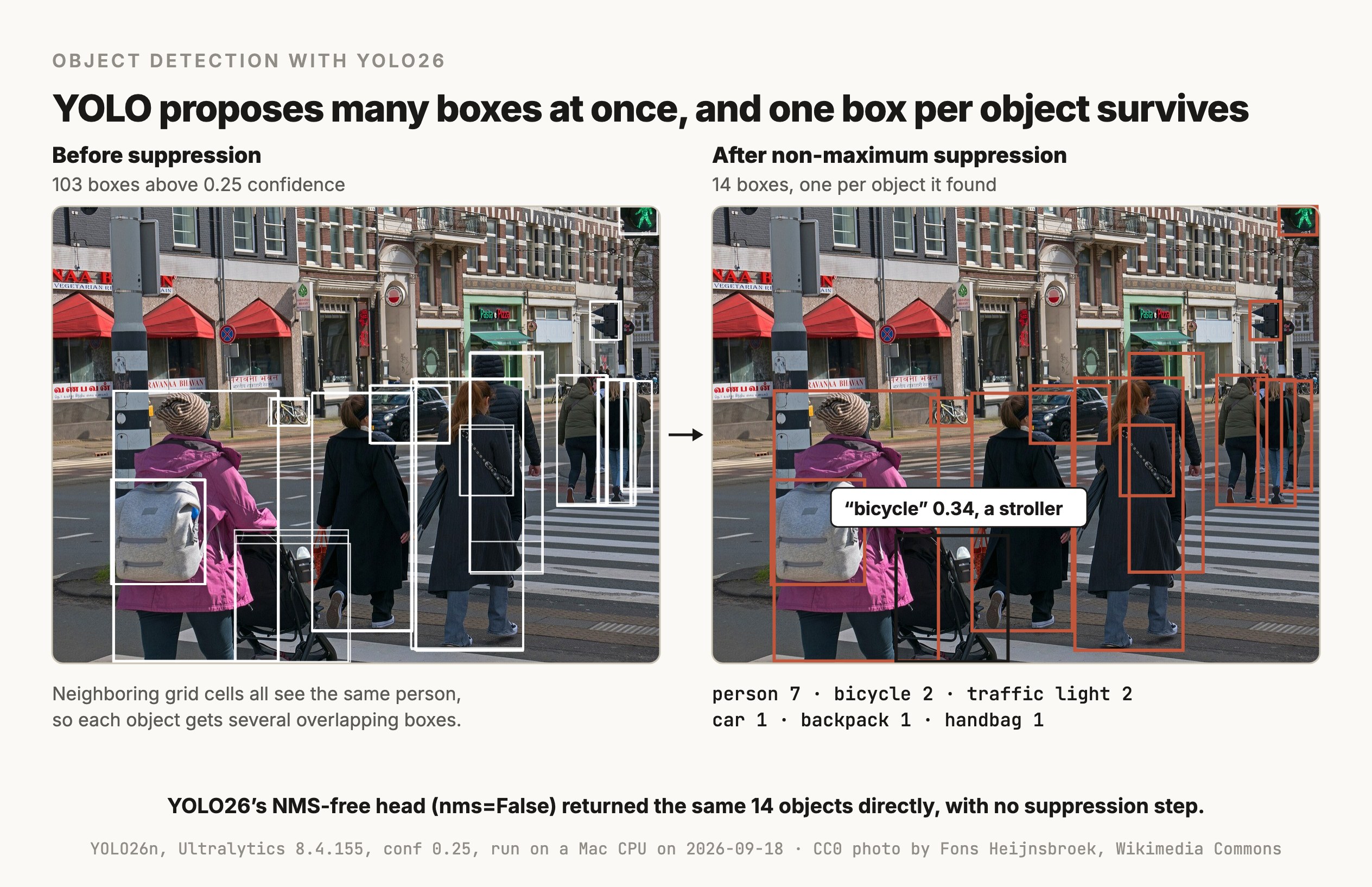
A person in the middle of the image falls under several neighboring grid locations, and each of them predicts a box for that person. So the raw output has many overlapping boxes per object, which is what the left half of the photo below looks like before anything cleans it up.
Non-maximum suppression keeps the best box per object
The standard cleanup is non-maximum suppression, or NMS. It compares boxes using intersection over union, or IoU, which is the area where two boxes overlap divided by the area they cover together. An IoU of 1 means identical boxes and 0 means no overlap. NMS then works through the boxes one class at a time:
- 01Sort the boxes by confidence.
- 02Keep the most confident box.
- 03Drop every other box of the same class whose IoU with the kept box is above a threshold, 0.7 by default in Ultralytics.
- 04Repeat with the next box that's still left.
In the run above, NMS took 103 candidate boxes down to 14. NMS is ordinary code that runs after the network, and on some edge hardware it's slow or awkward to export along with the model, which is why newer versions try to remove it.
YOLO26 can skip NMS with a second head
YOLOv10 (Wang et al., 2024) introduced "consistent dual assignments for NMS-free training". A second detection head is trained so that each object gets exactly one prediction, and the first head, which gives many boxes per object, is only used to give that training a richer signal. YOLO26 ships both heads. According to Ultralytics' docs, the default head still uses NMS "for accuracy", and passing nms=False switches to the one-to-one head, which returns at most 300 detections with no suppression step. In the test run it returned the same 14 objects.
DETR (Carion et al., 2020) had already predicted one box per object with no NMS, using a transformer that outputs a fixed number of object predictions directly. The DETR-family detectors entry on this index covers that line.
mAP is the number that ranks detectors
Detectors are compared by mean average precision, or mAP, on the COCO dataset, 80 everyday classes like person and car. A predicted box counts as correct when its IoU with the true box passes a threshold. COCO's main number, mAP50-95, averages the score over ten IoU thresholds from 0.50 to 0.95, so it rewards boxes that fit tightly. For scale, Ultralytics reports YOLO26n at 40.9 and YOLO26x at 57.5 on COCO.
Versions
The versions you'll see, as of September 18, 2026
The version numbers don't come from one team. Joseph Redmon's group wrote the first three, and later numbers came from Ultralytics and from other labs and companies, so a higher number isn't always a better or newer model from the same people.
| Version | Released | From | What changed |
|---|---|---|---|
| YOLOv1 | June 2015 | Redmon et al. | The single-pass grid detector |
| YOLOv2 and YOLOv3 | December 2016 and April 2018 | Redmon and Farhadi | Anchor boxes and detection at several scales |
| YOLOv4 | April 2020 | Bochkovskiy et al. | A tuned bag of training and architecture tricks |
| YOLOv5 | June 2020 | Ultralytics | Ultralytics' first PyTorch implementation |
| YOLOv8 | January 2023 | Ultralytics | The Python API and command line Ultralytics still uses |
| YOLOv10 | May 2024 | Tsinghua University | NMS-free training with two heads |
| YOLO11 | September 2024 | Ultralytics | The version before YOLO26 |
| YOLOv12 | February 2025 | Tian et al. | Attention blocks inside a real-time detector |
| YOLOv13 | June 2025 | Lei et al. | Hypergraph-based feature mixing |
| YOLO26 | January 2026 | Ultralytics | Optional NMS-free head, lighter box regression, better small-object training |
| YOLO27 | Not released | Ultralytics | A preview page only, with no launch date and no weights |
The recent projects on GitHub, from YOLOv10 to Ultralytics' own repository, are licensed AGPL-3.0. Ultralytics' license page says the free AGPL-3.0 license fits if you're "comfortable open-sourcing your entire project", and that using its models in a closed-source product needs a paid Enterprise license.
YOLO26 comes in five sizes, and Ultralytics' own numbers show the trade-off between accuracy and speed.
| Model | mAP50-95 | CPU, ONNX (ms) | T4 GPU, TensorRT (ms) | Parameters |
|---|---|---|---|---|
| YOLO26n | 40.9 | 38.9 | 1.7 | 2.4M |
| YOLO26s | 48.6 | 87.2 | 2.5 | 9.5M |
| YOLO26m | 53.1 | 220.0 | 4.7 | 20.4M |
| YOLO26l | 55.0 | 286.2 | 6.2 | 24.8M |
| YOLO26x | 57.5 | 525.8 | 11.8 | 55.7M |
Ultralytics measured the speeds with the NMS-free head at a 640-pixel input. The YOLO26 family also has variants for other vision tasks, including segmentation and pose estimation.
Choosing
Pick YOLO for fast boxes around known classes, and a neighbor when you need more
| The job | Reach for | Why |
|---|---|---|
| Boxes around known object types, in real time or on a device | YOLO | It's small and fast, and the tooling for training and export is mature |
| The most accurate real-time boxes on a GPU, with a permissive license | A DETR-family detector, like RF-DETR | Roboflow's benchmark puts it ahead of YOLO26 at similar speeds, and most sizes are Apache 2.0 |
| Objects you describe in words, with no training | An open-vocabulary detector, like Grounding DINO or YOLOE-26 | It takes a text prompt, like "red forklift", and finds matches |
| The exact pixels of each object | SAM, or YOLO26-seg | A mask covers only the object's own pixels |
| One label for the whole image | An image classifier | It's simpler and there are no boxes to label |
| Answering an open question about an image | A vision-language model | It reads the whole scene and writes an answer, and it's much slower per image |
The comparison with RF-DETR comes from Roboflow, which makes RF-DETR, so it's a vendor's benchmark, even though Roboflow measured every model the same way on a T4 GPU. On its numbers, as of September 2026, RF-DETR-M reaches 54.7 mAP50-95 at 4.4 milliseconds, against 52.5 for YOLO26-M at the same 4.4 milliseconds, and RF-DETR's small sizes are released under Apache 2.0 where YOLO26 is AGPL-3.0. At the smallest size YOLO26-N is still the fastest model in that table, at 1.7 milliseconds.
Try it
How to try it
Ultralytics' Python package runs and trains every size of YOLO26, and exports it to other formats. Install it with pip install ultralytics. The first call downloads the 5.3 MB checkpoint for the smallest model.
from ultralytics import YOLO

model = YOLO("yolo26n.pt")                 # the nano model, pretrained on COCO
result = model("street.jpg", conf=0.25)[0]  # one image in, one result out

for box in result.boxes:
    label = result.names[int(box.cls)]
    print(label, round(float(box.conf), 2), [round(v) for v in box.xyxy[0].tolist()])

nms_free = model("street.jpg", conf=0.25, nms=False)[0]  # the one-to-one head
print(len(result.boxes), "boxes with NMS,", len(nms_free.boxes), "without")
To detect your own classes, like hard hats or a particular product, you fine-tune on labeled images. Each image needs a text file with one line per object, holding the class number and the box's center, width and height as fractions of the image size. Then model.train(data="your_data.yaml", epochs=100, imgsz=640) starts from the pretrained weights. Ultralytics' training tips recommend at least 1,500 images and 10,000 labeled objects per class for the best results, and fewer can work for simple objects, so measure mAP on images the model didn't train on to find out.
Those test images have to come from different scenes than the training images. Photos from one site or one video are near-copies of each other, and a random split puts some in training and the rest in test, so the model is tested on scenes it has already seen and the mAP comes out higher than it will be on a new site. Split by group, meaning every image from one site or one video goes into the same split.
mAP also hides which objects the model missed. A picture with the predicted boxes drawn on it shows the wrong boxes and says nothing about the hard hat that got no box, so draw the labeled boxes next to the predicted ones and list every labeled object that no prediction overlaps.
Help me fine-tune YOLO26n with the ultralytics package to detect hard hats and people without hard hats on construction-site photos. My labeled images are in data/images with YOLO-format label files in data/labels. The filenames start with the site name, like siteA_0412.jpg, and frames from one site look alike, so split by site. Every image from one site goes into the same split, roughly 80/10/10 into train, validation and test with a fixed random seed, and print which sites landed where. Write the dataset YAML, train yolo26n.pt for 100 epochs at 640 pixels, and report mAP50-95 per class on the test split. Print the confidence threshold that gives the best F1 score on the validation split. At that threshold, match predictions to labels on the test split at IoU 0.5 and list every labeled object with no matching prediction, grouped by class and by site. Save 20 test images with the labeled boxes in one color and the predicted boxes in another, choosing the images with the most missed objects first.
Limits
What it can't do
- It only knows the classes it was trained on, and it has no "unknown" answer. The pretrained models know COCO's 80 classes. An object outside them can get no box at all, or a box with the wrong label. In a rerun on the photo above with the threshold dropped to 0.05, the striped hat and the three red awnings got no box. The stroller came back as "bicycle" at 0.34, and a round restaurant logo as "clock" at 0.09. So a low count can mean the objects weren't there or that the model has no class for them, and nothing in the output tells you which. New classes need labeled images and fine-tuning, or an open-vocabulary detector.
- It draws boxes, which include background. A box around a diagonal pipe is mostly empty space. Use the segmentation variant or SAM for exact shapes, and the rotated-box variant for aerial images.
- It misses small objects packed close together. The original YOLO paper said its model "struggles with small objects that appear in groups, such as flocks of birds". YOLO26 adds a training method aimed at small targets, and it's still worth testing on your most crowded scenes before you rely on it.
- It doesn't generalize well to scenes unlike its training images. The first paper noted it "struggles to generalize to objects in new or unusual aspect ratios or configurations", and a model trained on street photos can fail on thermal cameras or top-down drone footage.
- Its confidence score needs a threshold you test. A score of 0.3 can be a real object or a stroller called a bicycle, so choose the threshold on your own labeled images.
- Its license limits closed-source use. Ultralytics' models are AGPL-3.0, so a closed-source product needs Ultralytics' Enterprise license or an Apache-licensed alternative.
Go deeper
Redmon et al. (2015): You Only Look Once, Unified, Real-Time Object Detection · Wang et al. (2024): YOLOv10, Real-Time End-to-End Object Detection · Jocher et al. (2026): Ultralytics YOLO26 · Ultralytics docs: YOLO26 · Carion et al. (2020): End-to-End Object Detection with Transformers (DETR) · Lin et al. (2014): Microsoft COCO, Common Objects in Context
Coming soon
New modules go live as I write them. Get each one in your inbox the day it ships. No spam, just the next lesson.