
The capability
What a planner is
A planner is the part of an agent that works out, before anything runs, what has to be true when the task is finished and which steps should get there, writes that down in a form your code can read, and changes it when a step shows the world is different from what it assumed.
Take the pieces of that sentence one at a time, because each one turns into code you write.
- What has to be true when it's finished. A goal stated as checks your code can run at the end, like "the checkout test passes and the test file wasn't edited".
- Which steps should get there. A list of steps, each one a single tool call with an expected result, and a note of which steps need another step's output before they can start.
- A form your code can read. JSON with a fixed schema, so the harness can run the steps in order, see which ones are done and count what they cost.
- Changes it when a step shows otherwise. A replanning rule that decides, when a step fails, whether to retry it, change the rest of the plan or stop and ask a person.
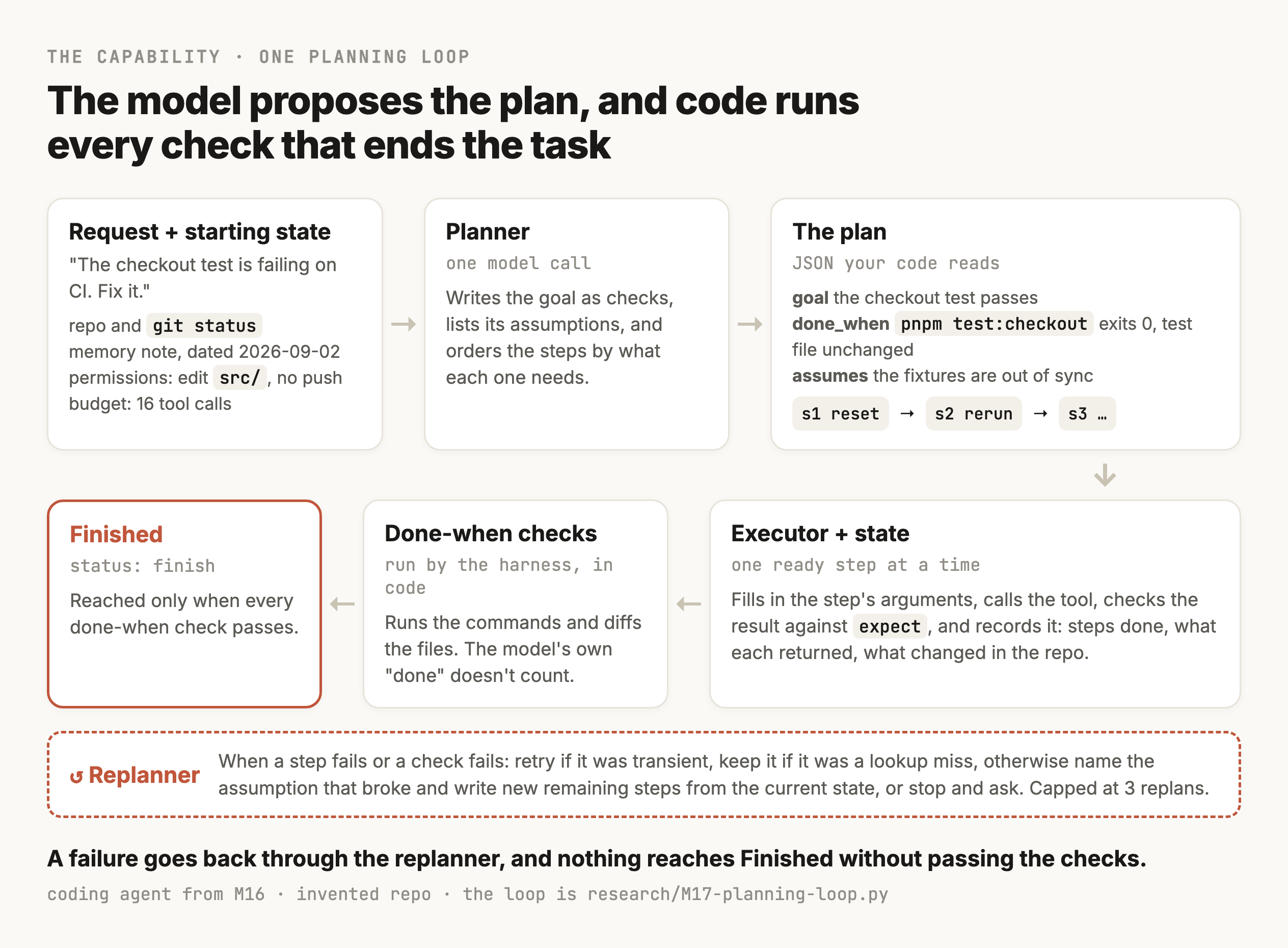
A planner has limits worth knowing before you build one. It can't know what a file contains until something reads it, so any plan written before the first read is partly a guess, and the steps that depend on what the read finds have to stay vague or get rewritten later. It also doesn't make a model better at the task. When Valmeekam and colleagues asked models to write complete plans for problems like those in the International Planning Competition, the best model, GPT-4, had "an average success rate of ~12% across the domains" (Valmeekam et al., NeurIPS 2023). The same paper found that plans did much better when an external verifier checked them and sent the errors back, and Kambhampati's group later argued that models "cannot, by themselves, do planning or self-verification" and should be paired with checkers outside the model (Kambhampati et al., 2024). Those were 2023 models on puzzle domains and newer ones do better, but the design that follows from it still holds for an agent in a repo. The model proposes a plan, and code checks each step and the finish.
Why this is a capability of its own
M9 already gave the agent a loop with limits in code, like a cap on model calls and a stop when the same tool call repeats, and M15 built checks that decide whether an output can be used. It's fair to ask what's left. What's left is the order of the work and the definition of finished. M9's loop decides when to give up, and M15's checks judge one output, and neither says which step should come next, which steps can run at once, or what the agent should do when step three proves step one was built on a wrong guess.
Those turn out to be where agents fail most. Cemri and colleagues labelled 1,642 traces from seven multi-agent frameworks and found step repetition in 15.7% of them, agents not recognising that the task was finished in 12.4%, and agents failing to follow the task's requirements in 11.8% (Cemri et al., 2025). The paper also says that failing to recognise termination conditions appears "almost exclusively in failed runs". Each of those is a planning failure, since each is about which steps to take or about when the task counts as finished.
Where it shows up
- A coding agent's task list, the checklist it writes at the start of a bigger change and ticks off as it goes.
- A research agent that decides which searches to run, which ones can run at the same time, and when it has enough to write the report.
- A data backfill where an agent works out which tables to rebuild and in what order, because some depend on others.
- The planning step M10 added to the flower company's support agent, which read only the customer's messages and fixed which tools the turn was allowed to use.
The shapes are different, and all of them keep a plan somewhere your code can read and check each step against it.
Where this starts
The checkout test the fixtures didn't fix
The coding agent from M16 works on a small team's web-app repo and remembers facts about the project between sessions. The team and its repo are made up, and so is every file in it. For this module the repo is also simulated, a copy held in a Python script with a fake test runner and a fake git history, so the same task can be run many times and the final state checked in code. The script is research/M17-planning-loop.py, and it runs on one local model, qwen3:8b through Ollama at temperature 0.
A developer writes "The checkout test is failing on CI. Fix it." The read policy from M16 loads one note for tasks about tests, saved on September 2nd, which says the checkout test is flaky when the fixtures get out of sync and that running pnpm fixtures:reset and rerunning usually fixes it.
The note is wrong this time. The day before, someone committed a change to src/pricing.js that rounds the tax on each line item down, with Math.floor, where it used to round to the nearest cent. On the test's three-item order that's two cents, and the test fails with "expected 107.07 to be 107.09". The commit message says the change was made at finance's request, and that the request was withdrawn the next day.
The planner, one model call that writes the whole plan before anything runs, turned the note into the plan below. The only edits are shorter wording in the does fields.
{
  "goal": "Fix the failing checkout test on CI by ensuring fixtures are in sync.",
  "assumptions": [
    "The checkout test failure is due to out-of-sync fixtures.",
    "Running `pnpm fixtures:reset` will restore the fixtures to a known state."
  ],
  "done_when": [{"check": "command_passes", "cmd": "pnpm test"}],
  "steps": [
    {"id": "s1", "does": "Reset the fixtures", "tool": "run",
     "depends_on": [], "expect": "The fixtures are reset successfully."},
    {"id": "s2", "does": "Re-run the test suite", "tool": "run",
     "depends_on": ["s1"], "expect": "The test suite runs with no failures."}
  ]
}
Two things in that plan are fine and two aren't. Testing the memory note first is a sensible opening, since it costs one command, and the planner wrote the note down as an assumption, which means a failure can point at it. What's missing is any step for when the note is wrong, and any check that stops the agent from finishing by changing the test's expected value. The only done-when check is that pnpm test passes.
The reset ran and the checkout test failed again with the same two cents. What happened next depended on which loop was running the plan.
- With no replanning, the executor had no steps left, so the harness wrote a report. The report explained the two-cent gap and suggested checking the fixtures and the tax logic, and the run ended with status
finishand the test still failing. - With replanning, the replanner named the broken assumption correctly, "running
pnpm fixtures:resetwill fully resolve the test failure", and then wrote new steps that read and editedsrc/checkout.js, a file that doesn't exist. The edit failed, and on its second replan it stopped and asked the developer whethercheckout.jswas missing. - One action at a time, the agent reset the fixtures and ran the tests in one command, saw the failure, searched for
calcTotal, readsrc/pricing.js, sawMath.floorin the tax function, replaced it with rounding to two decimals, and ran the tests again. They passed, and the run finished in seven model calls.
So on the module's own running example, the simplest agent was the only one that fixed it. That's worth sitting with before building anything, because it's what a planning loop has to beat. The replanning loop did the part planning is supposed to do, naming the assumption the failure disproved, and then failed on something planning adds, which is a step whose arguments were written before anything had been read. Section 13 goes through the plan that should have come out of that failure, and section 14 measures all four approaches on more tasks.
When to plan
A plan is worth writing only when the path isn't known in advance
Most requests an agent gets don't need a plan. "Which pnpm script runs the checkout tests?" is answered by reading package.json, and any structure on top of that one read is time the developer spends waiting. So the first design decision is which of three shapes a task gets.
- A single action. One tool call, then an answer. The model picks the call and your code runs it.
- A fixed workflow. Your code decides the steps, and the model fills in each one. Anthropic's guide calls these "systems where LLMs and tools are orchestrated through predefined code paths" (Anthropic, December 2024).
- A dynamic plan. The model writes the steps at run time, because nobody could write them in advance. The same guide says agents fit "open-ended problems where it's difficult or impossible to predict the required number of steps, and where you can't hardcode a fixed path."
A fixed workflow is often the right answer for coding work, which surprises people. Agentless fixes GitHub issues with the same fixed phases every time, from finding the code through to validating a patch, "without letting the LLM decide future actions". It resolved 96 of the 300 issues in SWE-bench Lite, 32.00%, at an average of $0.70 per issue on GPT-4o, which was the best result among the open-source agents it was compared against in mid-2024 (Xia et al., 2024). Closed tools in the same table scored higher, so it isn't the best possible, and the point stands that a fixed path your code controls can match an agent that plans for itself.
| Request | Shape | Why |
|---|---|---|
| "Which script runs the checkout tests?" | Single action | One read answers it |
| "Change the free-shipping threshold to 60" | Single action | One edit, and the tests catch a mistake |
| "Run lint and the tests before every deploy" | Fixed workflow | The same steps every time, so write them in code |
"Rename calcTotal everywhere and keep the tests green" | Dynamic plan | Nobody knows which files use it until a search runs |
| "The checkout test is failing on CI, fix it" | Dynamic plan | The cause is unknown, so the steps depend on what each one finds |
What planning costs on a task that doesn't need it
Section 14's evaluation includes four single-action tasks, like asking which currency src/config.js uses as the default, and the cost of planning shows up plainly in them. The direct agent picks one tool call and then writes the answer, and it used 2 model calls and about 4 seconds of model time on each. The planning loop with replanning used 5 calls and 17 seconds on average, because on top of a call per step to fill in arguments it spends one call writing the plan and another writing the report.
The currency question shows it most plainly. The planner wrote a one-step plan, read src/config.js, and added a done-when check that the file contains the text defaultCurrency. The file says CURRENCY = "EUR", so the check failed, the replanner ran twice looking for a name that was never there, and the answer, EUR, came back after 7 calls and 25 seconds, where the direct agent gave the same answer in 2 calls and 4 seconds. A planner that writes a check can write a wrong one, and a wrong check makes the loop do extra work on a task that was already finished.
Planning did get one of the four right that the direct agent missed. Asked which pnpm script runs only the checkout tests, the direct agent ran pnpm test -- --grep "checkout", saw one test pass, and answered with that command. The plan read package.json first and answered test:checkout, which is the script. That's the trade in miniature. A plan buys a read before the action, and on most small tasks the read isn't needed.
The practical fix is a gate, one small model call that decides whether a request gets a single action or a plan, and it's only worth adding if it chooses well. Across the 14 tasks in section 14 the script's gate picked wrong on three. It sent "do the checkout tests pass right now?" to the planner, and it sent the moved README and the checkout fix to the direct path, the second one reasoning that "resetting them and rerunning the tests should fix the problem", which is the memory note talking. The gated agent solved 8 of 14, one fewer than planning everything, at about the same number of calls, so this gate didn't pay for itself. A gate is a classifier, and M13's advice applies, which is to measure it on labelled requests before you trust its choices.
Goals and completion criteria
Turn the request into a goal your code can check
"Fix the checkout test" sounds like a goal and is too vague to plan against, because it doesn't say what finished looks like, and an agent left to decide for itself has a cheap way to finish. It can change the number the test expects. The test then passes and the agent reports success, while the tax bug the test was written to catch goes out to customers.
So the planner's first job is to write the goal down as checks. For the checkout task they'd look like this.
| Part | What it says for this task |
|---|---|
| Goal | The checkout test passes on the current code |
| Done when | pnpm test:checkout exits 0, and pnpm test exits 0 |
| Constraint | tests/checkout.test.js is unchanged, so the fix is in the code under test |
| Permissions | May read anything, edit files under src/, and run pnpm scripts. May not push, and may not touch .env files |
| Assumption | The failure is the flaky fixture the memory note describes |
| Question to ask first | None. Everything the task needs is in the repo |
Each row in that table does a different job. The done-when checks are what the harness runs at the end in code, and nothing else ends the task as a success. Constraints are checks too, and in this task the constraint is what stops an agent from finishing by changing the test's expected value. Permissions come from your code and the agent's token, and the planner only gets to read them, since a plan that lists git push as a step still can't push if the token is read-only. Assumptions are the guesses the plan rests on, written where a failing step can point at them later, and section 11 depends on that.
The last row is the one people skip. Some requests can't be planned without an answer from a person, like "deploy the redesign" when two staging branches exist, and some can be planned on a stated assumption, like "tests means the unit tests" when the repo has both unit and end-to-end suites. The rule of thumb is to ask when being wrong would be expensive or hard to undo, and to write the assumption down and carry on when it would be cheap to find out and fix. M16 used the same rule for memory, where an old fact was fine for a commit message and needed a confirmation before a deploy. An assumption in the plan shows up in the final report, so the developer sees it even when nobody was asked.
The checks the planner can write come from a small closed list your harness knows how to run, which is what makes them checkable.
[
  {"check": "command_passes", "cmd": "pnpm test:checkout"},
  {"check": "command_passes", "cmd": "pnpm test"},
  {"check": "file_unchanged", "path": "tests/checkout.test.js"},
  {"check": "file_contains", "path": "docs/README.md", "text": "Node 20"},
  {"check": "text_absent", "text": "calcTotal"}
]
Some goals can't be written as a command or a file check, like "the summary is accurate" or "the new copy sounds friendly". Those end on one of M15's verifiers, which might be a model judge or a person, and the plan records which one, because a task with no check at the end is a task the agent can finish by saying it did.
Starting state and memory
What the planner knows before step one
A plan is written from whatever the planner can see at the moment it's called, and that's usually less than you'd think. For the coding agent the starting state is the request and the repo as it stands, meaning its branch and git status, plus any CI log. On top of that come the memories the read policy from M16 loaded for this kind of task, and the permissions and budget the harness gave the run. Everything else the plan needs has to come from steps.
Memory needs care here, because it arrives looking like knowledge. The note the coding agent loaded, "the checkout test is flaky when the fixtures get out of sync", was true of some earlier failure, and M16's rule was that memory is a default and never an override. In a plan that means a memory becomes a dated assumption, and the first steps should be the cheap ones that test it. A planner that treats the note as a fact writes a plan with no way back if it's wrong, and every step after the fixture reset depends on something nobody checked.
Once the run starts there is a second kind of state, which is everything the run has learned and changed so far. It holds each step with its status and result, along with the assumptions still standing. It keeps a list of changes, which covers files edited and commands with side effects, and it counts how much of the budget has gone. Section 10 shows it as a structure your code owns, saved after every step the way M6 saved a checkpoint after each step of a refund, so a crash in the middle of a plan resumes from the last finished step and doesn't re-run an edit or a migration. The conversation list M5 managed is a bad place to keep it, because the model has to re-read all of it to work out where it is, and it gets compacted when it grows.
Step schema and granularity
A step your executor can run
Each step in the plan is a small record with fixed fields, and every field is there because some part of the harness reads it.
{
  "id": "s3",
  "does": "Find which commit last changed the tax rounding",
  "tool": "git_log",
  "args": {"path": "src/pricing.js"},
  "depends_on": ["s2"],
  "expect": "a list of commits, newest first",
  "side_effect": "none"
}
The id and depends_on fields are what the harness uses to decide what can run next. The tool must be one the agent is allowed to use, which the harness checks before running anything. The args can be empty in the plan and filled in by the executor when the step runs, because a step like "edit the rounding line" can't know the exact text of that line until an earlier read has returned it. The expect field says what a good result looks like, and the harness checks it in code wherever it can, for example with an exit code. The side_effect field says whether the step changes anything, from none for a read, to reversible for an edit in a working tree, to irreversible for a push or a migration against a shared database, and when something goes wrong later the harness treats each of them differently.
How big a step should be comes down to a trade. A step as coarse as "fix the bug" can't be checked, because nothing about its result tells your code whether it worked, and it can't be retried alone. A step as fine as "open the file", then "move to line 4", then "type one character", costs a model call each, and the plan goes stale while it's being run. The size that works is one tool call with a result your code can look at, which makes a step the smallest unit you can retry and check on its own.
The exception is steps that depend on something not yet known. "Edit the file the search finds" is a fine step to write before the search runs, and trying to be more specific only produces a guess. The replanner in section 2 did exactly that when it wrote an edit to src/checkout.js, a file that doesn't exist, before any step had read the repo.
Dependencies and parallelism
Order the steps by what each one needs
The depends_on field turns the list of steps into a graph. A step can start when every step it depends on has finished, and steps that don't depend on each other can run at the same time.
A deploy check that runs the linter alongside the unit tests and the checkout tests, then reports which fail, is the plainest example. The three commands need nothing from each other, so all three can start at once and the report waits for the last one. With each test run simulated at 20 seconds and the lint at the same, that's 20 seconds of tool time with the three running together, against 60 run one after another. Kim and colleagues built this into LLMCompiler, where a planner writes the graph and a scheduler runs every ready step in parallel, and reported "latency speedup of up to 3.7x, cost savings of up to 6.7x, and accuracy improvement of up to ~9% compared to ReAct" (Kim et al., ICML 2024). Those "up to" figures are the best results across their benchmarks, so a typical gain is smaller. The graph also has to be written, and on this deploy check qwen3:8b didn't write it. Section 14 shows every planning run collapsing the three commands into one step that ran only the test suite.
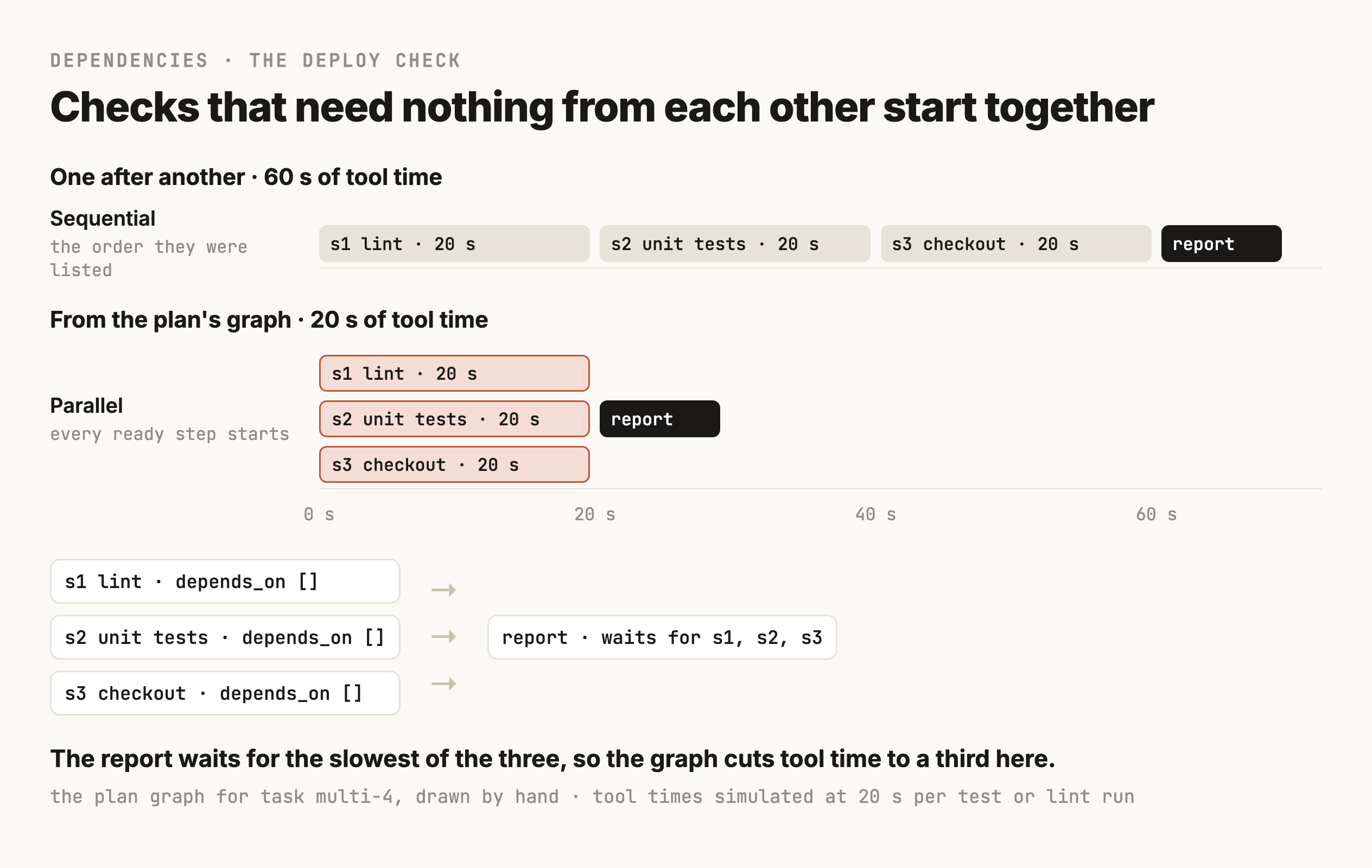
Running steps at once has rules of its own. Two steps that write the same file can't run together, because one edit will be made against text the other already changed, so the harness serialises any two steps that touch the same path even when the plan says they're independent. Steps with an irreversible side effect run alone, after everything they could depend on, so a failure elsewhere in the plan can still stop them. And parallel calls count against the same rate limits and budgets as sequential ones, which M9 covered for model calls and which applies to your own tools as well.
Approaches compared
Four ways to plan
The approaches in common use differ in when the model decides the next step and how much it sees when it does.
One action at a time
The model looks at the task and everything that has happened so far and picks the next tool call, then sees the result and picks again. This is ReAct, which alternates reasoning with actions. It beat imitation and reinforcement learning methods "by an absolute success rate of 34% and 10%" on two interactive benchmarks with one or two examples in the prompt (Yao et al., 2022). It adapts to every result, because each decision is made with the latest observation in front of it. The cost is that the model re-reads the whole history on every call, and since no plan exists anywhere, your code has nothing to check the run against and no list of what's left.
The whole plan up front
A planner call writes every step before anything runs, and an executor works through them. Plan-and-Solve describes it as "first, devising a plan to divide the entire task into smaller subtasks, and then carrying out the subtasks according to the plan" (Wang et al., ACL 2023). ReWOO pushed it further by having the planner refer to results it hasn't seen yet as variables, which made the model calls much shorter, and reported "5x token efficiency and 4% accuracy improvement on HotpotQA" (Xu et al., 2023). Your code can check the plan and run its independent steps in parallel. The catch is that it's written before any results come back, so a wrong guess in step one carries through every later step.
A broad plan, refined as you go
The planner writes the plan and a replanner rewrites the remaining steps whenever a result changes the picture. Plan-and-Act measured the gain on WebArena-Lite, 165 web tasks, where adding replanning to their planner took the success rate from 43.63% with a static plan to 53.94% (Erdogan et al., 2025). Their reason is the same one this module keeps coming back to, that a plan fixed at the start "is static throughout execution, which makes it vulnerable to unexpected variations in the environment." This is the approach the rest of the module builds.
Several candidate plans
The model writes more than one plan, or more than one next step, and a scorer picks one. When a branch fails, the search backs up and tries another. Tree of Thoughts did this on the Game of 24 puzzle, where GPT-4 with chain-of-thought prompting "only solved 4% of tasks" and the tree search solved 74% (Yao et al., NeurIPS 2023). It helps when a wrong early choice is expensive and a candidate can be scored cheaply before it runs. For a coding agent the cheapest scorer is often the test suite, which makes candidates practical for patches and less so for whole plans, since a plan's quality usually only shows once it runs.
| Approach | Model calls | When it works | How it fails |
|---|---|---|---|
| One action at a time | One per step, each re-reading the history | Short tasks where every result changes the next move | Loops, or stops without knowing whether it's done |
| Whole plan up front | One to plan, then one per step to fill arguments | Tasks whose steps are knowable before the first result | A wrong assumption carries through every later step |
| Broad plan, refined | The up-front calls plus one per replan | Tasks where results change the plan now and then | Replans in circles unless something caps it |
| Candidate plans | Several times the planning calls, plus scoring | A wrong first choice is costly and candidates are cheap to score | Pays for plans it throws away |
The planning loop in section 14 runs the first three of these side by side, plus the single action, on the same tasks. It doesn't run candidate plans.
Uncertainty and gathering information
Plan the cheap reads before the expensive guesses
A plan for "fix the checkout test" is a plan written in ignorance, since nobody knows yet why the test fails. What the planner can do is put the steps that reduce that ignorance first, and put the cheapest of them before the dearest.
That means treating each possible cause as a hypothesis with a step that could prove it wrong. The fixture note is one hypothesis, and testing it costs one reset and one rerun. A recent change to the pricing code is another, and it costs reading the failing assertion and one git log. A problem with the CI machine is a third, and testing it means asking someone with access. So the plan tests them cheapest first, and the steps that change code come after a hypothesis has survived its test.
The failing test's own output is the first thing to read. "Expected 107.07 to be 107.09" is two cents on a three-item order, which fits a change in how each line's tax gets rounded. Stale fixtures would more likely change the order itself, and move the total by more than a cent or two. A planner that reads that line before choosing a hypothesis would have ranked the fixture note lower.
Some steps exist only to gather information, and their failure is information too. A read of a file that doesn't exist tells you the file doesn't exist, and a search with no hits tells you the name isn't used. The first version of the loop in section 14 treated those as failed steps and sent them to the replanner, which on the checkout task gave up straight after reading a file it had guessed at. The second version keeps a failed lookup as an ordinary result and goes on to the next step. That change is right, and on the checkout task it wasn't enough, because the next step was an edit to the same guessed file, which section 14 goes through.
Replanning and recovery
When the plan meets the repo
Every plan meets something it didn't expect, and what the loop does next decides whether the agent is any good. The first question is what kind of failure it was, because each kind calls for a different response, and sending all of them to the replanner is how agents end up rewriting a perfectly good plan because of a network blip.
| Kind | What it looks like | What the loop does |
|---|---|---|
| Transient | ECONNRESET from the package registry, a 503, a rate limit | Retry the same step once with the same arguments, as M9's retry layer does |
| Lookup miss | A read of a file that isn't there, a search with no hits | Keep it as a result and move on, since it answers a question |
| Bad arguments | An edit whose old text isn't in the file | Let the executor fill the step again from the file's current text |
| Invalidating | The fixtures reset and the test still fails | The replanner names the assumption that broke and rewrites the remaining steps |
| Blocked | A missing secret, a permission the token doesn't have | Stop and ask, saying what was tried and what's needed |
Telling them apart is mostly your code's job. Transient errors match known patterns and are the same ones M9 retried. A lookup miss is any failed read-only step. What's left goes to the replanner, which is asked to say which kind it is, and to name the assumption the failure proved wrong when it says invalidating. That naming is what keeps replanning honest, because a replanner that can't name a broken assumption usually doesn't have a new plan, only the old one reworded.
Replan from where you are
A replan starts from the current state of the repo. Some steps already ran and some of them changed things, so the replanner gets the list of changes along with the results. Reads cost nothing to keep. A reversible edit that turned out wrong gets an explicit revert step in the new plan, so the undo is recorded like everything else. An irreversible step that ran, like a migration applied to a shared database, stays applied. The new plan works forward from it, because running the migration again would fail or apply something twice.
The migration is why the idempotency keys from M6 belong in a planning loop. A step whose tool accepts a key, so a repeat is recognised and ignored, is safe for the replanner to schedule again. A step without one has to be checked first, by asking the system whether it already happened, the way M6 checked a refund's status before retrying it.
Don't let it replan in circles
A replanner can loop as easily as a single-step agent can. It tries the fixture reset and the test fails, then it proposes a slightly different fixture reset and the test fails again. The script puts two limits in code. It caps replans at three, and it stops when the same tool call with the same arguments fails twice, which is M9's stopped_repeated_call applied to plan steps. A third rule is worth adding, which the script doesn't have. A replan should have to name an assumption no earlier replan named, so the replanner can't blame the same guess twice and keep going. On the rename task in section 14 both replans named the same broken assumption, word for word, before the repeated-call stop ended the run.
Stop with something useful
Some tasks can't be finished by anything the agent is allowed to do. The payments test needs a sandbox key the agent doesn't have and shouldn't have, and a push to preview needs a permission the agent's token doesn't carry. The right ending for those is a stop, and a stop is only useful if the message says what was tried and what changed, along with what's needed and who can provide it. "The payments test fails because PAYMENTS_SANDBOX_KEY isn't in the environment. I haven't changed any files. .env.example says to ask the payments team for it." is a message a developer can act on in a minute.
The wrong endings are the ones where the agent keeps going. It can mark the test as skipped, which is the payments version of editing the checkout test's expected value, or it can retry the push with different flags. The done-when checks catch the first one, since a skipped test fails file_unchanged, and M9's limits catch the second.
Budgets and termination
Budgets decide how the run ends
M9 put limits on every run, like a cap on model calls and a deadline, and those still apply. A planning loop needs a few more, because every plan and replan is an extra model call, and a plan can be fine at every step and still cost more than the task is worth.
The most useful budget is the total number of tool calls, 16 per task in the script, which covers retried calls and replanned steps together. The replan cap sits inside it. A budget per step helps on tasks with slow tools, since a test run that hangs should fail its step at a deadline and let the replanner see a timeout. And the cost of planning itself should be counted separately in your traces, so you can see how much of a task's spend went on deciding what to do.
Every run ends in exactly one of four ways, and the status your code records should say which.
| Status | Condition | What the developer sees |
|---|---|---|
finish | Every done-when check passed in code | The result, with the assumptions that were made |
ask_user | The replanner stopped on something only a person can provide | What was tried and the question |
stopped | A limit in code ended it | The same report, plus which limit fired |
failed | An error in the harness itself | An error logged with the trace, never shown as success |
A run that reaches stopped is the budget doing its job. The runs to worry about finish with checks that should have failed, or stop with a message nobody can act on.
The running example, end to end
The checkout fix, planned and replanned
Section 2 ended with the replanning loop correctly rejecting the fixture note and then editing a file that doesn't exist. What follows is the plan the loop should have produced, written by hand using every rule in this module. It was then run through the same simulated repo with no model involved, so every result below is what the tools returned (research/M17-reference-plan.py, output saved next to it). Nothing here came from qwen3:8b.
The first plan tests the note and nothing else
The first plan is almost the one the model wrote, with two changes. It runs only the checkout test, since that's the one the task is about and it's faster than the whole suite. And its done-when checks include the constraint the model left out.
{
  "goal": "The checkout test passes on the current code",
  "done_when": [
    {"check": "command_passes", "cmd": "pnpm test:checkout"},
    {"check": "command_passes", "cmd": "pnpm test"},
    {"check": "file_unchanged", "path": "tests/checkout.test.js"}
  ],
  "assumptions": ["A1: the fixtures are out of sync (memory note, 2026-09-02)"],
  "steps": [
    {"id": "s1", "does": "Reset the fixtures", "tool": "run",
     "args": {"cmd": "pnpm fixtures:reset"}, "depends_on": [],
     "expect": "exit 0", "side_effect": "reversible"},
    {"id": "s2", "does": "Rerun the checkout test", "tool": "run",
     "args": {"cmd": "pnpm test:checkout"}, "depends_on": ["s1"],
     "expect": "exit 0", "side_effect": "none"}
  ]
}
The plan stops after two steps on purpose. If the note is right, the test passes at s2 and the done-when checks finish the task. If it's wrong, nothing written now about the next steps would be more than a guess, so the planner leaves them to the replanner, which will have the test's output in front of it.
The rerun fails the same way, and that disproves A1
s1 prints "Fixtures reset (3 orders, 2 customers)." and s2 fails with "expected 107.07 to be 107.09" at line 7 of the test. That's an invalidating failure in section 11's terms, because it's the exact result assumption A1 said wouldn't happen, so the loop sends it to the replanner along with the state. The replanner sees the goal and the checks along with both steps and their outputs. It also sees the one change with a side effect so far, which is that the fixtures were reset. Resetting them is harmless to keep, so the new plan doesn't undo it.
The revised plan reads before it edits
The replanner's job is to name what broke and write new steps from here. The rule from section 6 does the most work at this point. Any step whose arguments depend on something not yet read gets no arguments, and the executor fills them in when it runs.
{
  "invalidated": "A1: resetting the fixtures didn't change the result",
  "assumptions": ["A2: a recent change to the pricing code moved the total by 2 cents"],
  "steps": [
    {"id": "r1.1", "does": "Read the failing test to see what it computes",
     "tool": "read", "args": {"path": "tests/checkout.test.js"}, "depends_on": []},
    {"id": "r1.2", "does": "List recent commits to the pricing code",
     "tool": "git_log", "args": {"path": "src/pricing.js"}, "depends_on": ["r1.1"]},
    {"id": "r1.3", "does": "Read the newest commit that could change the total",
     "tool": "git_show", "args": null, "depends_on": ["r1.2"]},
    {"id": "r1.4", "does": "Undo the rounding change if the commit explains it",
     "tool": "edit", "args": null, "depends_on": ["r1.3"], "side_effect": "reversible"},
    {"id": "r1.5", "does": "Rerun the checkout test", "tool": "run",
     "args": {"cmd": "pnpm test:checkout"}, "depends_on": ["r1.4"]},
    {"id": "r1.6", "does": "Run the whole suite", "tool": "run",
     "args": {"cmd": "pnpm test"}, "depends_on": ["r1.5"]}
  ]
}
The difference from what qwen3:8b wrote is in r1.3 and r1.4. The model's replan named src/checkout.js and wrote the exact edit, calcTotal to calcTotalWithTax, before any step had looked at a file, and both were guesses. Here those two steps have null arguments, and they'll get real ones from what r1.2 and r1.3 return.
The trace
| Step | Tool call | What came back | What the loop did |
|---|---|---|---|
| s1 | run pnpm fixtures:reset | Fixtures reset (3 orders, 2 customers) | Recorded the reset as a change |
| s2 | run pnpm test:checkout | FAIL, expected 107.07 to be 107.09 | Invalidating, A1 rejected, replan 1 |
| r1.1 | read tests/checkout.test.js | The test expects calcTotal(FIXTURE_ORDER) to be 107.09 | Continued |
| r1.2 | git_log src/pricing.js | a41c9e2 2026-09-21, round tax per line item down, per finance | Continued |
| r1.3 | git_show a41c9e2 | Math.round became Math.floor in lineTax, and the finance request was reverted on 2026-09-22 | Executor filled the edit from this diff |
| r1.4 | edit src/pricing.js | Edited, Math.floor back to Math.round | Recorded the edit as a change |
| r1.5 | run pnpm test:checkout | PASS, 1 passed | Continued |
| r1.6 | run pnpm test | PASS, 2 passed | Ran the done-when checks |
| checks | all three | test:checkout passes, test passes, test file unchanged | Status finish |
That's 8 tool calls and one replan. The report the developer gets says what was assumed, what disproved it, which commit caused the failure and why it was safe to undo, and what changed in the repo. That last part is the edit to src/pricing.js and the fixture reset.
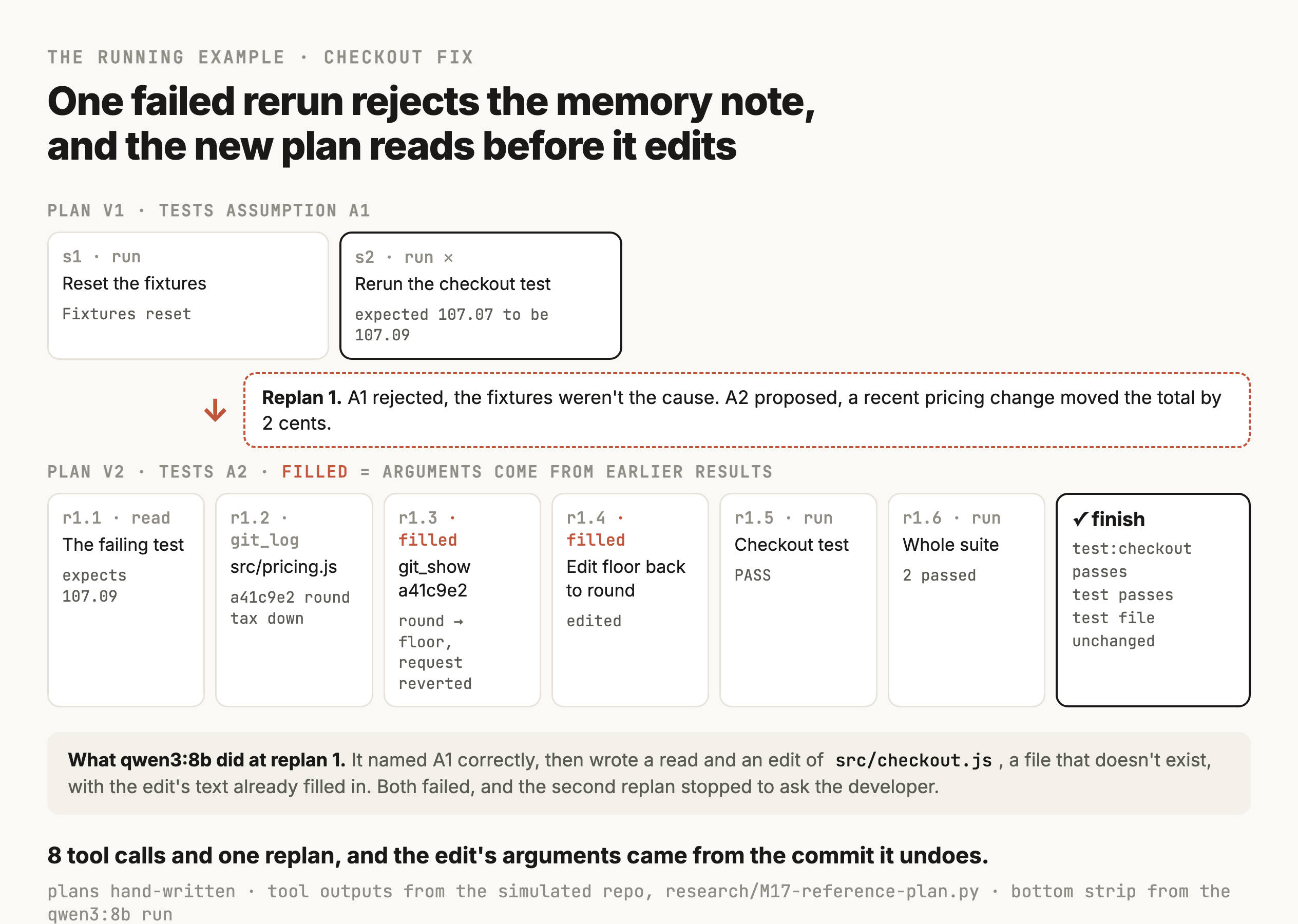
Compare that with the one-action-at-a-time agent from section 2, which also got the test to pass in six tool calls. It replaced Math.floor with toFixed(2) without reading the commit, so it never learned the change was deliberate and then reverted, and its report couldn't say why the fix was safe. On this task the plan's extra structure bought a better report and a fix it could justify. On the simulated repo's checks the two runs look the same, which is a limit of the checks, and section 14 comes back to it.
Evaluation and the planning loop, run
Measure the planner against agents that don't plan
A planning loop is extra machinery, and the only way to know whether it pays for itself is to run it next to simpler agents on the same tasks, with identical tools and scoring. The script does that with four strategies.
- Direct picks one tool call, and after it runs, writes the answer.
- One action at a time picks the next tool call after every result, up to 12 calls.
- Plan up front writes the plan and runs each step in order, with no replanning.
- Plan and replan is the loop from sections 10 to 12, including the replanner and its limits. It ran in two versions, one that sent a failed lookup to the replanner and one that kept it as a result.
Every run is scored by code that inspects the final state of the simulated repo. A rename only counts if no file still mentions the old name and the tests pass, and the checkout fix only counts if the test passes and the test file is unchanged.
What ran
The script defines 14 tasks in four groups. Four are single-action tasks, and four have several dependent steps, like the rename and a deploy check that runs three commands. In four more the first reasonable approach fails. A README has moved, for example, and a package install hits a network error once. In the last two, a payments test that needs a secret and a push the agent's token can't make, nothing the agent is allowed to do can finish the job, so the right ending is a stop. Fourteen tasks on one 8B model is a sighting of how these loops behave, and nowhere near a benchmark.
| Strategy | Single action (4) | Multi-step (4) | Recover (4) | Stop (2) | Total | Model calls per task | Model seconds per task |
|---|---|---|---|---|---|---|---|
| Direct | 3 | 0 | 0 | 2 | 5 of 14 | 1.9 | 5 |
| One action at a time | 3 | 3 | 3 | 2 | 11 of 14 | 4.1 | 12 |
| Plan up front | 4 | 1 | 0 | 1 | 6 of 14 | 4.5 | 20 |
| Plan and replan, lookups as failures | 4 | 2 | 1 | 2 | 9 of 14 | 5.7 | 27 |
| Plan and replan, lookups kept | 4 | 2 | 1 | 2 | 9 of 14 | 5.9 | 25 |
| Gate, then direct or plan and replan | 3 | 2 | 1 | 2 | 8 of 14 | 5.6 | 21 |
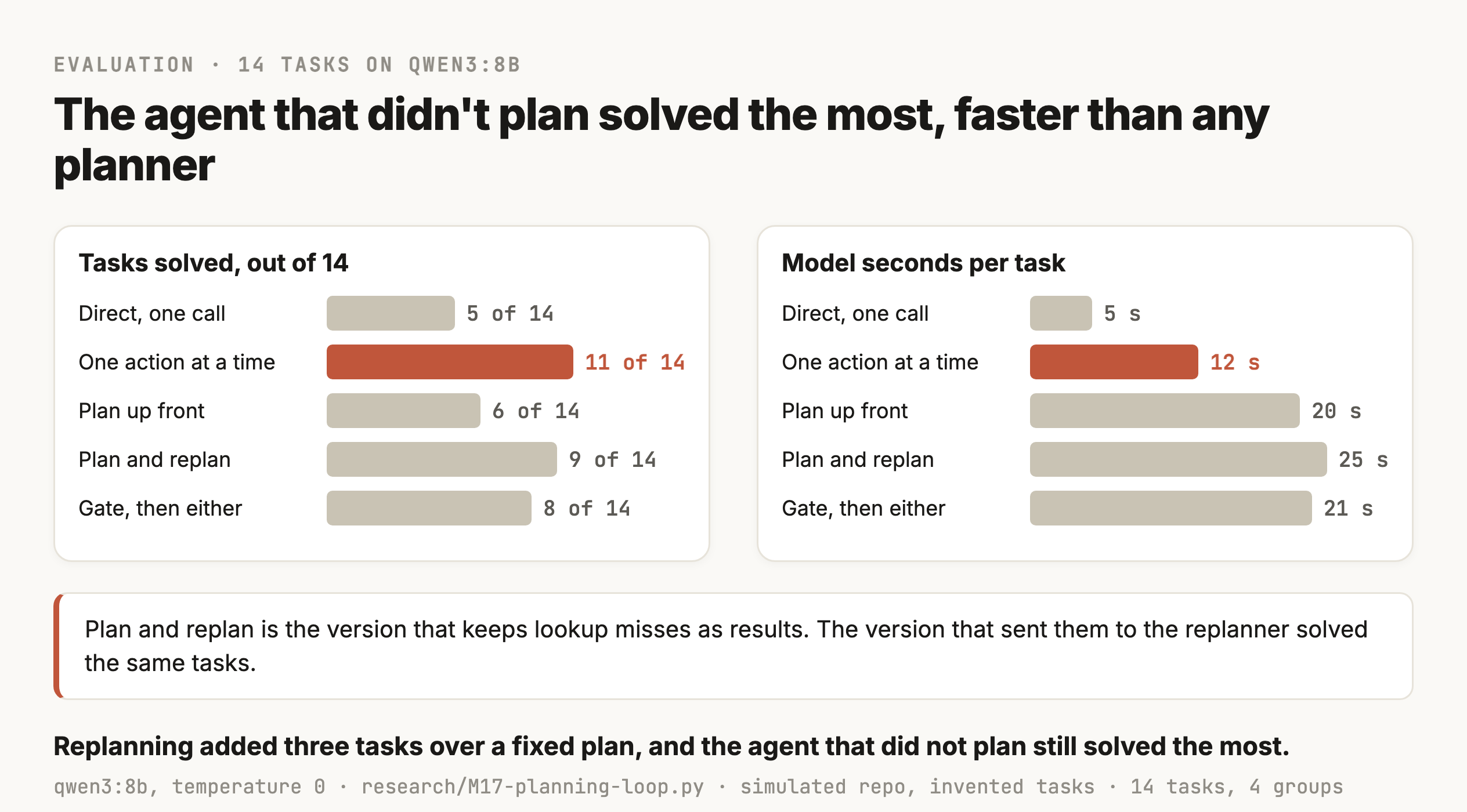
Two comparisons in that table are worth pulling apart. Replanning beat the fixed plan by three tasks, 9 against 6, and the traces show exactly which three. On the package install, the first pnpm install hit ECONNRESET, the loop retried it once as a transient failure, and the tests then ran and passed, where the fixed plan reported a network error and ended. On the rename of TAX_RATE, the plan edited only one of the two files that imported it, so the test run failed and the replanner added the edit to the other file. On the push, the fixed plan saw "Permission denied" and still ended with status finish, where the replanner stopped and asked for a token with write access. Those are the three mechanisms from sections 11 and 12 each doing its job once.
The other comparison is the one a decision rests on, and planning lost it. The one-action-at-a-time agent solved 11 of 14 in about half the model time of the replanning loop. That's a result about a small local model, and a stronger model on the planner would likely change it, which wasn't tested. It's also exactly the check you should run on your own system before adding a planner, because the baseline is cheap to build and it isn't a given that the planner beats it.
Where each failure came from
A success rate tells you whether to keep the planner, and it can't tell you what to fix. For that every failed run gets attributed to the component that caused it, by reading its trace. The planning loop's five failures, and the near-miss on the currency question, fall into three places.
| Component | What went wrong | Task |
|---|---|---|
| Planner | Collapsed three independent commands into one step that ran pnpm test, so the linter never ran | Deploy check |
| Planner | A step too coarse to run, "edit all files where calcTotal is used", done as one edit | Rename calcTotal |
| Planner | A done-when check copied from the developer's wrong command, pnpm db:migrate must pass | Migrations |
| Planner | A wrong done-when check, defaultCurrency in a file that says CURRENCY | Currency question (solved, after 2 wasted replans) |
| Replanner | Undid the rename it was asked to make, then hit the repeated-call stop | Rename calcTotal |
| Replanner | Wrote an edit to a guessed file before reading anything | Checkout fix |
| Executor | Asked the developer after one missing file, with no search for where the README went | README moved |
Most of those rows are the planner writing something it hadn't looked at yet, like a check against a name it guessed, a step that hid several edits, or an edit to a file it assumed. That points at the fixes. The executor should refuse a step that covers several edits and fail it back to the replanner, a planner-written check that references a file or name should be checked against the repo before the plan runs, and a replanned edit with arguments filled in should be rejected until a read of that file has happened.
The migrations row deserves a closer look, because the loop did the right work and still failed. The developer asked for pnpm db:migrate, which doesn't exist, and the planner turned the request into a check that pnpm db:migrate must pass. The replanner found pnpm migrate and ran it, and both migrations applied. Then the done-when check failed, the replanner was told not to weaken the checks, and it stopped. A check copied from the developer's words inherits the developer's mistake, and the fix is to write checks about the outcome the developer wants, here that migrations 004 and 005 are applied, and never about the command they happened to name.
The deploy check is the parallelism example from section 7, and no planner produced the graph drawn there. All three planning strategies wrote one step that ran the test suite, and none of them ran the linter, which was the command that failed. The one-action agent ran the tests and the linter and then went beyond the task, trying to fix the lint error it was only asked to report, and gave up when its guessed edit didn't match the file.
The lookup change made no difference to which tasks were solved. On the checkout fix, keeping the failed read of src/checkout.js as a result let the loop go one step further, and the next step was the edit to the same missing file, which failed as an edit. So the change is still right, since a missing file is an answer, and on its own it didn't fix anything.
The limits of the scoring
The stop tasks show one limit. Their scoring only asks that the run stopped without damage, and every replanning run passed it. Asked whether the stop message named the real blocker, the missing PAYMENTS_SANDBOX_KEY or the read-only token, the replanning loop named it on the push and missed it on the payments test, where it went looking for src/payments.test.js, which isn't where the test lives, and asked the developer to find the bug in the pricing code. The direct and one-action agents ran the tests and asked for the missing key. A stop is only as useful as its message, so a real evaluation scores the message too.
The checkout fix shows another. The one-action agent's toFixed(2) passes the simulated test, and in real JavaScript toFixed has floating-point quirks of its own, so it could round a different line wrong. The simulator can't see that, and the scoring gave it full marks. A real harness would run the real tests, and even real tests only check the inputs someone wrote down. That's M15's point about verification applied to planning, where passing the done-when checks tells you the plan met the checks you wrote.
Build a planning-loop evaluation for our coding agent. Make a sandbox copy of a small repo with a scripted test runner, and write 12 to 16 tasks in four groups: single-action tasks, multi-step tasks with dependencies, tasks where the first reasonable approach fails, and tasks that must end with the agent stopping to ask. Each task gets a scoring function that checks the final repo state in code. Run every task under four strategies with the same tools: one tool call then an answer, one action at a time with a 12-call cap, a plan written up front with no replanning, and a plan with a replanner, a one-retry rule for transient errors and a cap of 3 replans and 16 tool calls. Log every model and tool call as a trace line, save the results after every run so a crash can resume, and print success and model time per group. Then list every failed run with the component that caused it: planner, executor, replanner, done-when check or gate.
Putting it together
Putting it together
A planner decides what finished means and which steps get there, writes both down in a form your code can run, and changes the steps when a result disproves what they assumed. Most of the work in building one is in the parts around the model call.
The coding agent's loop ends up looking like this. A gate decides whether a request needs a plan at all, and it gets measured like any classifier, because a gate that plans the wrong requests costs a call and buys nothing. When a plan is needed, the planner turns the request into done-when checks from a closed list the harness can run, the constraints that stop it finishing the cheap way, like leaving the test file unchanged, and a list of assumptions with dates, where a memory note goes in as a dated assumption. Its first steps are the cheap reads that test those assumptions, and any step that depends on something not yet read gets no arguments.
The executor runs one ready step at a time and fills in its arguments from what earlier steps returned. Steps with nothing between them run together unless they write the same file or have an irreversible side effect. After every step the harness checks the result in code, keeps a failed lookup as a result, retries a transient error once, and sends anything else to the replanner with the full state, including what has already changed. The replanner has to name the assumption that broke before it writes new steps from the current state, and it's allowed to stop and ask. The replan cap and the 16-call budget end the run with a report a person can act on, and so does the same call failing twice. Nothing ends as finish until the done-when checks pass in code.
Then the loop gets measured against agents that don't plan, on the same tasks, scored on the final state, with every failure attributed to the component that caused it. On 14 tasks with qwen3:8b, replanning solved three more than a fixed plan, each one traced to a single mechanism in the loop, and the one-action-at-a-time agent still solved the most. The traces put nearly every planning failure in the planner or the replanner, most of them from writing a step or a check before reading what it named. That's a plausible result for a first version on a small model, and the attribution is what tells you which of the rules above to enforce first.
M18 covers the tools the executor calls and how to describe them so a model uses them well. M30 combines planning with memory and verification in agents that run for hours, where the plan itself has to be saved and resumed.
Checkpoint · recall · 5 questions
What the module said
- 01
What ends a planning run as a success in the loop this module builds?
- 02
Which request is the best fit for a dynamic plan, where the model writes the steps at run time?
- 03
What does the
depends_onfield in a step let the harness do? - 04
A step reads
README.mdand the file isn't there. What should the loop do with that? - 05
What did Plan-and-Act measure when it added replanning to a static planner on WebArena-Lite?
0 / 5 answered
Checkpoint · understanding · 5 questions
Reason it through
- 01
The agent is asked "fix the checkout test" and the plan's only done-when check is
pnpm test:checkoutexits 0. Why is that not enough? - 02
Why does a memory note like "the checkout test is flaky when the fixtures get out of sync" go into the plan as an assumption?
- 03
The loop sees
ECONNRESETfrom the package registry onpnpm install. Why is sending it to the replanner the wrong response? - 04
Halfway through a plan, a step applied migration 004 to the shared database and the next step failed. What should the new plan do about migration 004?
- 05
A team adds a planner to every request their coding agent handles. Simple questions get slower and nothing gets more accurate. What would fix that?
0 / 5 answered
Checkpoint · debugging · 4 questions
Debug it
- 01
The checkout task ended with status
finishand every done-when check passing. The diff changestoBe(107.09)totoBe(107.07)intests/checkout.test.js. What went wrong? - 02
A run on the payments test hits the 16-call budget. The trace shows the replanner proposing "add PAYMENTS_SANDBOX_KEY to .env" three times, each time as a slightly different edit. What should change?
- 03
On the rename task, after the plan edits
src/pricing.jsandsrc/cart.js, its test step fails with "does not provide an export named 'calcTotal'" fromtests/checkout.test.js. Which kind of failure is it, and what should happen? - 04
On the 14 tasks in section 14, the one-action-at-a-time agent solved 11 and the replanning loop solved 9, and a teammate proposes dropping planning for good. What should the team look at before deciding?
0 / 4 answered
Go deeper
Anthropic (December 2024): Building effective agents · Yao et al. (ICLR 2023): ReAct, Synergizing Reasoning and Acting in Language Models · Wang et al. (ACL 2023): Plan-and-Solve Prompting · Xu et al. (2023): ReWOO, Decoupling Reasoning from Observations · Kim et al. (ICML 2024): An LLM Compiler for Parallel Function Calling · Erdogan et al. (2025): Plan-and-Act, Improving Planning of Agents for Long-Horizon Tasks · Yao et al. (NeurIPS 2023): Tree of Thoughts · Valmeekam et al. (NeurIPS 2023): On the Planning Abilities of Large Language Models · Kambhampati et al. (2024): LLMs Can't Plan, But Can Help Planning in LLM-Modulo Frameworks · Xia et al. (2024): Agentless, Demystifying LLM-based Software Engineering Agents · Cemri et al. (2025): Why Do Multi-Agent LLM Systems Fail? (MAST) · Shinn et al. (2023): Reflexion, Language Agents with Verbal Reinforcement Learning
That's the last one written so far
Pick your next module from the board.