
The capability
What is an LLM, and how does it run things?
A large language model, or LLM, is a program that's been trained on a huge amount of text to do one thing, and that's guess what text comes next. You give it text, it picks a likely next piece, adds that piece to the end and repeats until it decides to stop. GPT and Claude work this way, and so do the open models you can download and run on your own machine.
Everything an LLM product does comes back to that one thing. When a chatbot answers a question, the model is predicting the text of an answer. When an agent looks up an order, the model has predicted a piece of text that asks for the lookup, and some other code did the lookup. So when people say an LLM runs something, what's running is the model plus the code around it, and this module is about where one stops and the other starts.
Now you might be asking why an engineer needs to know that split. Well, because a lot of the bugs you'll chase in an AI product come from mixing those two up. The model gets blamed for forgetting something your code never sent it, or your code gets blamed for an answer the model made up. If you know which side did what, you know where to look.
Where it shows up
Every product built on a model works like this, whether it's a chat window or a coding assistant that edits files in your repository. The names change between providers, but the pieces are the same, so what you learn here carries over to whichever model you end up using.
Where this starts
The model does less than you think
The first time you call an LLM API on your own, it is almost anticlimactic. You send one block of text, and the model sends one back. That is the whole interaction, and you cannot send another message unless you run your code again. It keeps no memory of what you sent, and it cannot take any next steps on its own. One input prompt, one output response. That is the raw model.
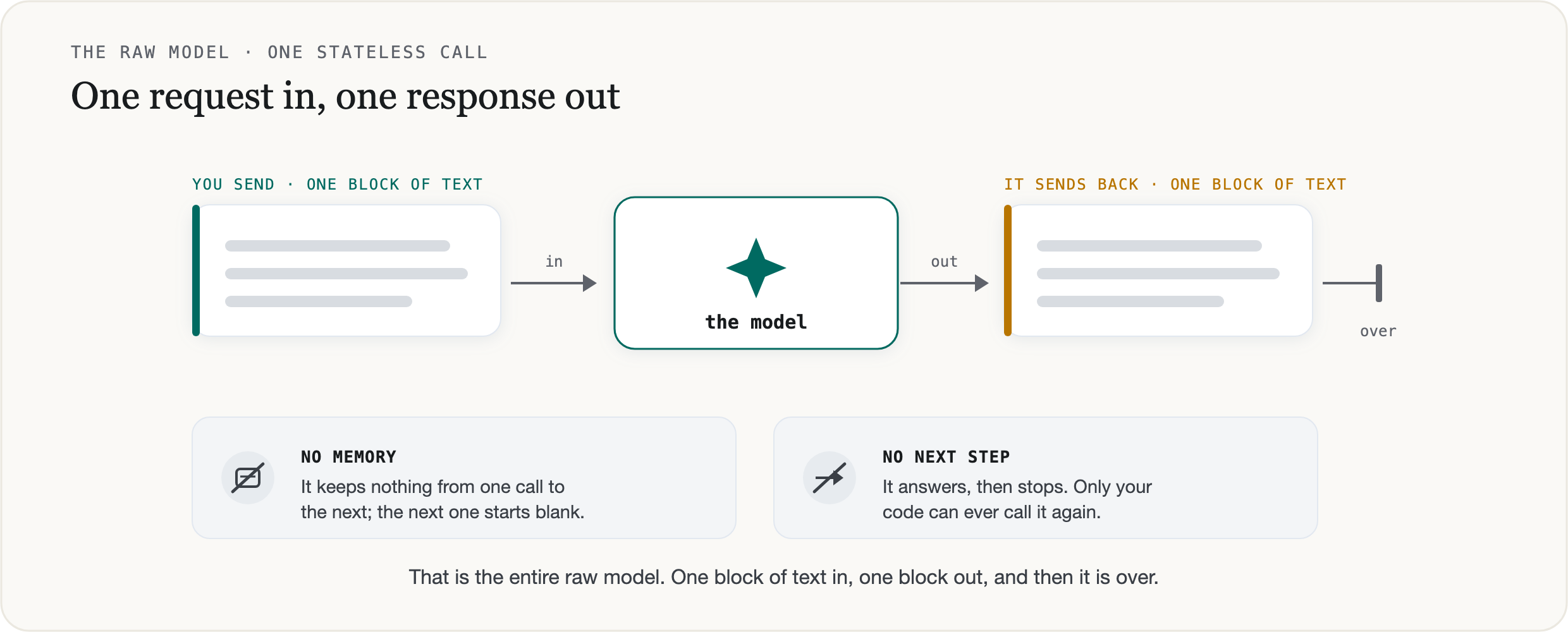
You'll see it in OpenAI’s quickstart, it is a handful of lines where you make a client and send it one string, then print what comes back..
from openai import OpenAI

client = OpenAI()

response = client.responses.create(
    model="gpt-5.6",
    input="Write a one-sentence bedtime story about a unicorn.",
)

print(response.output_text)
Everything else you picture when you think of an LLM is built on top of that one call. The looping conversation, the chat that remembers your name when you tell it, the agent that uses tools, none of that is the raw LLM model. It's still a bunch of code in the background calling the model over and over and stitching the separate answers into what feels like a single system that remembers you and acts on its own.
This is not the theory of how the weights work. Attention and transformers, the architecture that makes next-token prediction possible, is covered better than I could in the papers and videos linked at the bottom. This module is the layer above that, the plumbing that turns one stateless call into something that can hold a conversation and take actions.
A handful of mechanics carry most of it, and each is simpler and stranger than it looks:
Tokens come first. The model works in tokens, which are chunks of text often smaller than a word, and it never sees the clean row of letters you typed. That is what the "how many r's in strawberry" test made famous.
Then the loop. One call answers once, and a chatbot is that same call run again by your code for every new message.
Then context, which is where people are most often surprised. The model has no memory at all, and what looks like memory is a list of messages your code re-sends on every single call.
And tools, which the model never runs. It writes a request, in text, and a harness you built runs it and feeds the result back in.
Tokens
The strawberry problem
There is a famous test for language models, where you ask how many r’s are in “strawberry”, and for a long time, the good models got it wrong and answered two. This became the go-to example of an LLM being surprisingly dumb.
The model has seen “strawberry” in millions of sentences and probably knows everything about it. But before any of the actual text ever reaches the model, a tokenizer breaks the word into tokens, which are chunks of text. Each one of those tokens is mapped to an ID number. By the time it arrives, “strawberry” has become a small handful of tokens. The model works from those chunks and no longer has the ten letters s-t-r-a-w-b-e-r-r-y laid out in a row to step through. At least not a non-reasoning model.
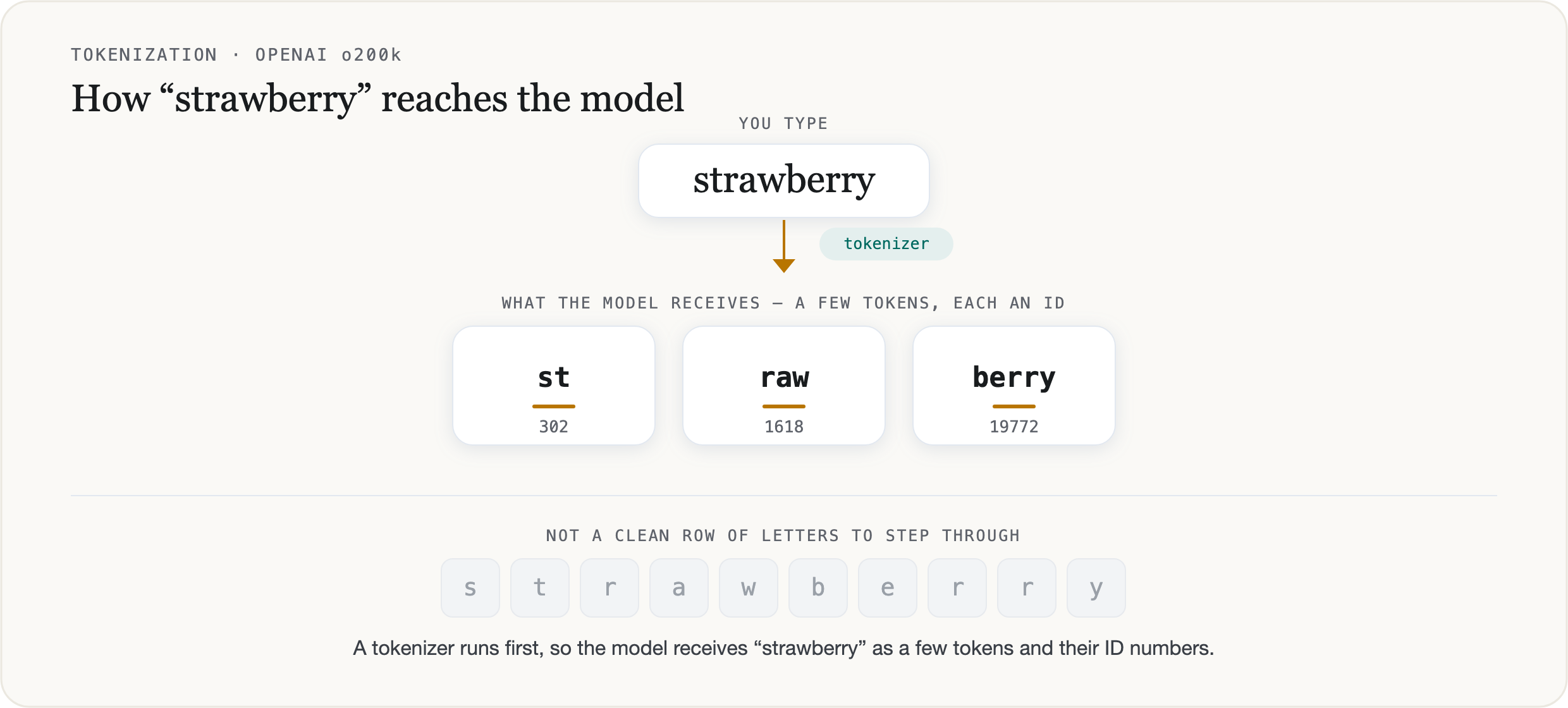
The easy conclusion is that the chunks are the problem. The model works in pieces, the thinking goes, so it never sees the r’s clearly enough to count them. But that's not what goes wrong. The letters are recoverable from the tokens which you can see by probing a model and confirming that the spelling is correct (Fu et al., 2024). A non-reasoning model (the kind that just answers you right off the bat), can spell “strawberry” perfectly well. What it can’t do is reliably count the letters, and that stays true for whichever chunk a letter falls in.
Why a non-reasoning model can’t, and how a reasoning model can, comes down to something separate from the chunks, namely how the model produces an answer, one piece at a time. The fix even has a name and a price, reasoning tokens. Both are easier to follow once you know what a token is, so that is where we go next.
Tokens
Why models work in tokens
A model reads text in chunks, most of them shorter than a word. A token is one of those chunks, and every token comes from a fixed vocabulary, a numbered list of all the chunks a tokenizer knows, each with its own ID. Splitting text into tokens comes down to looking each piece up in that list. What goes in the list is the design choice. You could fill it with whole words, or with single characters, and both extremes cause real problems, which is why most models land on something in between.
Whole words look like the clean choice, but they fail on two counts. A word-level vocabulary needs an entry for every word the model might ever meet, in every language it might see. That list runs into the millions, and the model carries a slot for each one, so most of them stay rare and poorly learned. Anything off the list is worse off still: a new product name or a word in a language you did not plan for has no token at all, and its meaning is gone.
Single characters fix the coverage problem, since any text is just letters and symbols you already have. What they cost is length. A word that was one unit becomes five or ten, so every input gets several times longer in tokens. A transformer’s work grows faster than the length of what it reads, because its attention step compares every token with every other one. So longer inputs take more work to process and fill the context window faster. Characters are exact and expensive.
This comes down to one thing, the size of the vocabulary. Characters give you a tiny one, so everything is spelled out in many tokens; whole words would need an enormous one you cannot build. Between those extremes, the exact size still matters. The bigger the vocabulary, the more common sequences each get their own token, so the same text comes out as fewer tokens, which is cheaper and faster to run. But you cannot raise it without limit. The model carries a learned entry for every token in its vocabulary, so more entries means more parameters and memory, and the rarer a token, the less training it gets to learn a good one. Efficiency pulls the size up and model cost pulls it back, so providers settle on a size in between.
Subword tokenization is the middle ground most models use. The tokenizer scans a large amount of text and learns the pieces that show up most often. It starts from single characters and keeps merging the most frequent neighboring pair into one new token, again and again, until it has a vocabulary of common chunks. Common words end up as a single token. Rare or unseen strings fall back to a few smaller pieces, down to single bytes if they have to, so nothing is ever truly unknown. The vocabulary stays bounded, commonly around a hundred thousand tokens where a word list would need many millions, and sequences stay short. Common words and common word-pieces get their own entry; anything rarer is assembled from the smaller pieces the list does have.
You can see all of this on one sentence. Here is “A capybara ate my strawberry” run through OpenAI’s tokenizer:
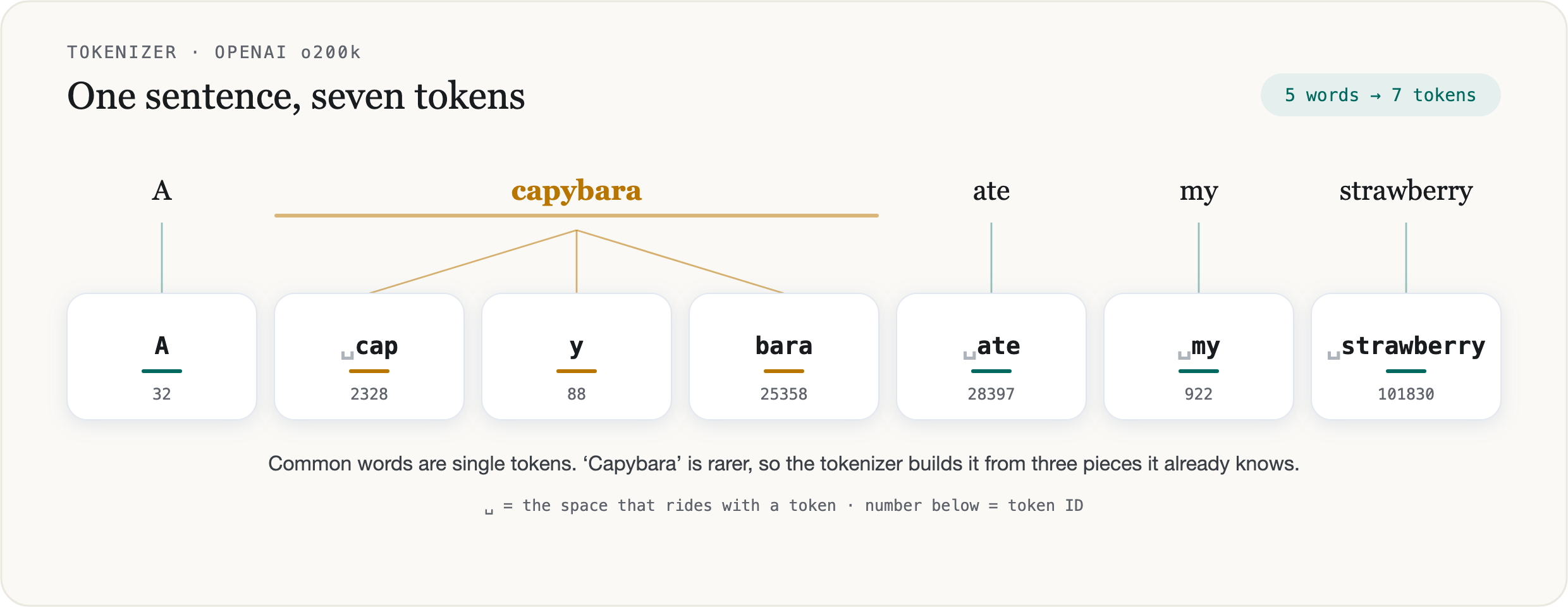
Two things in that split are worth noticing. Common words come through as single tokens, while a rarer word like “capybara” is built from smaller pieces the vocabulary already has. And the split shifts with the surrounding text. “Strawberry” is a single token here, but lift it out on its own, with no space in front of it, and it drops to three, something like st, raw, berry. Either way the model works from these pieces, the same thing “strawberry” showed at the top, now across a whole sentence.
A short-looking prompt can still be a lot of tokens. Code and non-English text often break into far more tokens than their length suggests, so when the count matters, measure the tokens directly.
Generation
One token at a time
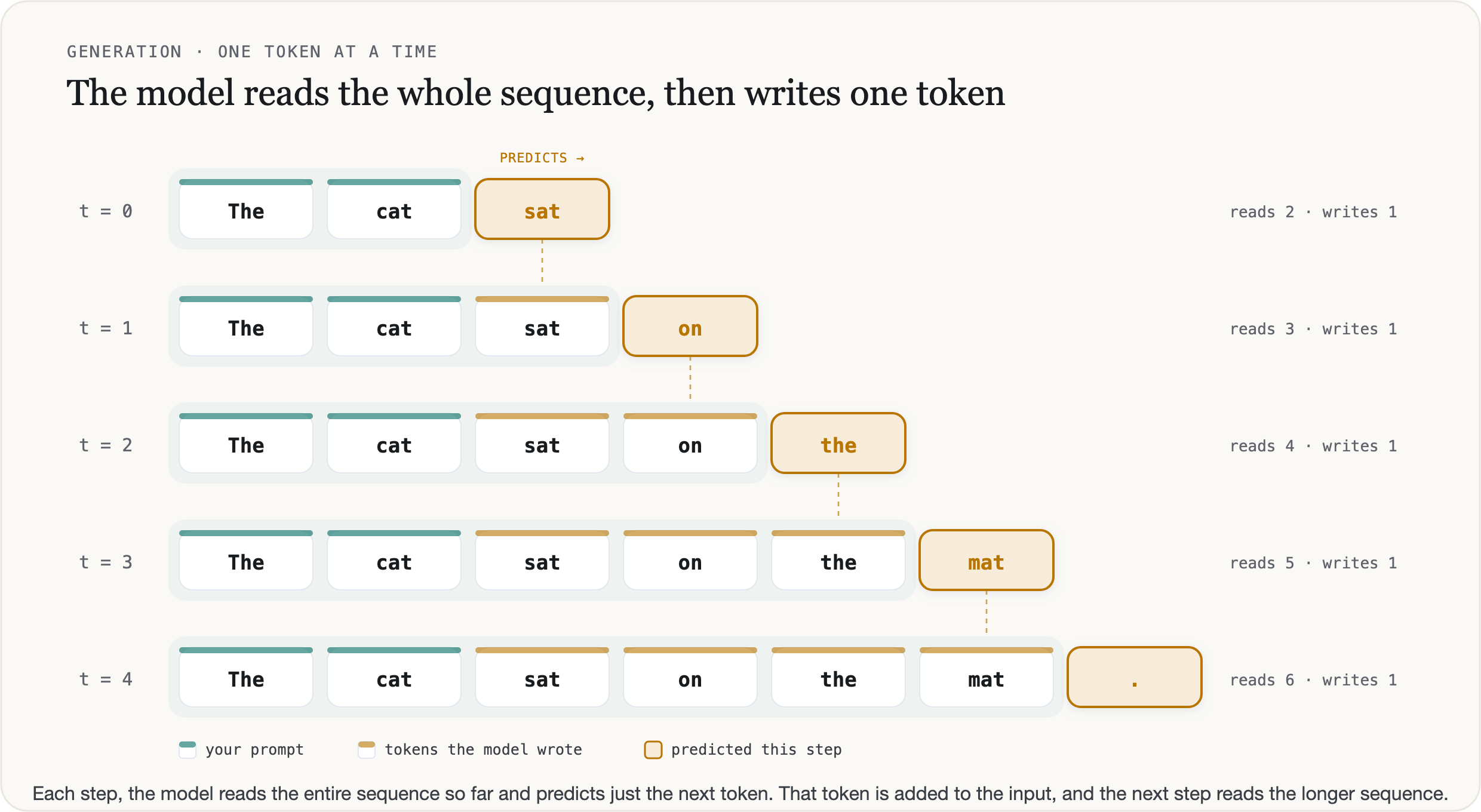
Splitting your text into tokens is only half the story. The model also outputs tokens, and it makes them one at a time. Every model works this way, reasoning or not. At each step it looks at everything so far (the whole input + every output token up to t=n) and predicts the single next token. That token gets added to the end, and the next step predicts the one after it from the longer text. A hundred tokens of output is a hundred of those steps run one after another, and each step goes through every layer of the model.
A KV cache saves each step from redoing the earlier tokens
Done literally, looking at everything so far on every step would mean running the whole prompt and every earlier output token back through the model for each new token. Inference servers skip that repeat work with a KV cache. Inside each layer, attention turns every token into two vectors, a key and a value, and a token finds what it needs from the earlier tokens by comparing itself against their keys and reading their values. A token can only look back at the tokens before it, so once its key and value are computed they never change. The server keeps them in GPU memory, and each new step runs only the newest token through the model and reads the earlier tokens' keys and values from that cache (Kwon et al., 2023).
So a step does fresh work for one token, plus a lookup across everything in the cache, and that lookup gets bigger as the text gets longer. The cache also takes GPU memory for every token of every request the server is running, which is one reason long contexts cost more to serve. The model still predicts from the whole sequence at every step, exactly as the figure shows, and the cache only saves recomputing the parts that haven't changed.
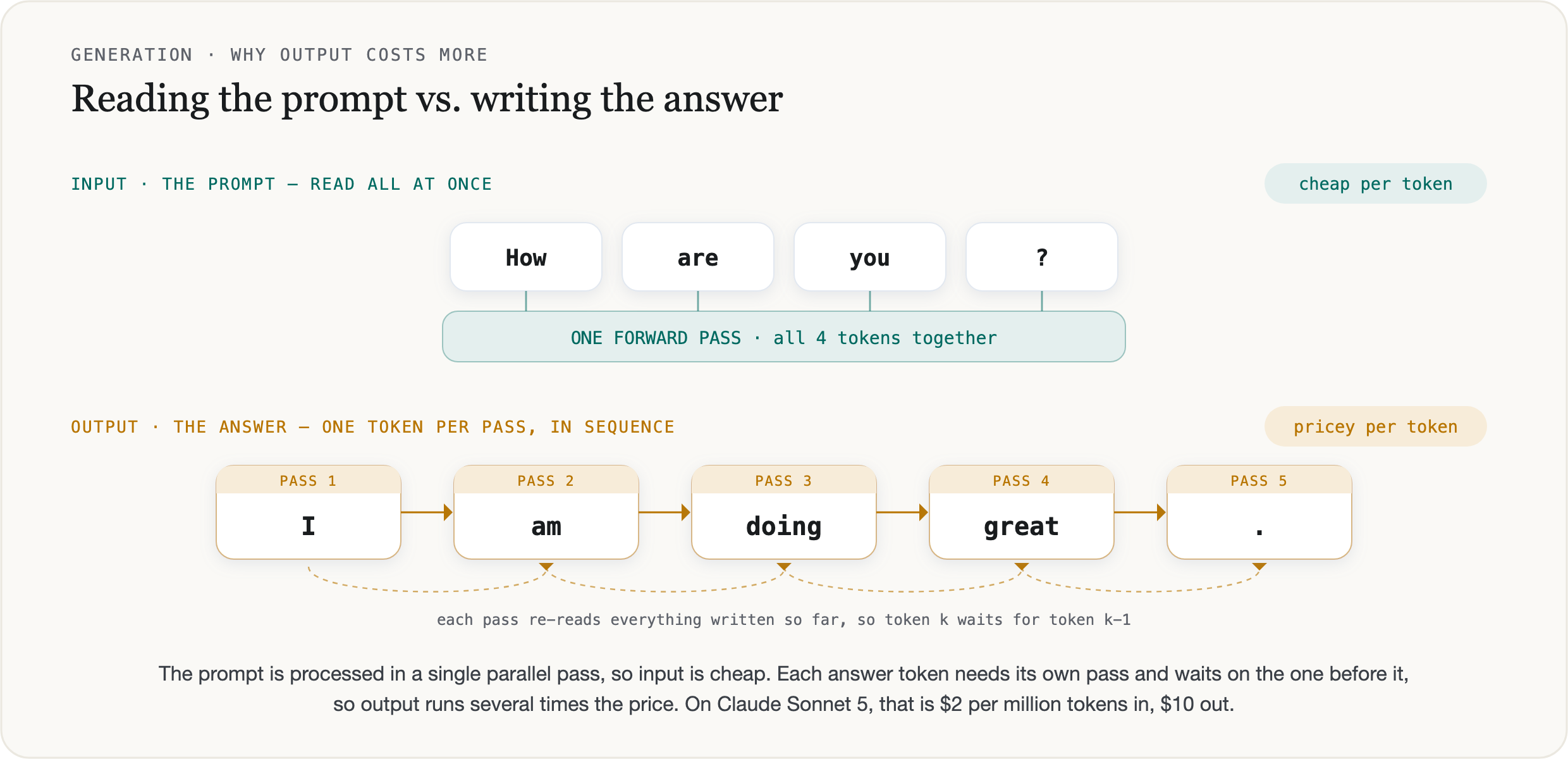
Input and output run through the hardware differently. The input prompt gets read in parallel, all at once. These models run on GPUs, built to do enormous amounts of parallel arithmetic at once, so the model takes your whole input in a single pass and works every token of it at the same time, filling the KV cache as it goes. Output cannot work that way. As I mentioned above, each token is generated from everything written so far, so the model cannot start one until the previous is done (that is what autoregressive means), and the tokens come out in sequence, one step each. A step that handles a single token spends most of its time moving the model's weights and the cache through memory, and only a little of it on arithmetic, so much of the GPU’s parallel power goes unused. That difference is what the price reflects. Input is cheap per token, and output costs several times more. For example, Claude Sonnet 5 is $2 per million input tokens and $10 per million output.
Reasoning
Reasoning
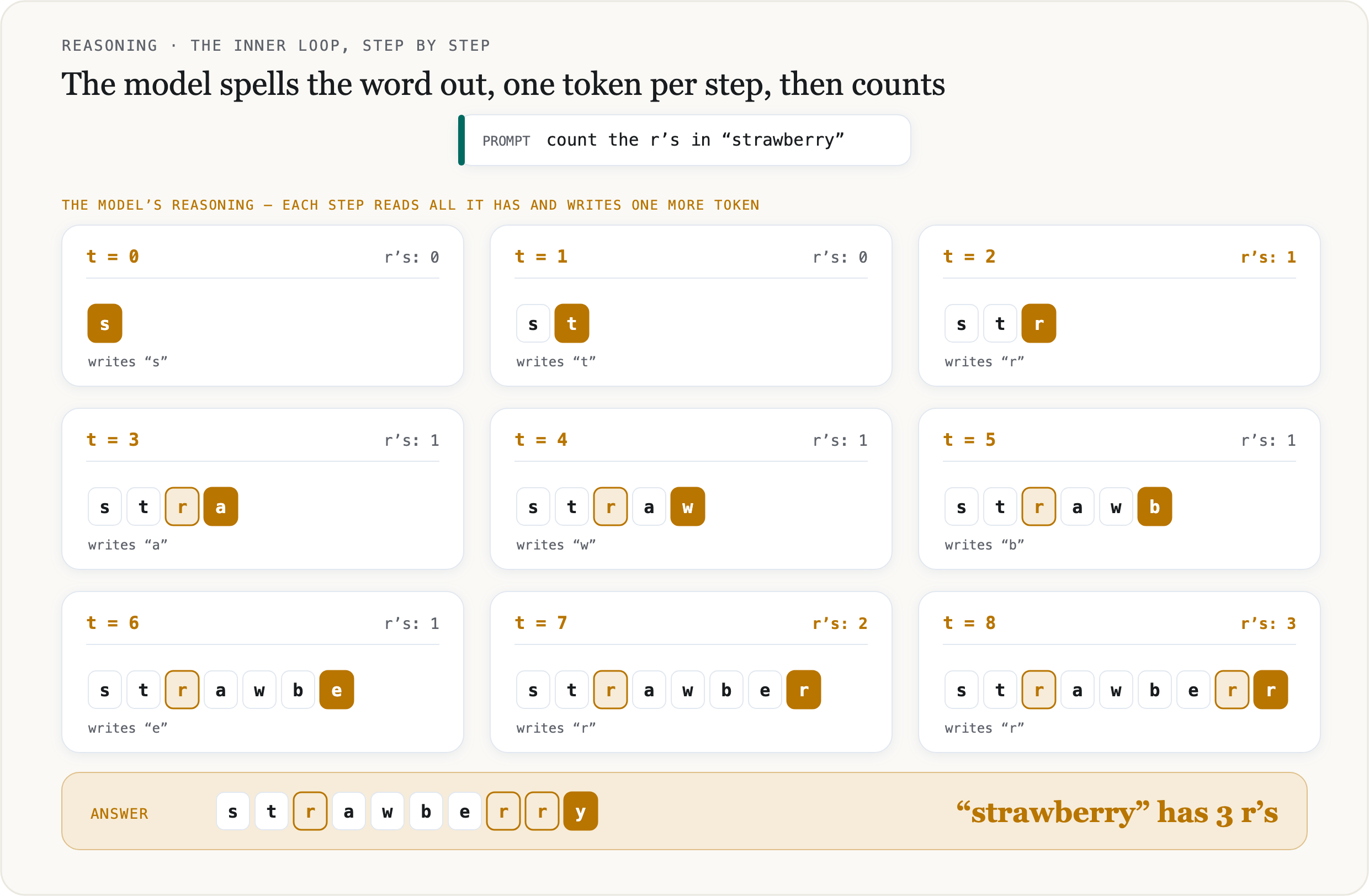
Back at the strawberry test, we set the chunking aside as the cause and never said what goes wrong instead. Nobody can point to the exact computation behind one particular wrong answer, so what follows is a likely explanation, and it mainly shows why writing steps out helps. A non-reasoning model generates token by token like any other model, and when you ask it how many r’s are in “strawberry”, it usually writes the number within the first few tokens of its reply, with no working written out before it. Every step is the same pass through the same layers whatever the question, so whatever counting happens has to fit inside the few steps before the number gets picked. Counting letters, especially repeated ones, is step-by-step work, and it likely doesn't fit reliably in that little room, so the model answers from a rough sense of the word. “Strawberry” has its two r’s back to back, and two is the number it lands on.
A reasoning model handles it by working the problem out on the page first. It spends tokens to spell the word into its letters and count them one at a time before it commits to an answer. Writing the steps out spreads the count over many steps, and each step can read what the earlier ones wrote down and build on it. Imagine the model now being able to reason and think of each letter separately BEFORE it gives you a final answer. You do not need a special model for this. Tell a plain model to spell the word out and count, and it will usually get there too; what a reasoning model adds is doing that on its own, by default.
You can watch it on a word the model has never met. Ask a reasoning model to count the r’s in something like “ungarbarrylirryburirira.” It cannot recall an answer, so it lays the string out, u n g a r b a r r y l i r r y b u r i r i r a, and works through it letter by letter. A strong one gets it right, even though it is a hard case, so it may land on a wrong tally first and fix it before giving you a final output.

That reasoning mechanism is not free. All of is considered to be output tokens, generated before the answer, but still billed at the same output rate whether or not the interface shows them to you (it still costs as much as any other output token even if it is not shown in the final output). So a reasoning model buys a better answer with more tokens and more latency. Reach for it when a problem needs working through, and leave it off when it does not.
BTW, It should go without saying, that when the task is purely mechanical, like counting the number of Rs in a word, don't go for LLMs. A model reasoning through characters is slow and can still land on the wrong number. string.count("r") is instant and exact. Save the model for the parts of the job that need a model. The strawberry example was there to show the inner workings of tokens.
The loop
A chatbot is an LLM in a loop
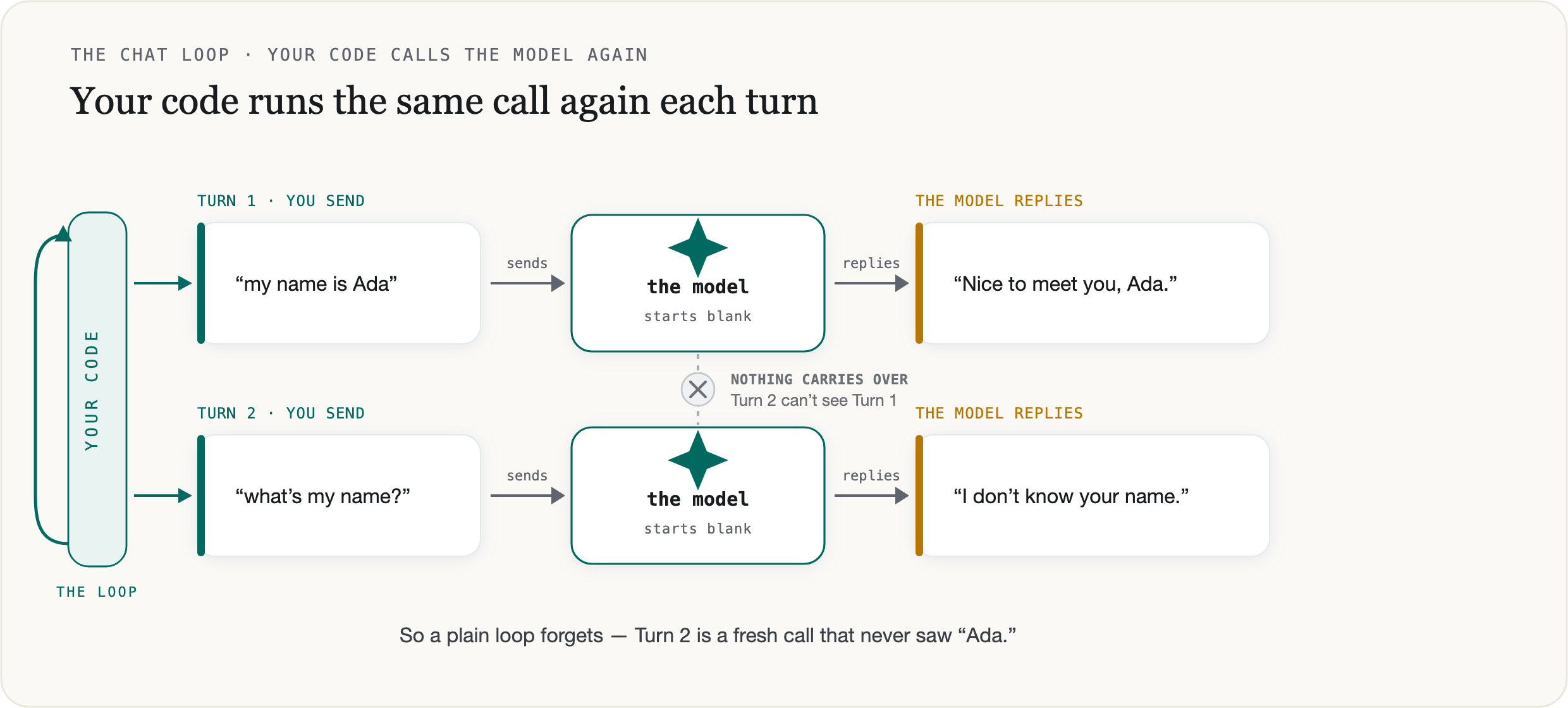
Every section so far has been about one call to the model, a single API request. You send a block of text, and it sends one back. That request is over, and a chatbot clearly does more than that. You type, it replies, you type again, it replies again, for as long as you keep going. The model doesn’t change between those replies, and it isn’t running on its own in between. Each new reply is your a piece of code (usually a while loop) calling the model again.
That is the loop, then. Your code sends the user’s message and shows the reply that comes back, then waits for the next message and sends again. Each turn is a full call from scratch, one block of text in and one out, exactly like the first one. The model never runs this loop; it answers once and stops, every time, and your code is what decides to call it again. (This is a different loop from the one inside a single call, where the model writes its answer one token at a time. That inner loop runs on the provider’s side, inside the one call. This outer one is yours.)
Written out, the loop is short:
from openai import OpenAI

client = OpenAI()

while True:
    user_message = input("you: ")  # wait for the next message

    # a full call from scratch, sending only this turn's message
    response = client.responses.create(
        model="gpt-5.6",
        input=user_message,
    )

    print("model:", response.output_text)
Run it in its simplest form, sending only the newest message each turn, and you get a chatbot that answers everything and remembers nothing. Tell it “my name is Ada” and it replies. Ask it “what’s my name?” on the next turn and it has no idea, because that second call never saw the first. Every turn, the model wakes up with no past.
So the loop gets you a chatbot that keeps answering. It still has no idea who it is talking to. Making each call carry what came before is the next piece.
Context
Memory is a list you resend
The model does not remember anything you told it earlier. It keeps nothing between calls. Each one stands alone, and the server holds no thread of the conversation after it answers. The only thing the next call sees is what your code puts into it.
So how does a chatbot remember your name? It's because your code keeps the conversation as a list of messages, one entry per turn, and sends the whole list on every call. When you type your next message, the app appends it to the list and hands the model everything from the start again. Every call, the model rereads the whole history from scratch, because you sent it. The rereading is all the memory there is. Some providers store that list for you and call it a thread or a session, but underneath it is the same list, re-sent on every call.
from openai import OpenAI

client = OpenAI()
history = []

while True:
    history.append({"role": "user", "content": input("you: ")})

    response = client.responses.create(
        model="gpt-5.6",
        input=history,            # the whole conversation, resent every turn
    )

    print("model:", response.output_text)
    history += response.output    # add the reply so the next call can see it
That is the manual version, and it is what happens in the background. You keep the list and resend it. Newer OpenAI SDKs add a shortcut. You send only the new message and the id of the last response, and OpenAI keeps the earlier turns on its own servers.
from openai import OpenAI

client = OpenAI()
last_id = None

while True:
    user_message = input("you: ")

    response = client.responses.create(
        model="gpt-5.6",
        input=user_message,              # only the new message
        previous_response_id=last_id,    # OpenAI already holds the rest
    )

    print("model:", response.output_text)
    last_id = response.id
Nothing underneath changed. OpenAI is storing the same list and feeding it to the model for you. You still pay for every turn in it, and it can still outgrow the window. Not every provider offers this, so the manual version is the one that always works.
That list is the context. For any single call, everything the model can use is in it: the system instructions at the top, and every message in the conversation so far, including this one. Nothing else is in scope. If a fact is not in the list, the model does not have it, no matter how many times you told it in some earlier chat.
The context window is the size limit on that list, measured in tokens. A conversation long enough to pass the window has to lose something, so your code drops or summarizes the oldest turns. That is why a long chat starts to forget how it began. The beginning fell out of the window, or the app trimmed it to fit.
For you, that has direct consequences:
Memory is your job. The model will not hold state for you, so if you want it to remember something, that something has to be in the list you send.
You pay for the whole list every turn, since each call re-sends the full history. A long conversation therefore costs more per message the longer it runs.
And "it forgot" is almost always a context problem. Either the fact was trimmed to fit the window, or it was never put into the list in the first place.
Tools
The model asks, your code acts
By now the chatbot holds a conversation and remembers what you told it. What it still cannot do is anything at all beyond writing. Ask it for today’s weather or a row from your database, and it can only produce text, with no way to go and look. Everything a model emits is text. It never calls an API or runs code.
Tools are how it acts anyway, and the model still does not act. When you give a model tools, one of its possible replies becomes a request to use one, naming the tool and the arguments to call it with. Your code reads that request and runs the real function, then sends the result back on the next call. The model reads the result and keeps going, so it decides which tool and when, while your code is the thing that runs it.
Getting a model to do this is older than any real support for it. The early trick was to spell the format out in the prompt: to search, write a line like Action: search("…") and stop. The model wrote that line as ordinary text, and your code pulled the tool name and arguments out of it with regular expressions and ran the tool. It worked, and it was fragile. The model would drift off the format, a stray word, an argument that would not parse, and the parser broke. Nothing enforced the shape. You were trusting the model to format text exactly right every time (ReAct, Yao et al., 2022).
Models are trained for it now. You send a list of tools, each with a name and a description of what it does, plus a schema its arguments must fit. When the model wants one, it returns the call as structured data, the tool name and the arguments already in the shape the schema asked for, and flags the reply as a tool call. Your code reads the fields straight off and runs the function, then returns the result. No scanning, no guessing at the format. Because the model was trained on this, it holds the shape far more reliably than one coaxed into a text convention. OpenAI and Anthropic both expose it the same way, as function calling and tool use. Training a model to choose the tool and its arguments goes back to work like Toolformer.
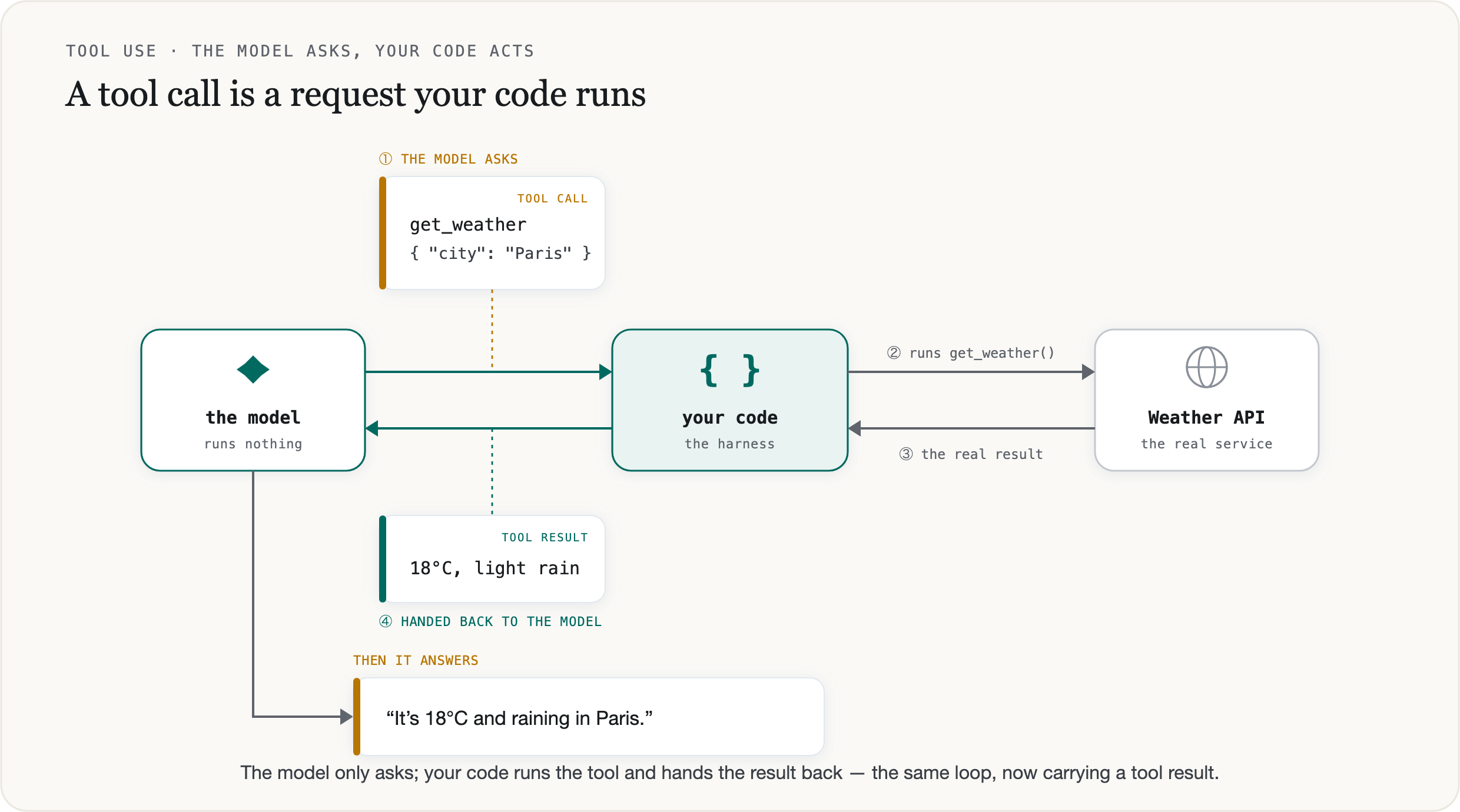
Under both, old and new, the model only ever emits text. A tool call is text too, structured text the model learned to produce, filling the same reply it would otherwise answer in. It runs nothing. Your harness runs the tool and owns whatever it touches. And it all rides the same loop from before: the model asks for a tool, your code runs it and adds the result to the list, the model reads the result and either answers or asks again. An agent is that loop, left to run until the model stops asking.
Putting it together
The model is the small part
Step back, and under every chatbot and every agent sits the same stateless call from the start, one block of text in and one back, with nothing kept afterward. Everything else was your code wrapping that call: a loop that carries the conversation forward by resending it each turn, and tools that turn the model’s requests into actions your code runs. The model reads and writes all of it in tokens, which is why you measure and pay for everything by the token.
That is what makes these systems debuggable. When a chatbot forgets what you told it a minute ago, the fault is the list you sent, and the weights are fine. When it miscounts the letters in a word, the model is reading tokens, and no prompt fully fixes it. Once you know which layer a behavior comes from, you know where to look.
Checkpoint · recall · 6 questions
What the module said
- 01
You call an LLM API directly, with none of your own code wrapped around it. What does that single call give you?
- 02
Before your text reaches the model, a tokenizer runs. What does it do?
- 03
The module rejects a single-character vocabulary. What is the cost of spelling everything out one character at a time?
- 04
Why does output cost several times more per token than input?
- 05
A reasoning model "thinks" before it answers, and the interface hides that thinking. What do those hidden reasoning tokens cost you?
- 06
A chatbot "remembers" your name across turns. Where does that memory live?
0 / 6 answered
Checkpoint · understanding · 6 questions
Reason it through
- 01
A non-reasoning model spells "strawberry" out letter by letter when you ask it to, yet still says the word has two r's. What does that rule out as the cause of the miscount?
- 02
What does a reasoning model do that lets it count the r's a non-reasoning model misses?
- 03
A model is 400 tokens into its answer. What does it compute to produce token 401?
- 04
The module describes two loops. A chatbot's turn-by-turn back-and-forth is the outer one. Who runs it?
- 05
You give a model a set of tools and ask for the weather. It returns a tool call for get_weather. What has the model done at that point?
- 06
Early tool use asked the model to write a line like
Action: search("…")that your code pulled apart with regular expressions. Why is trained function calling more reliable?
0 / 6 answered
Checkpoint · debugging · 5 questions
Debug it
- 01
A user gives your assistant a preference at the start of a long session. An hour later it acts as if it never heard. Nothing on your side errored. What is the most likely cause?
- 02
To cut token spend, a teammate switches from re-sending the full history to sending only the new message with
previous_response_id. Costs barely move. Why? - 03
You need exact counts of a character across a million strings for a data-cleaning job. A colleague suggests prompting a reasoning model for each one. What is the problem?
- 04
Two bugs land the same week. First, the chatbot forgets a detail you gave it a minute ago. Second, it says "banana" has two a's. Which layer owns each?
- 05
A tool-using agent gives a confident weather answer, but it is stale. You check the trace and see
get_weatherwas never called on that turn. Which layer failed, and where do you look?
0 / 5 answered
Go deeper
Attention Is All You Need (the transformer paper) · The Illustrated Transformer · Andrej Karpathy: Intro to Large Language Models · 3Blue1Brown: Transformers, visually
That's the last one written so far
Pick your next module from the board.