
The capability
What does it mean to treat the model as a component?
Think of any other part your app depends on, like a database or a payment API. You know what you send it and what comes back, and you wrap it in your own code so the rest of the app doesn't need to know which vendor you're using. Treating the model as a component means handling it the same way. What you send it is the list of messages plus a few settings. What you get back is text, or JSON if you ask for it, plus a count of the tokens you're billed for.
The model is a weird kind of component, though. Send a database the same query twice and you get the same rows back, but a model can give two different answers to the same input. The provider can also update or retire it on their own schedule, so the model you tested last month may not be the one answering today. On top of that, picking which model to use is your call, and that one choice changes both what you pay and how good the answers are.
So this module goes through the choices that let you build on something like that safely, and how to keep them in one place in your code so changing them later doesn't mean touching everything else.
Where it shows up
This comes up any time your code does something with what the model sends back. A feature that tags incoming emails has to read the tag out of the reply, so it needs the output in a fixed shape it can parse. A team moving from one provider to another has to find every place the model gets called. Both are a lot easier if every call goes through one function in your code.
Where this starts
The model is a part you choose
The last module was about how a model works from the inside, the tokens going in and out, the loop, the memory, and the tools it has access to. This module is about what you do with that once you are actually building, how to use a specific model well as a part of a real system. You end up treating the model like a component you choose and configure, the same way you would a database or any other part you build on, and a lot of the work is making those choices deliberately once you know what the task needs.
The first of those choices is which model to run, and my default is to start with the strongest model available for the task, just to get a quick proof that the task can work at all. I am not optimizing anything yet. I start there because if the strongest model cannot do the task, a smaller one almost certainly cannot either, so I would rather find that out on the first day than after a week of tuning a weaker model that was never going to make it.
Once I have that proof, or at least a decent check that it works, the optimizing starts. Now I care about the things I ignored at the start such as latency, cost, accuracy, precision or whatever this particular feature has to hold up under in production. A lot of times that could mean switching the model, from the big expensive one I proved it on to the smallest and cheapest one that still does the job well enough.
For example, I might start on something like 5.6 Sol with high reasoning, purely to confirm the feature is possible. Sol on high reasoning is strong, but it is also really expensive and really slow. So if I am optimizing for latency, I will try to get the same task running on 5.6 Luna low and see how much quality I actually lose. Sometimes I lose nothing that matters, and I have just cut the latency and the cost by a lot. Other times the smaller model drops the part I needed, and I land somewhere in the middle, or go back up.
It does not have to stay in one model family either. I might prove something out on Fable and then work toward a smaller model, or a different model altogether, depending on what I am optimizing for. What drives the choice in the end is what the task needs and what your own numbers say once you measure them (this is an example of how knowing how to build datasets and evals from module 1 will come in handy.)
Picking the model is one of the decisions this module is about. A few more come with it:
- The dials. Temperature, Reasoning effort, Max tokens, and a few others. Small settings that change how the model answers, and most of the time you leave them alone.
- Structured output. Getting the model to return clean JSON your code can rely on, so its answer is data you can read straight off.
- Versioning. The same prompt can give a different answer tomorrow, because the model is non-deterministic and the provider keeps shipping updates. You pin a version so your system does not move under you.
- A swappable seam. Put the model behind a thin interface, and swapping one provider for another, or a closed model for open weights, comes down to a config change.
Each one is a small decision on its own. Together they are what let you keep improving the model behind your system as better ones come out, well after the first version ships.
Settings
The dials
Every call to the model carries a handful of settings besides the prompt, and they are worth understanding even though in practice you end up changing one or two and leaving the rest at their defaults.
- Temperature
- Max tokens
- Top-p
- Stop sequences
- Seed
- Reasoning effort
The two I tune the most are Temperature and Reasoning effort. Temperature controls how deterministic the model is. At each step the model produces a probability for every token it could generate next, and Temperature decides how sharply it favors the likely tokens over the unlikely ones when it makes the pick.
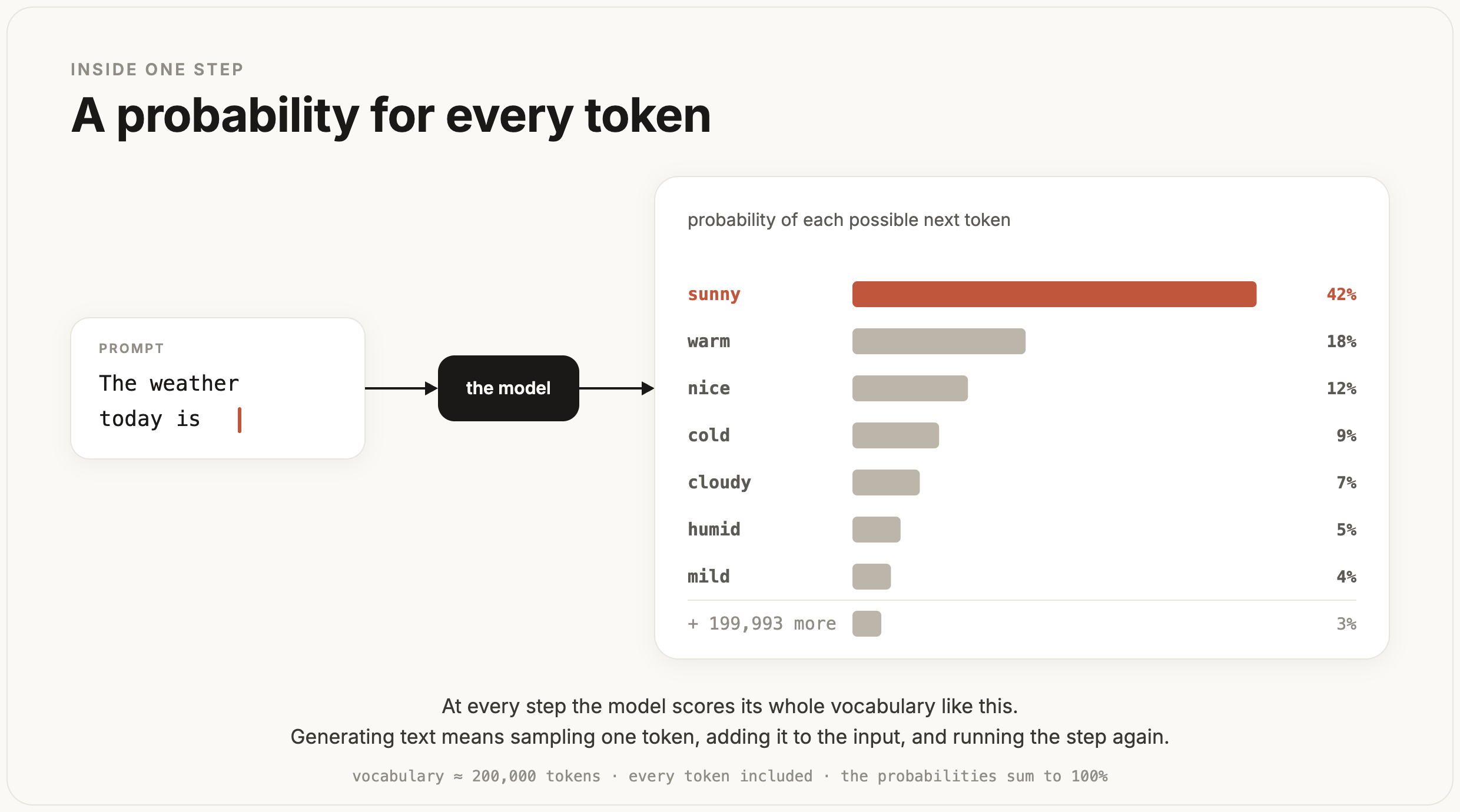
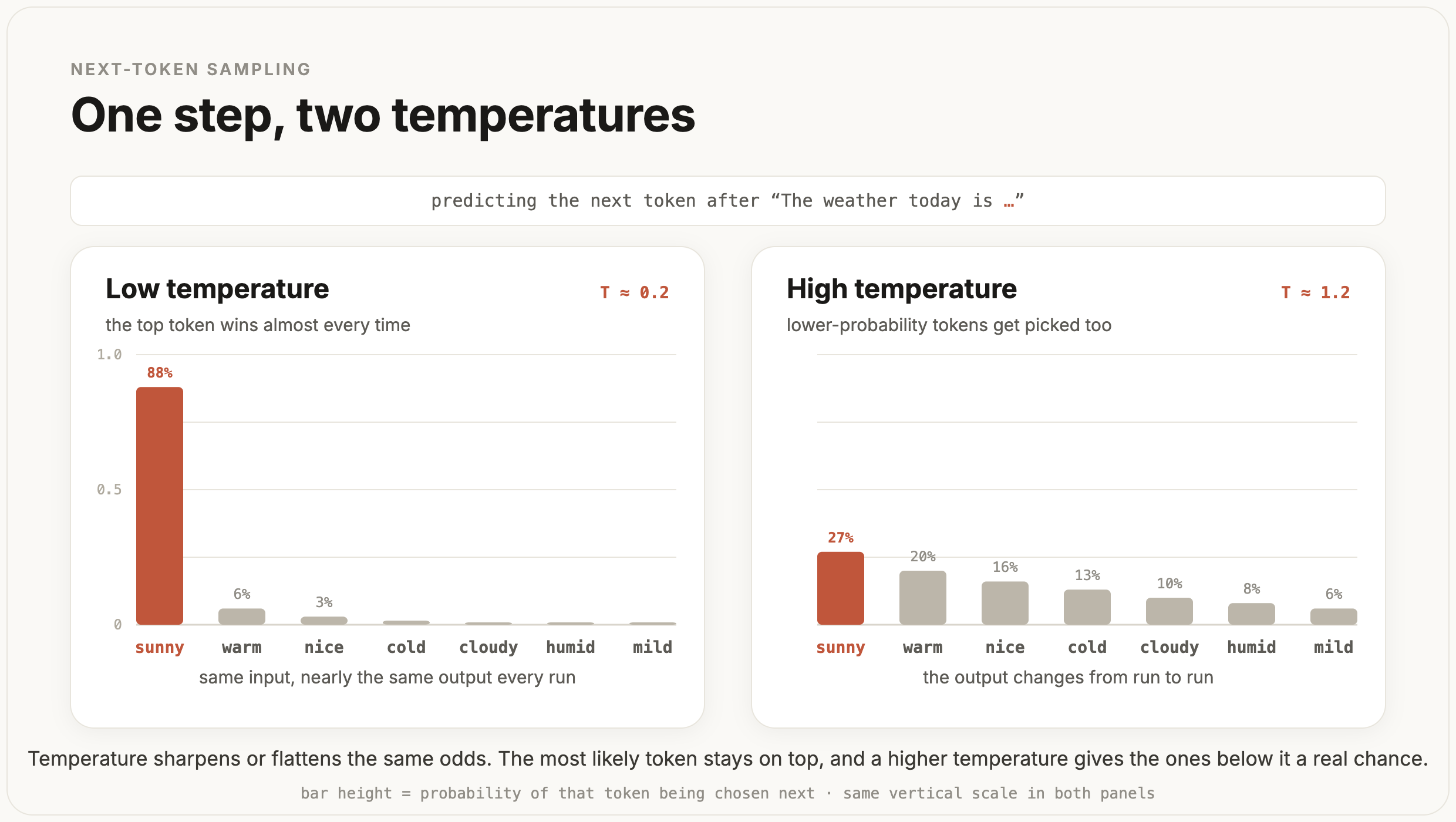
Keep it low and the model almost always takes the highest-probability token, so the same input comes back close to the same every run, which is what I want any time the answer is supposed to be one specific thing like a category or a piece of JSON my code is about to read. Raise it and lower-probability tokens start getting chosen too, so the output changes from one run to the next, which helps for writing or brainstorming where the same phrasing every time would get stale. Most of the production work I do needs the answer to be steady, so I keep Temperature at or near zero and leave it there. Check the provider before you reach for it, though. As of September 2026, Anthropic's Claude models from 4.7 on don't support temperature, top_p or top_k, and sending a non-default value returns a 400 error, so on those models you leave the dials out and steer the output with the prompt (Anthropic, using the Messages API).
The other one is Reasoning effort, on the models that have it. A reasoning model works through a problem in hidden thinking tokens before it writes its answer, the way the last module described, and the effort setting controls how much of that thinking it is allowed to do, usually on a scale from low to high. If you turn it up, the model spends more of those tokens on the problem, which buys real accuracy on something genuinely hard like a multi-step deduction or a tricky piece of code. If you turn it down, it commits to an answer sooner, which is faster and cheaper, and completely fine for a task that was never that hard in the first place. It is the same time-for-quality tradeoff you make when you pick a bigger or smaller model, except here you are making it inside one model. In practice I set it the way I set the model itself, starting high while I am still proving a feature can work and then walking it down toward the lowest effort that still holds up, so I am not paying for deep reasoning on a job that does not need it.
Max tokens is one I almost always set and then leave, the ceiling on how many tokens the model is allowed to generate in a single reply. Left uncapped, a model that decides to ramble runs up the bill, and there is a worse problem than the bill. If the model reaches the ceiling partway through its answer, the reply just stops wherever it happened to be, and now something downstream is holding a response that ends mid-sentence, or a block of JSON that no longer parses because it got cut off before the closing brace. I set the ceiling high enough to fit the longest answer I actually expect, and I treat a reply that ends right at the limit as a sign the real answer was longer than the room I gave it.
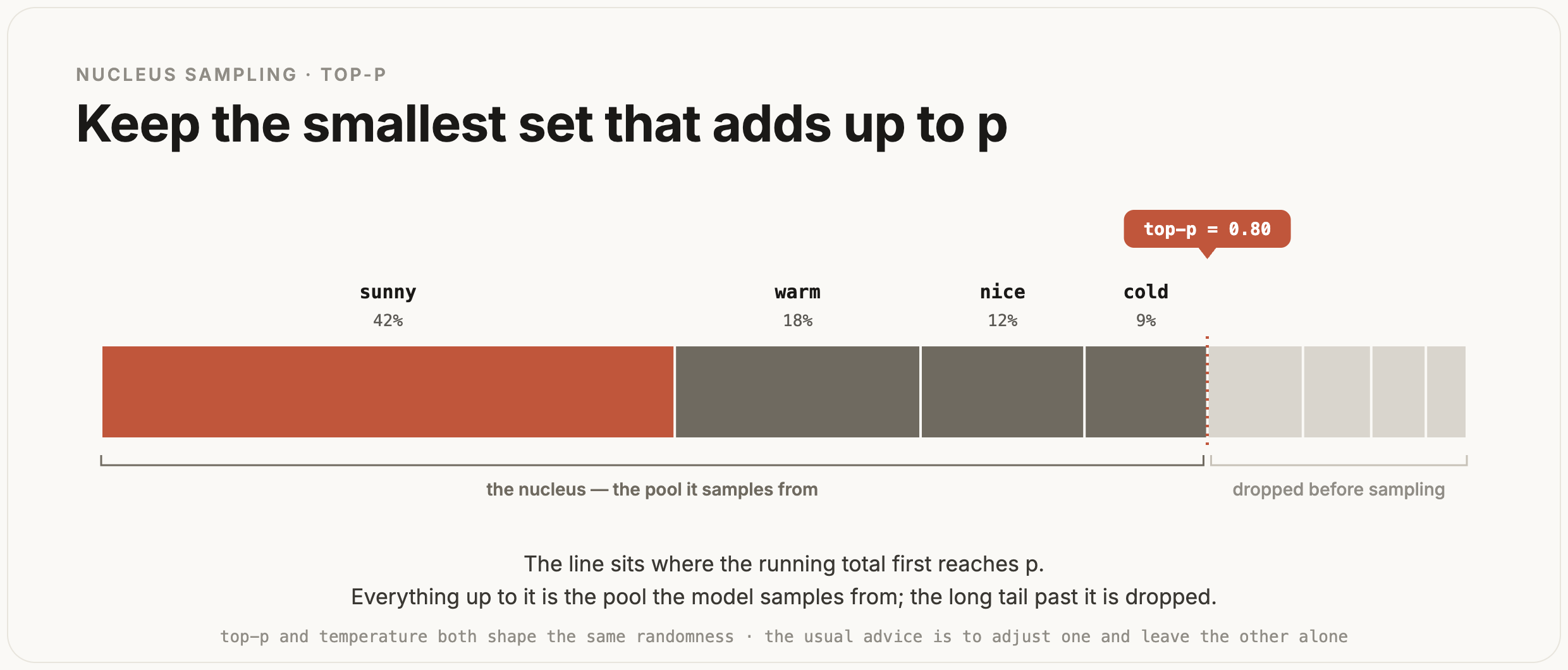
The rest I mostly leave at their defaults, though it helps to know they are there and roughly what they touch. Top-p reaches for the same randomness that Temperature does from a different angle, narrowing the pool of tokens the model is allowed to sample from down to the most likely ones, and the standard advice is to pick one of them to adjust and leave the other alone so they are not both pulling on the same thing.
Stop sequences are strings you hand the model that tell it to stop generating the moment it would produce one of them, which is useful when you are pinning down a format or marking the end of an agent's turn. Some APIs take a Seed, which asks the provider for the same output across repeated calls, though it is best effort and not a guarantee.
None of these settings will save a weak prompt or the wrong model, though. They sit on top of the two things that actually decide whether the output is any good, the model you picked and the prompt you sent it, so they are worth reaching for only once those two are already in a good place.
Structured output
Getting JSON your code can trust
Now let's go back to the classifier where the answer is meant to be a single category my code reads from. Say it sorts support tickets, and for each ticket I want back a small object: a category, a priority, a one-line summary. The obvious move is to ask for it. I add "Respond only with JSON in this shape" to the end of the prompt, set temperature to zero so the answer is steady, and parse what comes back with json.loads.
That could work in a demo, but when you scale it to production, it would fail once every few hundred calls. The model could open with "Sure, here's the JSON:" and the string my parser sees now starts with words that should not be there. Or it wraps the object in a json fence. Or it adds a confidence field I never asked for, or renames category to label. Or the reply runs into the max-tokens ceiling and stops before the closing brace, so the JSON is valid right up until the point it gets cut off. Every one of these throws in json.loads, and a classifier that crashes on one ticket in three hundred is still paging someone at night.
When LLMs first came out this is what everyone did. But now, providers give us a better approach. As you already know by now, the model is sampling tokens one at a time from a distribution over its whole vocabulary, and "Respond only with JSON" is just more text tilting that distribution toward JSON-looking tokens. It makes the extra words at the start less likely, but it can't rule them out. At temperature zero the single most likely first token is usually {, but nothing guarantees it, and if the model opens with anything else your json.loads is already broken.
Structured output deals with this at the sampling step. You hand the provider a schema, a description of the exact shape you want back, and the model can't leave it.
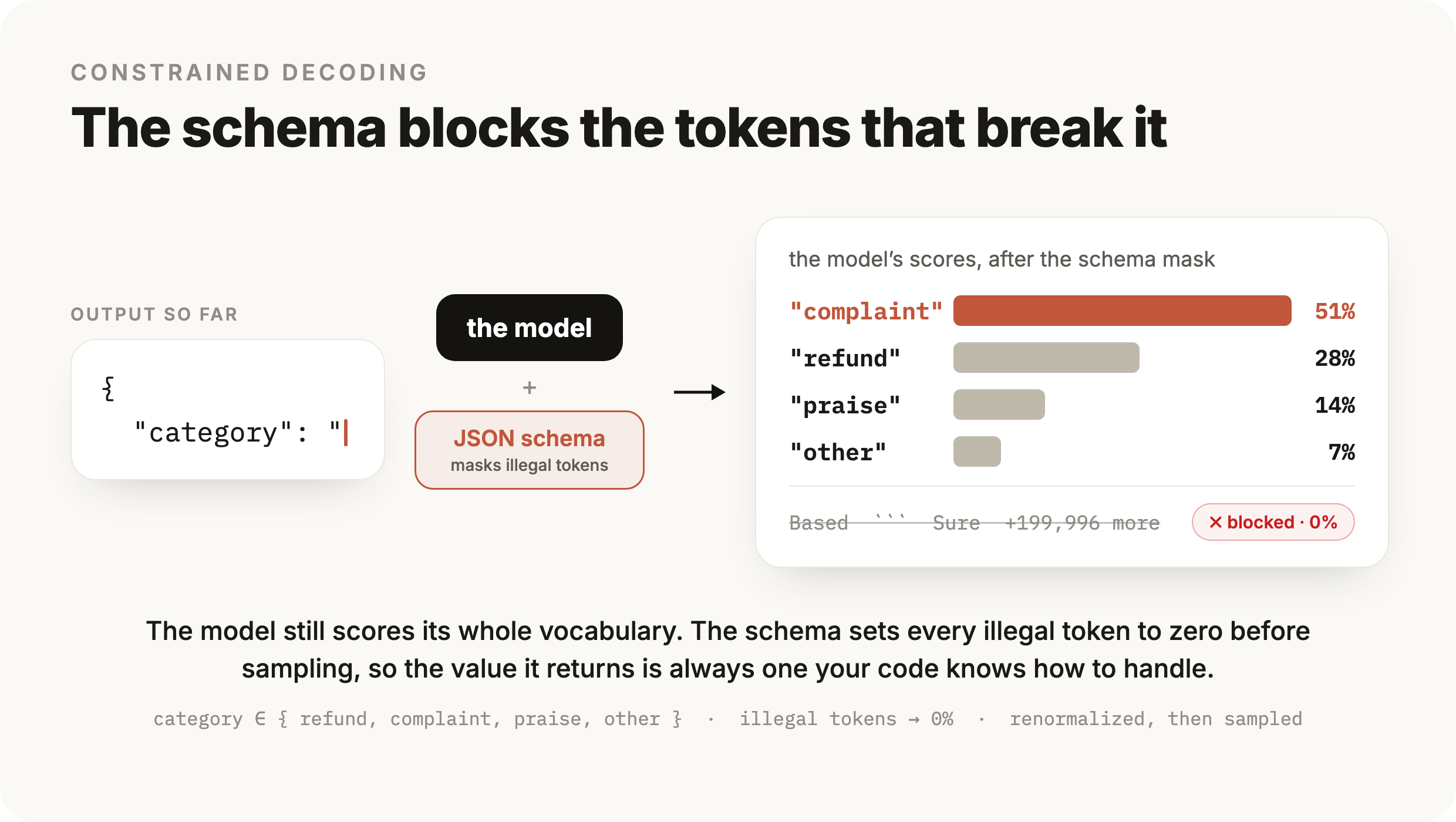
Under the hood this is called constrained decoding. At each step the model still scores every token the way it always does, but before the pick, the decoder crosses out every token that would make the output stop matching your schema and samples only from the ones left. Right after { "category": ", the schema says the only legal continuations are your four category values, so every other token in the vocabulary drops to zero and the model picks one of the four. Malformed JSON cannot come out, because the token that would have malformed it was never an option.
In the OpenAI API you pass the schema as a json_schema format with strict turned on:
from openai import OpenAI

client = OpenAI()

ticket_schema = {
    "type": "object",
    "properties": {
        "category": {
            "type": "string",
            "enum": ["refund", "complaint", "praise", "other"],
        },
        "priority": {"type": "string", "enum": ["low", "high"]},
        "summary": {"type": "string"},
    },
    "required": ["category", "priority", "summary"],
    "additionalProperties": False,
}

response = client.responses.create(
    model="gpt-5.6",
    input=ticket_text,
    text={
        "format": {
            "type": "json_schema",
            "name": "ticket",
            "schema": ticket_schema,
            "strict": True,
        }
    },
)
Pay attention to the strict flag. Without it the schema is a strong suggestion; with it the provider constrains decoding to match, so the object comes back with every field present and category always one of the four strings my code switches on. Other providers also give you access to this although it might look a little different. On Anthropic you can define a tool whose input schema is the shape you want, set strict on it, and read the arguments the model fills in, and the constraint on which tokens are allowed works the same way underneath.
Some APIs also offer another weaker option, which is a plain JSON mode that only guarantees the output parses, and says nothing about its shape. You get a valid object that might carry the wrong field names or an extra key, which moves the failure from your parser to the line that reads result["category"] and finds nothing there. When your code depends on specific fields, the schema is the one to use.
The schema gets you a reliable shape. It doesn't check whether the shape is filled in correctly. category is guaranteed to be one of your four strings; whether it's the right one is a separate question. The model can still read a complaint and label it a refund, and now that wrong answer is a clean value sitting in a field your code trusts. So the datasets and evals from module 1 don't go away once the output is structured; they are still how you find out the label is wrong. The failure is still there, it just looks different now. Where a bad response used to crash the parser and take the feature down in the moment, now the same mistake is a wrong value the module-1 eval catches on the next run.
Two problems still get through, and both go back to the dials. If the reply hits the max-tokens ceiling partway through, constrained decoding still hands you an object that stops before its closing brace, so size the ceiling for the whole schema and treat a response that ends right at the limit as suspect. And on models that can refuse a request for safety reasons, a refusal can come back in place of the object, so the code that assumes the field is always there needs a branch for the call that returned no object at all.
Versioning
The same prompt can answer differently next week
You ship the classifier. The prompt is set, the schema is set, temperature is at zero, and for a week the labels look right. Then one morning a few tickets come back labeled differently, and two evals that were passing are now failing. You didn't touch the prompt or the code. Two different things can cause this, and it helps to tell them apart, because the fix is different for each.
The first is that the same model doesn't always return the exact same text. Even at temperature zero, where the model takes its top token at every step, the output isn't guaranteed to be identical from one run to the next. The model runs on GPUs that add up floating-point numbers in an order that depends on how requests happen to be batched together, so the scores come out a little different between runs, and once in a while a different token ends up on top. At temperature above zero you are asking for that variation on purpose. So a small amount of run-to-run change is normal, and if your code or your eval assumes the exact same string every time, that assumption is the part that's wrong. This is another reason to have your eval check the parsed field, like category == "refund", which stays stable even when the surrounding text shifts a little.
The second cause is the bigger one, and it's what versioning refers to. When your code calls gpt-5.6, that name is an alias. The provider points it at their current build of the model and repoints it to newer builds over time. Your code hasn't changed, but the model behind the alias has. A newer build is usually better on average, and better on average can still be worse on the exact thing your prompt was tuned for, so a change you never made can regress your feature.
The fix is to stop calling the alias and pin a specific version. Providers publish dated snapshots of each model, frozen builds with a date in the name. gpt-5.6 is the moving alias; an ID like gpt-5.6-2026-08-14 is one specific build that doesn't change after it ships. Put the dated snapshot in your config and the model stops moving under you.
Pinning doesn't hold forever, though. Providers retire old snapshots on a schedule, which they call deprecation. You get a date after which the pinned version stops serving, and before that date you have to move to a newer one. So pinning doesn't remove the migration. It lets you decide when you do it, on a day you pick, ahead of the deprecation date.
That migration is a model swap, and you already know how to check a model swap. Run the new version against the same eval dataset from module 1 before you switch. If the numbers hold, ship it. If the new model drops the cases you cared about, you found that out from your own eval, before a user did. It's the same comparison you ran when you tried the small model against the big one, pointed now at a new version of the same model.
So the version is one more thing you choose and freeze, like the model and the dials. You pin it so the system stays put, and you keep the eval so you can move when the provider makes you.
A swappable seam
One place that talks to the model
Look at where the classifier stands now. The call to client.responses.create is OpenAI's shape, gpt-5.6-2026-08-14 is an OpenAI model id, the text.format block is OpenAI's way of asking for structured output, and reading response.output_text is how you pull the answer out of an OpenAI response. All of that is fine until you want to try a different model. Say Anthropic ships something that scores better on your eval, or you want to run an open-weights model you host yourself to cut the cost. If every place in your code that talks to the model has OpenAI's request and response shape baked in, switching means editing all of them.
You want to avoid that, because everything this module has been about is a decision on the model. Which model to start with and how far to optimize down, the temperature and reasoning effort, the max-tokens ceiling, the structured-output schema, the pinned version. If the model is scattered across your code, each of those decisions is scattered with it. The fix is to give the model one boundary in your code and keep every call behind it.
The point of that boundary is to keep the rest of your app from depending on the model. Your code shouldn't know it's calling OpenAI. It should know just one thing. It hands over a prompt and a schema, and it gets back an object in that shape. Which provider ran, which model id, which version, how the request was built, and how the response was unpacked all stay on the far side of the boundary. That point, where you can replace the model without changing anything around it, is the seam. You already do this with other outside services. A database sits behind a data-access layer and a payment provider sits behind something like a charge() call, so you can switch what's behind them without rewriting the app. The model is the same kind of dependency, and one you'll swap more often than most: for a better version, a cheaper provider, or an open-weights model you host yourself.
In practice that boundary is one function. The rest of your app calls complete(prompt, schema) and gets a dict back. The provider differences don't disappear inside it. OpenAI wants a text.format block and hands the answer back as text; Anthropic wants a tools list and hands it back as a tool call inside a list of content blocks. Something has to turn the one signature into each provider's call, so that translation lives inside complete, with a branch per provider.
import json
import anthropic
from openai import OpenAI

PROVIDER = "openai"          # the one line you flip to swap
openai_client = OpenAI()
anthropic_client = anthropic.Anthropic()

def complete(prompt: str, schema: dict) -> dict:
    if PROVIDER == "openai":
        response = openai_client.responses.create(
            model="gpt-5.6-2026-08-14",
            input=prompt,
            text={
                "format": {
                    "type": "json_schema",
                    "name": "out",
                    "schema": schema,
                    "strict": True,
                }
            },
        )
        return json.loads(response.output_text)

    if PROVIDER == "anthropic":
        response = anthropic_client.messages.create(
            model="claude-opus-5",
            max_tokens=1024,
            messages=[{"role": "user", "content": prompt}],
            tools=[{"name": "out", "strict": True, "input_schema": schema}],
            tool_choice={"type": "tool", "name": "out"},
        )
        for block in response.content:
            if block.type == "tool_use":
                return block.input
The Anthropic branch forces the model to call the out tool with tool_choice. That works on Opus 5, but as of September 2026 Claude Fable 5.1 and Mythos 5.1 reject a forced tool choice with a 400 error, and on those you leave tool_choice at auto with the strict tool, or ask for the answer in a fixed JSON shape with Anthropic's structured outputs (Anthropic, API errors). Either way the change stays inside complete.
The rest of your app calls the one function and never sees any of this:
from llm import complete

def classify_ticket(ticket_text: str) -> dict:
    return complete(ticket_text, ticket_schema)
classify_ticket sends a prompt and a schema and gets a dict back. It can't tell which branch ran, and it doesn't change when you swap. Swapping is flipping PROVIDER, or reading it from an environment variable. As you add providers the branch grows, and past two or three you'd usually pull each one into its own function and let complete pick between them, but the idea holds. The app depends on one signature, and the provider code stays hidden behind it.
Getting the providers to agree on the same signature is a challenge though, and there's more to it than the branch above shows. Finish reasons, refusals, and token limits are all reported differently by each provider. complete earns its place only if it flattens all of that into the same return value, so the caller genuinely can't tell which provider ran. The moment a provider-specific detail leaks through the return value, the code that calls complete starts branching on the provider, and the seam is gone.
Open weights fit the same function. A model you host yourself behind a server that speaks the OpenAI API, which vLLM and similar runtimes do, is a change of the client's base URL and the model name inside complete, with the signature untouched.
You don't have to write any of this yourself. Libraries like LiteLLM and LangChain are this seam already built. LiteLLM gives you one completion(model="anthropic/claude-opus-5", messages=...) call that reads the provider from the model string and returns the same shape whatever ran; LangChain wraps each provider in a shared chat-model interface. These libraries don't make the provider differences go away. They move that same adapter behind their own interface and maintain it for you. Writing it by hand once is what makes them legible, so when one provider's structured output or a refusal comes back different through the shared call, you know it's the adapter that changed, and that's where you look.
And swapping the provider behind the seam is a model swap, so it comes back to the eval. Before you trust the new one, run it against the dataset from module 1 and compare, the same as every other model change in this module. The seam swaps the plumbing. It does nothing for the prompt. A prompt you wrote for one model can score worse on another with nothing else changed, because different models read the same instructions differently. So the eval here is doing real work. It's how you catch a prompt that needs reworking for the new model, before it reaches a user.
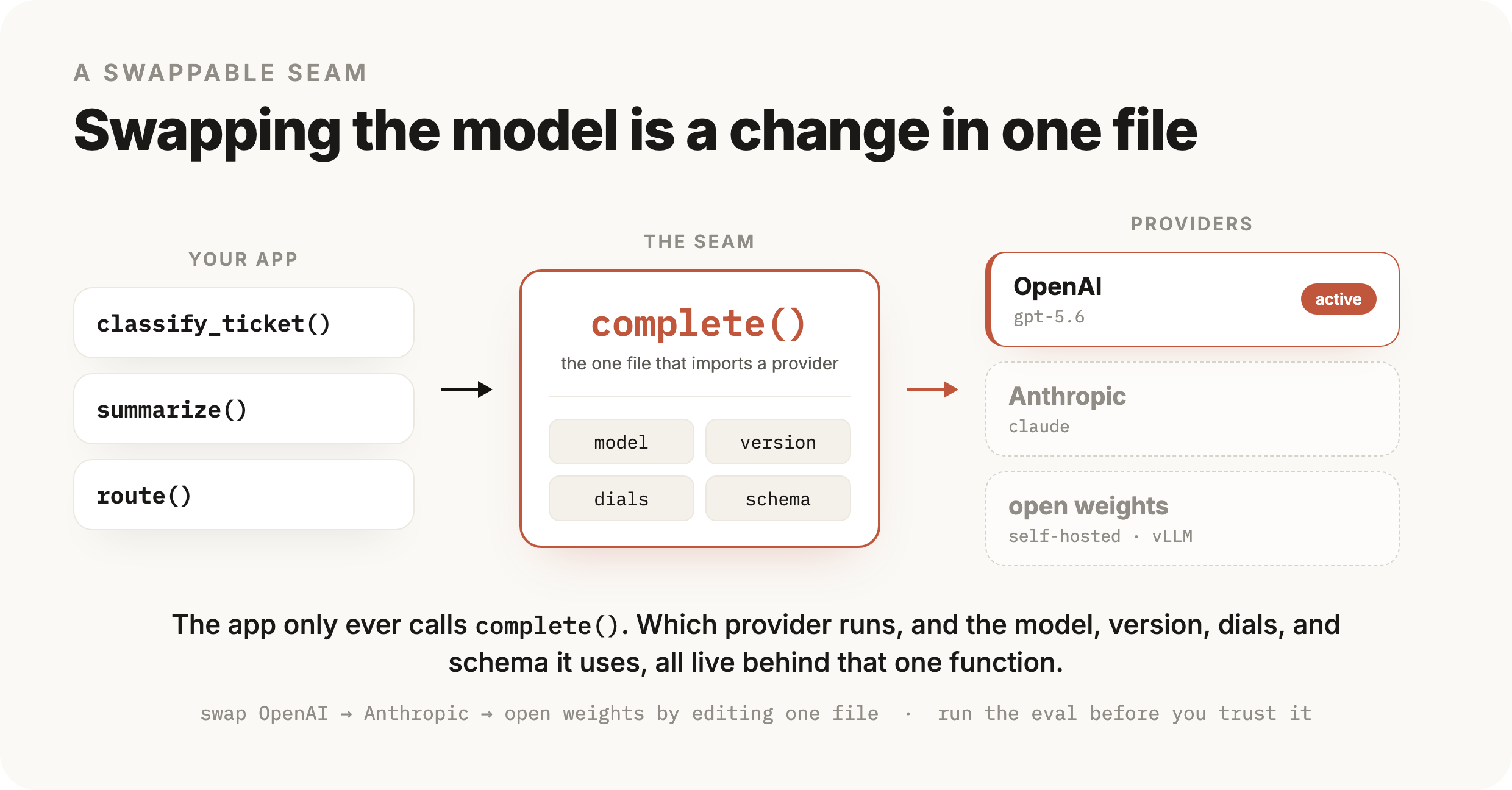
With the seam in place, the whole module comes together. You pick a model, starting on the strongest one to prove the task is possible and optimizing down toward the cheapest one that still holds up. You set the dials, mostly temperature and reasoning effort, for the steadiness or the depth the task needs. You get the answer back as structured output your code can read. You pin a version so the model doesn't move under you. And you put all of it behind one seam, so the model is a part you can swap. When a better model shows up next month, moving to it is an edit in one file, checked against your eval, and the rest of your system never notices.
Checkpoint · recall · 6 questions
What the module said
- 01
You're building a new feature and reach for the strongest model available first. Why start there?
- 02
What does the temperature setting control?
- 03
Turning reasoning effort up costs more tokens and more latency. What does it buy?
- 04
What is the max-tokens setting, and what happens when a reply reaches it?
- 05
With structured output and a strict schema, how does the provider keep the JSON matching your shape?
- 06
Your code calls the model by an alias like
gpt-5.6. What does pinning a dated snapshot change?
0 / 6 answered
Checkpoint · understanding · 5 questions
Reason it through
- 01
At temperature 0 your classifier still returns unparseable JSON now and then, with a stray preamble or a code fence. A teammate says lower the temperature further. Why won't that solve it?
- 02
A simple classification route runs on high reasoning effort. It's slow and expensive and already scores 99% on your eval. What's the sensible change?
- 03
You add a strict schema. Every response is now a valid object whose
categoryis one of your four labels, but eval accuracy doesn't move. Why not? - 04
You ship a classifier, change nothing on your side, and a week later some labels differ and two evals flip. Which explanation fits?
- 05
A summarizer's JSON sometimes ends before the closing brace, and each time it does the reply hit the max-tokens limit exactly. You raise the limit and it stops. Did raising the limit fix a broken model?
0 / 5 answered
Checkpoint · debugging · 5 questions
Debug it
- 01
You put the model behind a
complete()seam, then swap OpenAI for Anthropic. Now the callers ofcomplete()are full ofif provider ==branches. What went wrong? - 02
A structured-output endpoint returns a valid object most of the time, but a few long tickets come back as objects that won't parse, and each of those replies ends right at the token limit. Where's the bug?
- 03
Your classifier reads
result["category"]on every response. Once in a while it throws because there's no object at all, and only on certain inputs. What's happening? - 04
Your pinned snapshot is being deprecated, so you move to the newer one. It passes a quick manual check, but a week later ticket routing gets worse. What should you have done first?
- 05
You swap the provider behind
complete(). The change is one line, nothing errors, but quality drops on the new model and your eval flags it. What's the likely cause?
0 / 5 answered
Go deeper
OpenAI: Structured Outputs guide · Anthropic: Models overview · LiteLLM: one call across providers (the seam, prebuilt) · LangChain: framework for building on LLMs · LlamaIndex: framework for LLM apps and RAG · Instructor: structured outputs with Pydantic · vLLM: serve open-weights behind an OpenAI-compatible API
That's the last one written so far
Pick your next module from the board.