
The capability
What are data and state in an AI system?
State is anything your system has to remember from one request to the next. As you already know from M3, the model remembers nothing between calls, so anything an AI system remembers has to live in code and storage you own. Data and state is about figuring out where each piece of that goes, and keeping it right while servers restart and the source data changes.
If you've built a normal web app, a lot of this will look familiar, since you're storing rows in a database and reading them back. An AI system adds a few problems of its own. A single run can take many steps and several minutes, so you need to be able to recover from a crash halfway through without refunding a customer twice. The documents the model answers from get edited, so the copy your system searches has to keep up with them. And some of what you store is embeddings, which are lists of numbers used to search by meaning, and those need their own kind of index.
If you get this right, a conversation keeps going even when the next message lands on a different server, and a long task picks up where it stopped after a crash.
Where it shows up
This comes up in any AI feature where the same user comes back more than once. A chat product has to keep every conversation somewhere that survives a deploy. A coding agent that runs for twenty minutes has to save how far it got. A search feature over company documents has to notice when a document is edited and update its copy.
Where this starts
The conversation list can't live in your server's memory
A model keeps nothing between calls, so to hold a conversation your code keeps the messages in a list and sends the whole list every time. That was the starting point of M3, where the list was one line, history = [], inside a loop running on your laptop. M5 kept that list and spent the whole module deciding what should go in it.
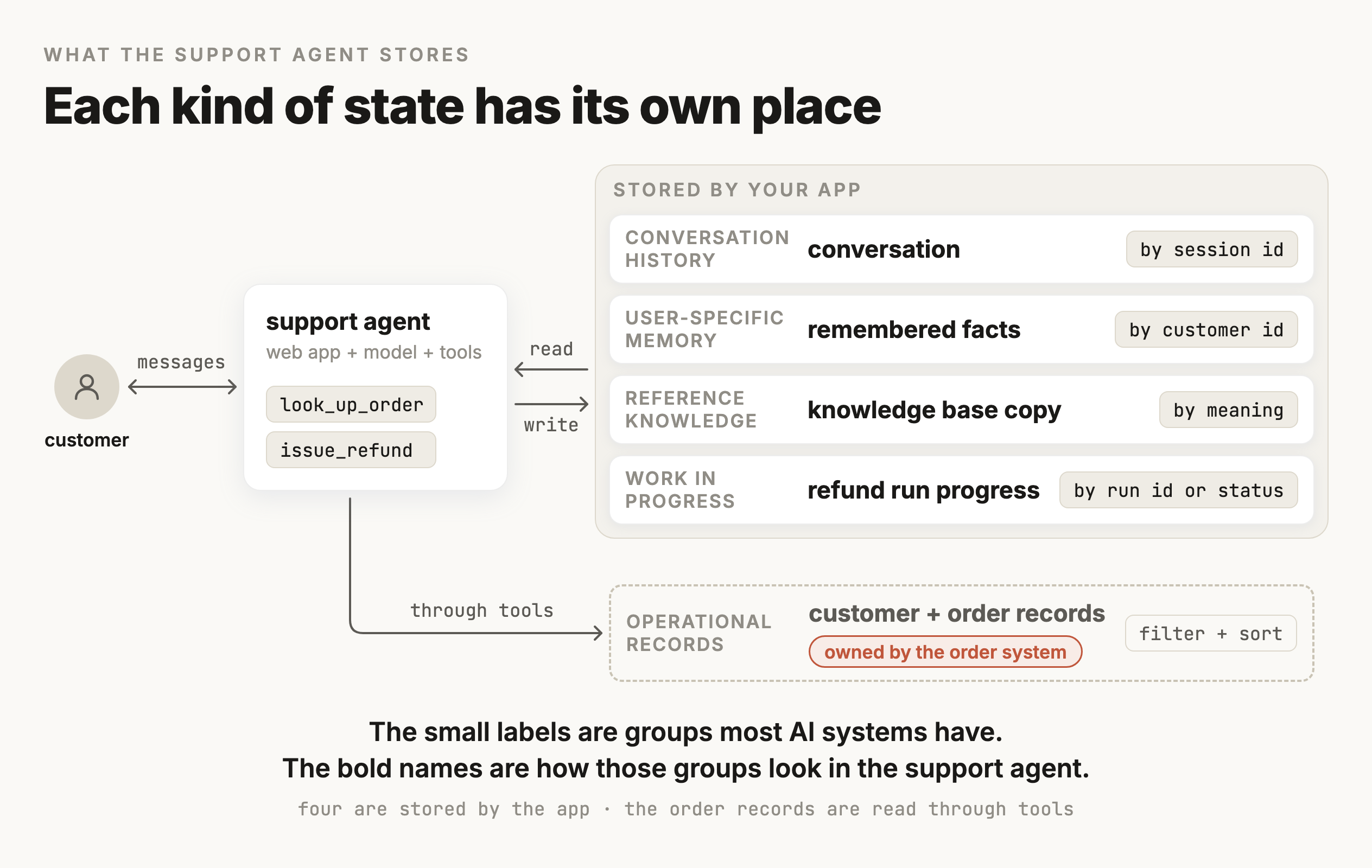
That list is only one part of the state an AI system keeps. A durable AI system, one that serves the same users across many interactions, stores whatever state it needs between them. In most systems that state falls into these groups:
Conversation history is what was said in each session, including the tool calls and everything they returned.
Operational records are the business data the system reads and changes, like orders or accounts, and they are usually owned by some other system entirely.
User-specific memory is the facts about one person that should carry over into their next session.
Reference knowledge is the documents the system answers from, like policies or manuals, and the thing about those is that they change over time.
Work in progress is how far a multi-step task has got, so that it can carry on after a crash without starting from the beginning.
The rest of this module works through where each group should live and how to keep it correct. It uses one concrete system the whole way through, the customer support agent from Module 5. That agent's tables and tools are one example of these groups. A coding agent or a document-processing pipeline has the same groups under different names, and the same reasoning applies to them.
Now put the conversation list behind a web server, because that's how the support agent from Module 5 would run in production. That agent answers customers about their orders. It has two tools, one that looks up an order and one that issues a refund. It also keeps a running conversation with each customer. Each customer gets a session id, and the simplest way to keep each conversation is a dictionary keyed by that id.
from fastapi import FastAPI
from openai import OpenAI

app = FastAPI()
client = OpenAI()
conversations = {}  # session id -> list of messages, held in this process's memory

@app.post("/chat")
def chat(session_id: str, message: str):
    history = conversations.setdefault(session_id, [])
    history.append({"role": "user", "content": message})

    response = client.responses.create(model="gpt-5.6", input=history)  # tools left out to keep this short

    history.append({"role": "assistant", "content": response.output_text})
    return {"reply": response.output_text}
This works when you try it locally. If you send two messages, the agent remembers the first one when it answers the second. The whole memory of the system is that conversations dictionary, and the dictionary is an ordinary Python object held in the memory of one running process.
However, in production that dictionary gets lost in two ways.
- The process restarts. Every deploy stops the running process and starts a new one. The new process begins with an empty dictionary, so every conversation that was in progress is gone. A crash does the same thing.
- More than one copy of the app is running. Production deployments almost always run several copies of the app at once, either as several worker processes on one machine or as several machines behind a load balancer. Each copy has its own
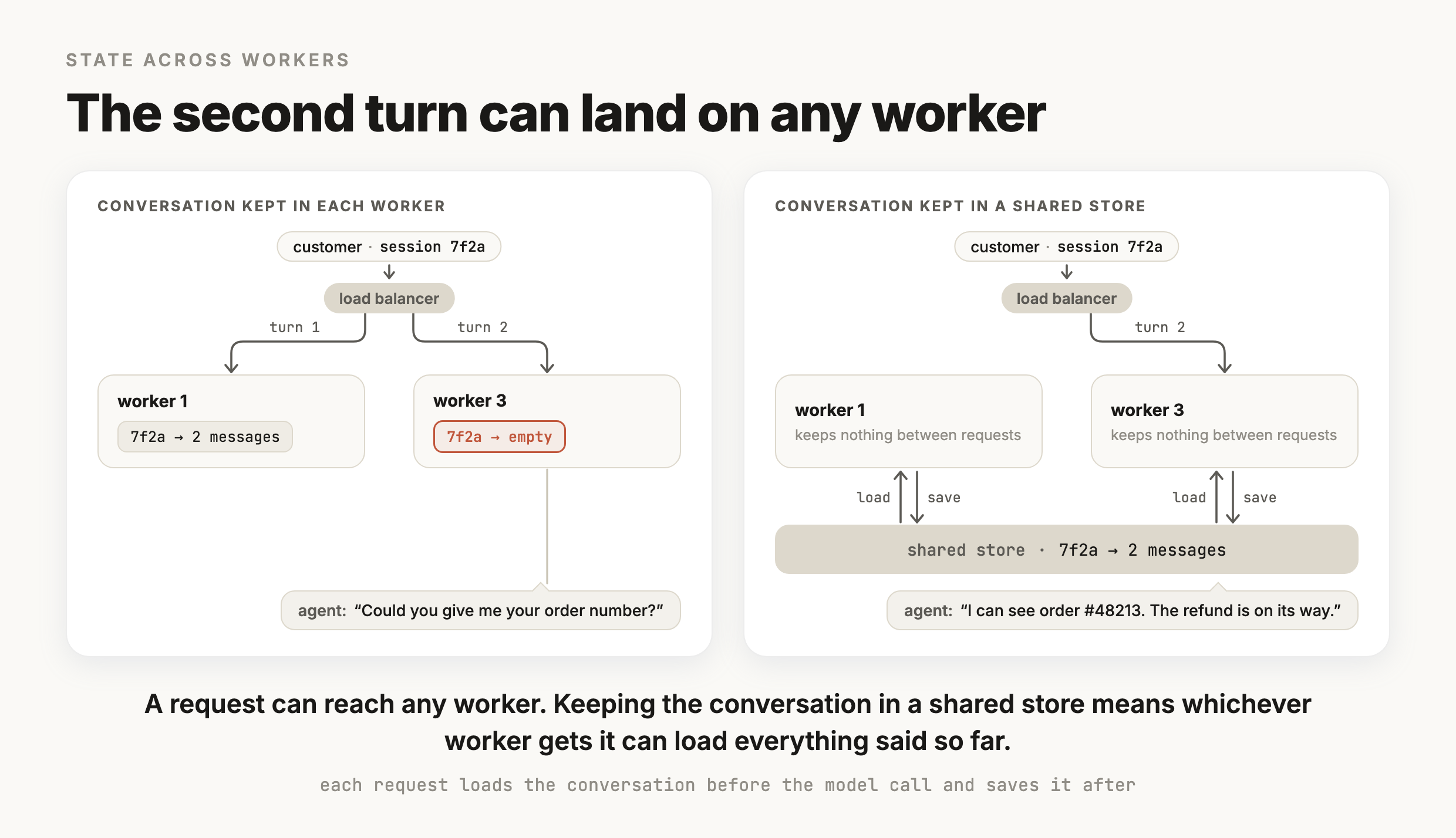
conversationsdictionary. A customer's first message lands on worker 1, which stores it. Their second message lands on worker 3, which has never seen this session, so the model gets a list with one message in it and asks the customer for the order number they gave a minute ago.
The second one is harder to spot, because nothing crashes and no log shows an error. The agent just asks again for something the customer already told it. The support agent did the same thing on its fortieth turn in M5, for a different reason. In M5 the order number was in the list and got lost in a long, cluttered context. Here the list this call received never had it, because the list that did is sitting in another process. Looking at the exact context the call received, the debugging habit from M5, separates the two quickly.
A common fix is sticky sessions, a load balancer setting that sends each customer back to the same machine every time. One thing to watch, though, is that sticky sessions only choose the machine. If that machine runs four worker processes, the request can still land on any of them. The conversation is also still lost whenever that machine restarts or gets removed during a scale-down, so sticky sessions only reduce how often the loss happens.
The way to prevent the loss is to keep the conversation in a store outside the process, one that every copy of the app reads from and writes to. Each request loads the conversation by session id before it calls the model and saves it back before it returns.
@app.post("/chat")
def chat(session_id: str, message: str):
    history = store.load(session_id)   # the full saved conversation
    history.append({"role": "user", "content": message})

    context = build_context(history)   # M5's budget and compaction pick what this call sees
    response = client.responses.create(model="gpt-5.6", input=context)

    history.append({"role": "assistant", "content": response.output_text})
    store.save(session_id, history)    # write it back before returning
    return {"reply": response.output_text}
The store keeps the whole conversation, and build_context picks what each model call sees from it, using the budget and compaction rules from M5. With that change any worker can handle any turn, and a conversation that was saved survives a restart. A request that was still running when its process stopped is lost, which is the same kind of problem as the interrupted refund later in this module. The web process now holds nothing between requests, the same way the model holds nothing between calls. Everything that has to last lives in the store. A service built this way is called stateless. The name is a little misleading, since the system still has plenty of state. It means none of that state is kept in the process that handles the request.
The shortcut from M3, where you pass previous_response_id and OpenAI keeps the earlier messages on its servers, still leaves one piece of state with you. Your code has to remember the id of the last response for each session, and in M3's example that id was a local variable. On a server running several workers it needs to go in a shared store too, for the same reason the dictionary did.
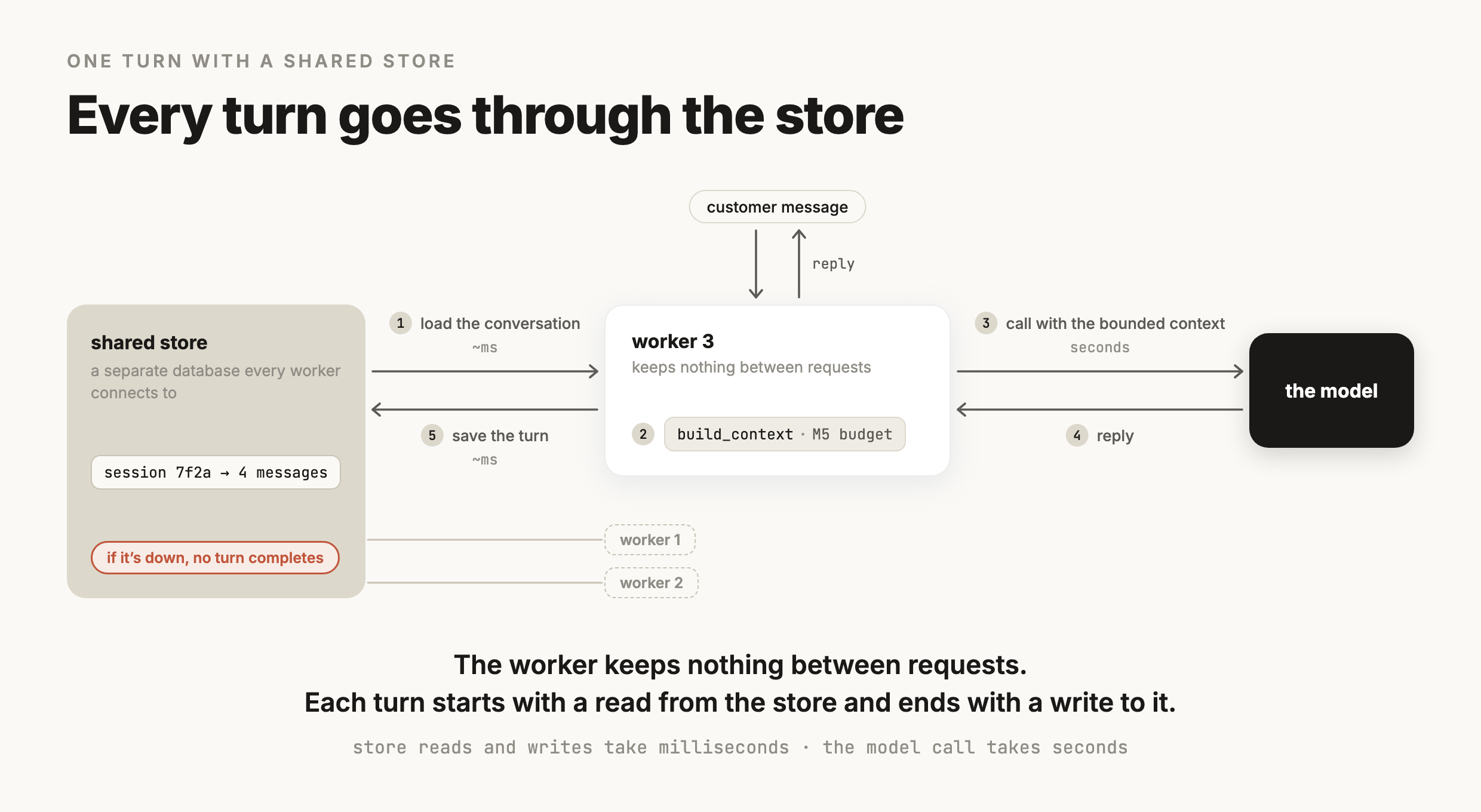
Every turn now reads from the store before the model call and writes to it after. A read from a database in the same data center usually takes a few milliseconds, which is small next to the model call. The store is also now a dependency of every turn, so when it's unavailable the agent can't answer anyone.
A shared store also means two requests for the same session can run at the same time on different workers, reading and writing the same saved conversation. A customer who sends two messages quickly, or a browser that retries a request that seemed slow, can produce this sequence:
- 01Request A loads the conversation, which has four messages.
- 02Request B loads the same four messages.
- 03A adds its message and the reply and saves six messages.
- 04B adds its own message and reply and saves six messages, replacing what A saved.
A's message and its reply are gone, and nothing reported an error. The fix is to handle one turn per session at a time. When a second request arrives while a turn is still running, your code either makes it wait or tells the client to resend it after the first reply comes back. When the conversation is stored as one row per message, which comes up two sections from now, the database can catch this collision for you.
The code above leaves store undefined, because what the store should be depends on what you're storing. The conversation is only one of several kinds of state the support agent keeps.
Kinds of state
What the support agent has to store
The conversation is the state people think of first, because losing it is what the customer notices. A durable AI system stores whatever state it needs across interactions, and the groups from the start of this module show up in almost every such system. The questions that decide how each piece gets stored are general too:
Who owns the original? Either your app does, or another system is the source of truth, meaning its copy wins whenever the two disagree.
How does your code read it? Either by an id it already has, or by searching for it.
How long does it have to last? One session, or months.
And what happens if it is lost or out of date? The answer ranges from a repeated question to a refund issued twice.
The rest of this section applies those questions to the support agent. The five kinds below are specific to this example, including their names and tables. A different system would name them differently and answer the same questions. The figure shows how the general groups map onto the support agent, and which of its kinds the app stores itself.
The conversation
The conversation is each session's messages in order, along with every tool call the model made and every result that came back. Your code adds to it on every turn and loads it by session id before every model call, which is the load and save from the last section. The store keeps the whole transcript, and the context for each call is built from it, so what the model sees stays within M5's budget. It has to last at least as long as the session, and usually longer, because a customer who comes back an hour later expects the agent to remember what they already said.
Customer and order records
These are the customer's account and their orders, including each order's status and any refunds already issued. Your app usually doesn't own them. They live in the company's order system, which is their source of truth. The agent reaches them through its tools. The lookup tool in this example asks for things like every order this customer placed in the last 30 days that hasn't shipped yet, which means filtering and sorting across many records. The answer has to be current, since an order status that's an hour out of date is a wrong answer to the customer. The refund tool also writes to these records, and a refund it issues has to be recorded exactly once.
Facts remembered about a customer
These are the things worth keeping from a customer's earlier sessions, for example that they want refunds sent back to their original card. Your code writes each one keyed by the customer's id and loads them at the start of the customer's next session, which is the memory store from M5. They need to last across sessions, often for months. Deciding which facts are worth remembering is the subject of M16, Memory. This module is only about where they're kept.
The knowledge base
The help-center articles and the refund policy make up the knowledge base, which is what the agent answers policy questions from. Your app didn't write these either. The support team edits them in their help-center tool, and your app keeps its own searchable copy. That copy usually stores an embedding for each passage, a list of numbers computed from the text so that passages with similar meaning get similar numbers. This copy is searched by meaning. Your code computes an embedding for the customer's question the same way and gets back the passages whose embeddings are closest to it. And because it's a copy, it can fall behind the original. If the support team shortens the refund window from 30 days to 14, the agent keeps quoting 30 until your copy is updated.
The progress of a run that's still going
Handling one refund request takes four steps:
- 01look up the order
- 02check that it's inside the return window
- 03issue the refund
- 04tell the customer it's done
The progress of a run is the record of which of those steps have finished and what each one returned. Your code gives the run an id when it starts and updates the record as each step completes. Most runs finish in seconds, but a run can wait for days if a large refund needs a person to approve it before step 3. If the process dies after step 3 has been recorded, the worker that resumes the run has to find it among the unfinished runs and read its record to see that the refund already went through. Without that record, the run starts again from step 1 and refunds the customer twice. A crash that lands after the refund but before it's recorded is harder to handle, and a later section covers it.
The five differ most in how your code reads them, and they fall into two groups:
- Fetched by an id your code already has. The conversation is loaded by session id and the remembered facts by customer id. A run in progress is loaded by its run id. In these cases your code knows which record it wants before it asks.
- Searched. The order lookup filters and sorts records by fields like status and date, and so does the worker that looks for unfinished runs after a crash. The knowledge base is searched by meaning, returning the passages closest to the question.
The order records stay in the order system and the agent reaches them only through its tools, so four of the five are yours to store. For those four, how each one is read and how long it has to last decide what kind of store it belongs in, which is what the next section is about.
Choosing the store
Start with one Postgres database for all four
For most teams building something like the support agent, one Postgres database can hold all the state the app stores itself. Postgres is a relational database, which keeps data in tables of rows and columns and answers queries written in SQL. It handles both ways the support agent reads its state, and with an extension it can store and search embeddings as well.
Lookups by id and searches by field both run on indexes
Postgres finds a row by its id without reading the whole table because of an index, a separate structure the database keeps sorted so it can jump straight to the matching rows. Declaring a column the primary key creates that index automatically. Naming a column id doesn't, and any other column you look rows up by needs an index you create yourself. Loading a conversation by session id is that kind of lookup, and so is loading a customer's remembered facts by customer id.
Searches by field use the same mechanism, as long as the index matches the query. A support lead's list of refunds waiting for approval asks for runs with status waiting_for_approval, oldest first. An index on (status, updated_at) fits that query, because Postgres can jump to the rows with that exact status and read them already sorted by update time. Column order matters here. The same index can't serve a query that sorts every run by update time regardless of status, and a condition like status != 'done' doesn't narrow the scan the way an exact match does, so design each index from the query it has to answer.
Postgres also gives you two guarantees the support agent depends on:
- Durability. When Postgres confirms a write, by default the change is already in its log on disk, so a crash right after doesn't lose it.
- Transactions. A transaction is a group of writes that either all take effect or none do. Recording that step 3 finished and saving the refund id it returned can happen in one transaction, so a crash can't leave one written without the other. A transaction only covers writes inside Postgres. The refund itself happens at the payment provider, outside any transaction. A later section deals with that.
Embeddings go in a column with pgvector
pgvector is a Postgres extension that adds a vector column type. Each passage of the knowledge base becomes a row, with the passage's text in one column and its embedding in another. Searching is an ordinary query. Your code computes an embedding for the customer's question and asks for the five rows whose embeddings are closest to it.
SELECT passage
FROM kb_passages
WHERE published
ORDER BY embedding <=> $1   -- $1 is the embedding of the customer's question
LIMIT 5;
The <=> operator is cosine distance, a measure of how far apart two embeddings point, so ordering by it puts the closest passages first. The question's embedding has to come from the same embedding model, with the same settings, as the passages' embeddings. Two different models produce unrelated sets of numbers, so the distance between them doesn't mean anything.
By default pgvector compares the question against every row. That always finds the true closest passages, and it gets slower as the table grows. An approximate index such as HNSW makes the search much faster by checking only part of the table, and in exchange it can miss some of the true closest passages. How many of them it still finds is its recall. Suppose exact search returns five passages for a question, and the index returns four of those plus one other passage. The index found four of the five, a recall@5 of 80%. That number only measures agreement with exact search. Whether those passages answer the question is a separate measurement, covered in M19. Measure recall on your own questions before and after you add the index.
Two limits are easy to hit on a first setup:
- Dimensions. An index on a
vectorcolumn supports up to 2,000 dimensions. OpenAI's text-embedding-3-small returns 1,536, which fits, but text-embedding-3-large returns 3,072, which doesn't. You can store those ashalfvec, a half-precision type that indexes up to 4,000 dimensions, or ask the embeddings API for shorter vectors with itsdimensionsparameter. - Filters. With an approximate index, the
WHERE publishedabove is applied after the index has picked its closest candidates. If the filter removes most of them, you get back fewer than the five you asked for. pgvector 0.8.0 added iterative index scans, which you turn on withSET hnsw.iterative_scan = strict_order. The index then keeps scanning until enough rows pass the filter or it reaches a scan limit you can configure, so a filter that matches only a few rows can still come back short. For a filter that narrow, an ordinary index on the filter column with exact search can work better.
Keeping embeddings in the same database also means filtering on an article's fields is an ordinary WHERE clause. When a passage changes, your code computes the new embedding first and then writes the new text and the new embedding in one statement, so a search never pairs new text with an old embedding.
Redis for short-lived state you can afford to lose
Redis is an in-memory key-value store, meaning it keeps its data in RAM and fetches each value by its key, which makes reads fast. It can also expire a key automatically after a set number of seconds, which suits state that should disappear on its own, like a conversation that has been idle for a day.
Because the data lives in memory, what survives a crash depends on how Redis writes to disk. A self-hosted Redis with default settings saves a snapshot of its data at intervals, and Redis's own documentation says to be prepared to lose the last few minutes of writes if it stops without a clean shutdown. Turning on its append-only file, which logs every write, cuts that to about one second at the default setting. The same documentation recommends running both together if you want safety comparable to Postgres. Managed Redis services set their own persistence, so check what yours does.
For the support agent, Redis fits as a cache in front of Postgres, holding active conversations for fast reads while every new message is written to Postgres first. After the Postgres write, your code updates or deletes the cached copy. If that step fails, the cache keeps serving the old conversation until its key expires, so keep the expiry short and trust Postgres whenever the two disagree. Losing the cache only costs a slower read from Postgres. It's a poor fit for run progress, where losing one write means a resumed run can't tell that the refund already went through. Many teams never add it here at all, since a Postgres lookup by id is already fast next to a model call.
When to add a separate vector database
Dedicated vector databases such as Pinecone or Qdrant specialize in storing and searching embeddings. They make sense when the knowledge base grows large enough, or gets searched often enough, that similarity search slows down the rest of your Postgres database. They also make sense when you need a search feature pgvector doesn't have. The cost is a second system holding a copy of the knowledge base, which has to be kept up to date with the original. Before moving, measure recall and latency on your own queries, so you know whether the new system does better on your data.
Store the conversation as one row per message
The store.save from the first section wrote the whole list back on every turn, which works when each session's conversation is one block of JSON. Storing one row per message changes two things:
- Each turn only adds rows. Saving a turn inserts the new messages, so a long conversation isn't rewritten every time.
- You can query across conversations. Every conversation where the refund tool returned an error is a single query. Those rows are what the traces in M2 and the eval datasets in M1 get built from.
CREATE TABLE messages (
  session_id  text,
  position    int,
  role        text,          -- user, assistant, tool call, tool result
  content     jsonb,
  created_at  timestamptz DEFAULT now(),
  PRIMARY KEY (session_id, position)
);

CREATE TABLE customer_facts (
  customer_id text,
  fact        text,
  updated_at  timestamptz DEFAULT now()
);
CREATE INDEX ON customer_facts (customer_id);

CREATE TABLE runs (
  run_id      uuid PRIMARY KEY,
  status      text,          -- running, waiting_for_approval, done, failed
  step        int,
  results     jsonb,         -- what each finished step returned
  updated_at  timestamptz DEFAULT now()
);
CREATE INDEX ON runs (status, updated_at);

CREATE EXTENSION IF NOT EXISTS vector;
CREATE TABLE kb_passages (
  id          bigserial PRIMARY KEY,
  article_id  text,
  published   boolean,
  passage     text,
  embedding   vector(1536)
);
CREATE INDEX ON kb_passages USING hnsw (embedding vector_cosine_ops);
DEFAULT now() only fills updated_at when a row is inserted, so any code that updates a row has to set updated_at itself.
Loading a conversation reads its rows in order, and saving a turn appends rows after the last position the request loaded.
SELECT content FROM messages
WHERE session_id = $1
ORDER BY position;

INSERT INTO messages (session_id, position, role, content)
VALUES ($1, $2, 'user', $3),
       ($1, $2 + 1, 'assistant', $4);   -- $2 is one past the last position loaded
The primary key on (session_id, position) also catches the overlapping turns from the first section. When two requests for the same session loaded the same conversation, both try to insert at the same next position. The first insert succeeds and the second fails with a duplicate-key error, which your code can turn into a message asking the client to resend.
Tool calls get rows too, and each call has to stay matched to its result. When the model calls a tool, OpenAI's Responses API returns a function_call item with a call_id. Your code sends the result back as a function_call_output item with the same call_id. If you store each item's JSON unchanged and in order, reloading the rows gives the model every call next to its result.
{"type": "function_call", "call_id": "call_7Qx2", "name": "look_up_order", "arguments": "{\"order_id\": \"48213\"}"}
{"type": "function_call_output", "call_id": "call_7Qx2", "output": "{\"status\": \"delivered\"}"}
Put together, the support agent runs one Postgres database with four tables. The cache and the separate vector database from earlier in this section stay optional.
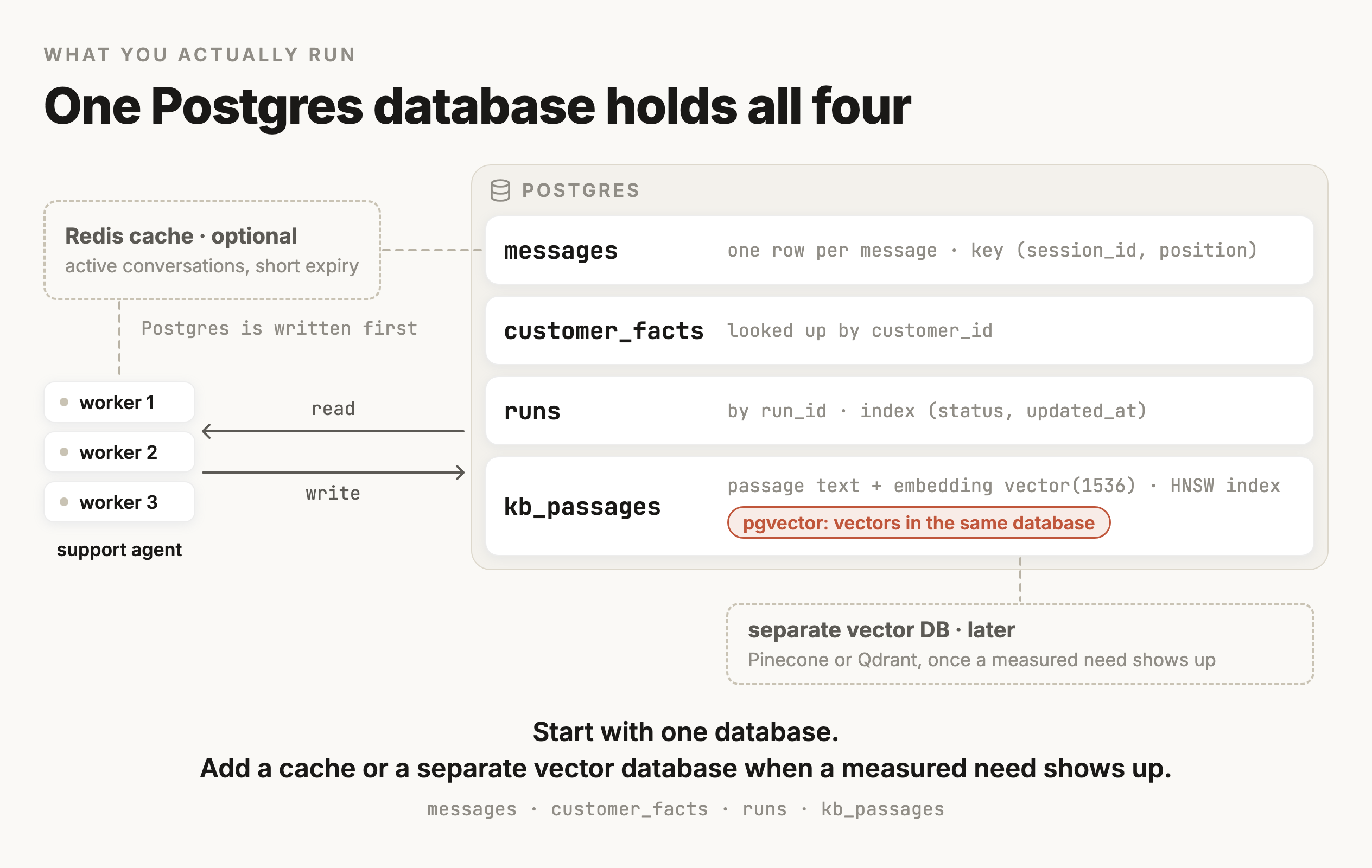
With the runs table, a worker can find a run that was interrupted. When to write to that table, and what to do when a crash leaves a refund's outcome unknown, is the next section.
Crash recovery
Save progress after every step, and make the refund safe to repeat
The refund run from earlier in this module has four steps, and the third one issues the refund. Its progress goes in the runs table from the last section, so a run that gets interrupted can pick up where it stopped. Saved progress handles most of what can go wrong. The refund step needs one more safeguard, because it changes money in another company's system.
Save a checkpoint when each step finishes
A checkpoint is a saved record of a run's state at a known point, written so that a restarted run can continue from there. For the refund run, the checkpoint is its row in runs, holding the number of the last step that finished and what each finished step returned. Your code writes it right after each step completes. A worker that resumes the run reads it first and skips every step it records as finished.
STEPS = [look_up_order, check_return_window, issue_refund, notify_customer]

def run_refund(run_id):
    run = load_run(run_id)                # last finished step, and saved results
    for number, step in enumerate(STEPS, start=1):
        if number <= run.step:
            continue                      # finished before the interruption
        result = step(run_id, run.results)
        save_checkpoint(run_id, step=number, result=result)
save_checkpoint updates the run's row with the step number and the result in one transaction, and sets updated_at, since the column's default only covers inserts.
Skipping finished steps doesn't cover every case. A crash can land after a step finishes and before its checkpoint is saved, and then the resumed run does that step again. For the first two steps that's harmless. Looking up an order or checking a date only reads data, so doing it twice has the same effect as doing it once, which is what idempotent means. Repeating the fourth step sends the customer a second confirmation, which confuses them but costs nothing. Repeating the third step refunds the customer twice.
Agent frameworks can do the checkpoint bookkeeping for you. LangGraph, for example, saves checkpoints of a run's state to Postgres through its PostgresSaver, stored under a thread id, so an interrupted run can be resumed. Making the refund call safe to repeat is still up to your code.
A crash can leave the refund's outcome unknown
Saved progress can't handle this sequence:
- 01The worker calls the payment provider to refund $80.
- 02The provider issues the refund and sends back a success response.
- 03The worker process dies before
save_checkpointruns. - 04Another worker resumes the run. The checkpoint says only two steps finished, so it calls the provider again. The customer gets $160.
A transaction can't prevent this. It groups writes inside Postgres, and the refund happens inside the payment provider's system, which your transaction has no way to include. Saving the checkpoint before the call doesn't prevent it either. If the worker records step 3 as finished and then dies before calling the provider, the resumed run skips the refund and the customer never gets one. Whichever order you pick, there's a moment where a crash loses track of the refund.
A timeout creates the same moment without any crash. The call to the provider times out, and your code can't tell whether the refund went through before the connection dropped.
An idempotency key makes a repeated refund request safe
An idempotency key is an id your code attaches to a request so the provider can recognize a repeat of it. The provider carries out the first request with a given key and saves its result. A later request with the same key gets that saved result back, and no second refund is issued. Stripe, for example, takes the key in an Idempotency-Key header on its API requests.
def issue_refund(run_id, results):
    order = results["order"]              # saved by step 1
    return payments.create_refund(        # your payment provider's client
        payment_id=order["payment_id"],
        amount=order["refund_amount"],
        idempotency_key=f"refund-{run_id}",
    )
The key is built from the run id, so every attempt at this run's refund sends the same key. In the crash above, the resumed worker sends the same key again. The provider recognizes it and returns the refund it already issued.
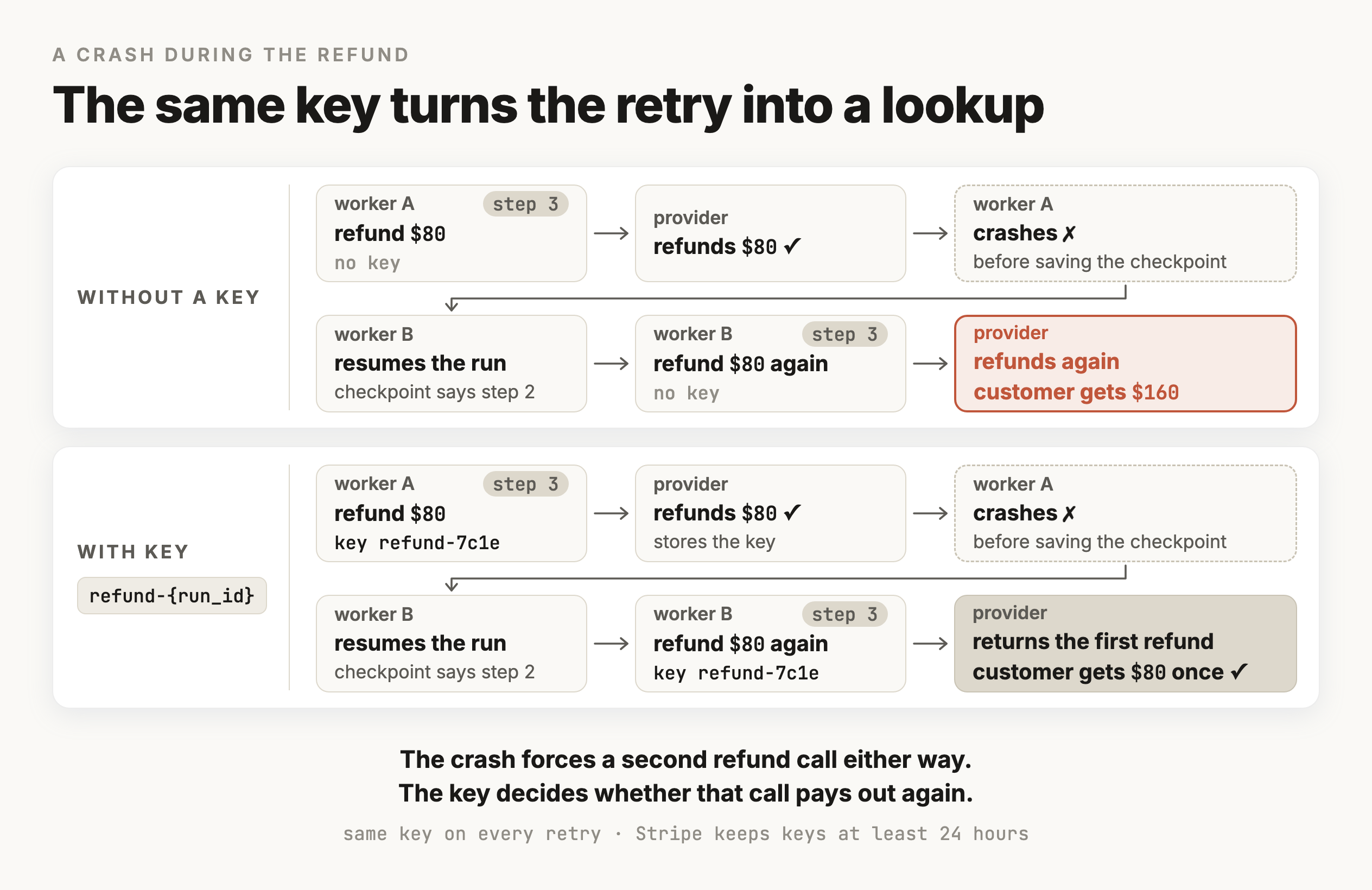
That only works if these conditions hold:
The key has to be the same on every retry. A key generated at random on each attempt looks like a brand new request every time, so build it from something fixed about the work itself.
The provider has to support keys, which many payment APIs do. When yours does not, you need the check described in the next part of this section.
The key has to still be stored on their side. Stripe removes keys after at least 24 hours and treats a request carrying a removed key as new, so a run that crashes and resumes a week later gets no protection from it.
And the request details have to match. Stripe compares a repeated request against the original and returns an error when the parameters differ, so read the amount from the same place both times.
With a checkpoint after each step and a key that stays the same across retries, a resumed run issues the refund at most once, as long as the provider honors the key and the retry arrives while the key is still stored.
When the outcome is still unknown, check before retrying
If the provider doesn't support keys, or the key has expired, the resumed worker has to find out what happened before it does anything. That means asking the provider whether a refund already exists for this order. It helps to attach your own reference, like the run id, to each refund when you create it, so the refund can be found by that reference later. Record the refund in the checkpoint if it exists, and issue it if it doesn't. If the provider can't tell you either way, set the run's status to needs_review so a person checks it before anything else happens.
The same comparison is worth running on a schedule across all recent runs. A reconciliation job reads recent refunds from the provider and compares them with the runs table. It flags any refund with no finished run behind it and any finished run whose refund the provider has no record of. Crashes that the resume logic missed show up in that report.
A run with no recent update may still be in progress
When a worker looks for interrupted runs, a row with status running can mean two different things. Another worker may be in the middle of it right now, or the worker handling it may have died. Runs with status waiting_for_approval aren't interrupted at all, so the search leaves them out.
A lease tells those two cases apart. A lease is a time limit on a worker's claim to a run. The worker that starts a run writes its own id and a lease expiry a couple of minutes ahead, and keeps pushing the expiry forward while it works. A run counts as abandoned only when it's still marked running and its lease has expired. This needs two more columns on the runs table from the last section, and an index built for the search that finds abandoned runs.
ALTER TABLE runs ADD COLUMN worker_id text, ADD COLUMN lease_until timestamptz;
CREATE INDEX ON runs (lease_until) WHERE status = 'running';UPDATE runs
SET worker_id = $1,
lease_until = now() + interval '2 minutes',
updated_at = now()
WHERE run_id = (
SELECT run_id FROM runs
WHERE status = 'running' AND lease_until < now()
ORDER BY lease_until
LIMIT 1
FOR UPDATE SKIP LOCKED
)
RETURNING run_id;FOR UPDATE SKIP LOCKED locks the row the query picks, and any other worker running the same query at the same moment skips that row and moves on, so each abandoned run is claimed by one worker. The index above is a partial index, which only includes rows that match its condition. It matches this query, and it stays small because finished runs, most of the table, aren't in it.
Reconciliation compares two records of the same refund, the one in your runs table and the one in the payment provider's system. The knowledge base has a similar problem with its copy of the help-center articles, and keeping that copy up to date is the next section.
Keeping copies in sync
Update the knowledge base copy when the help center changes
The rows in kb_passages were made from the help-center articles at the moment your code last read them. When the support team shortens the refund window from 30 days to 14 in the help center, nothing about that edit reaches your table on its own. The agent keeps finding the old passage and keeps telling customers they have 30 days. The order records don't have this problem, because the agent reads them through the order system's tools every time. Anything your app copies has to be updated by your code whenever the original changes.
Keeping the copy current is a separate job from searching it well. Searching well, including how articles get split into passages in the first place, is retrieval work covered in M19, RAG & Retrieval. The steps below treat passages and embeddings only as stored data that has to match the help center.
Find out which articles changed
An article changing can reach you two ways.
- Get notified. Many help-center tools can call a URL you give them, a webhook, when an article is edited or deleted. Your code queues a sync for that article as soon as the call arrives.
- Ask on a schedule. A job runs every few minutes and asks the help center's API for the articles updated since its last run.
A webhook can be missed, for example when your endpoint is down during a deploy, so teams that use webhooks usually keep the scheduled check running as a backstop. Deleted articles need a check of their own, since a deleted article doesn't appear in a list of recently updated ones. Once a day or so, the job compares the article ids in the help center with the ones in your copy and removes passages whose article no longer exists.
Replace all of an article's passages at once
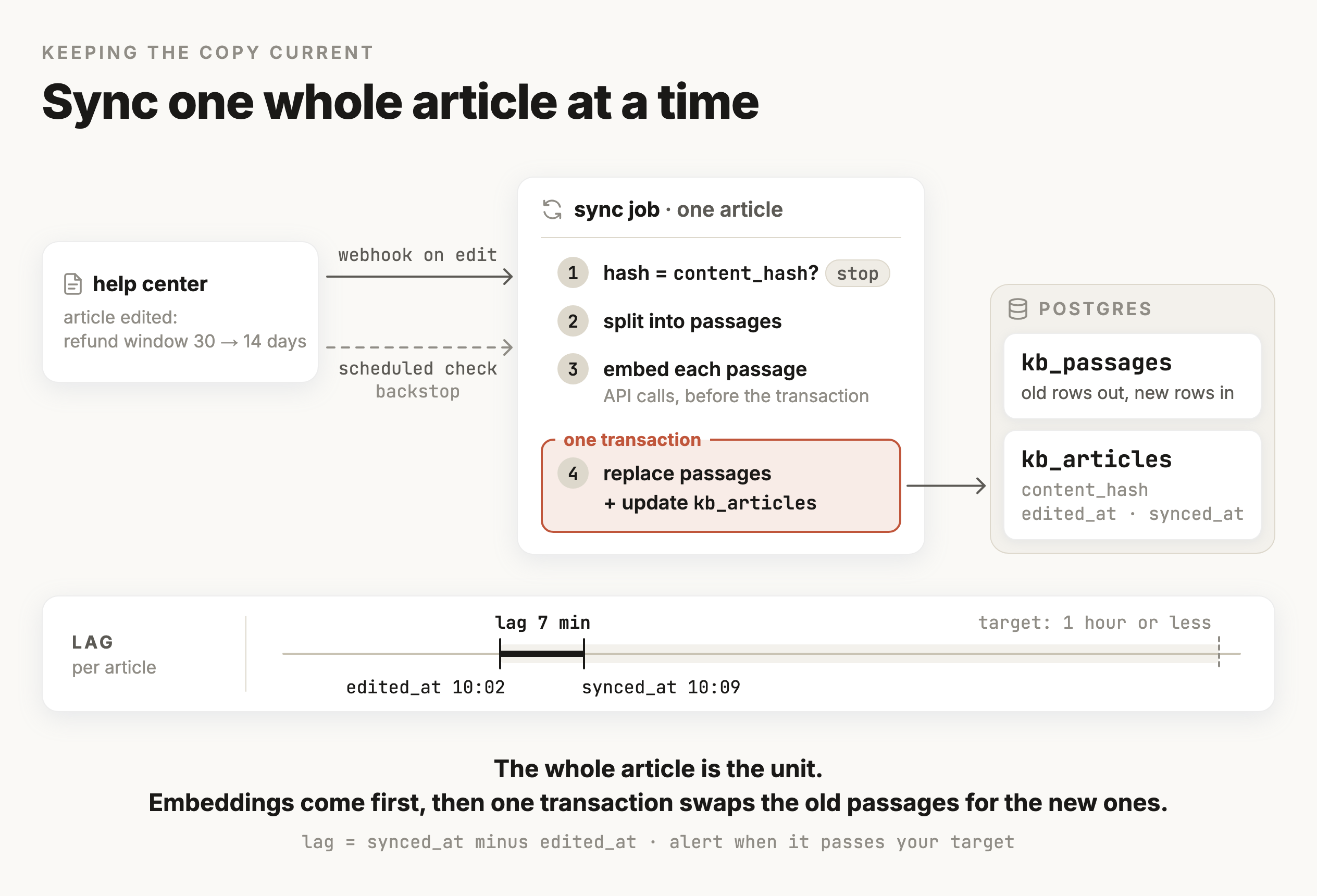
An edit can change how an article splits into passages. If the support team adds a paragraph near the top, every passage boundary after it moves, so updating passages one at a time would leave stale pieces behind. The simpler rule is to treat the whole article as the unit. The sync keeps a small table with one row per article, recording a hash of the article's text, which is a short fixed-length value computed from the text that changes whenever the text does.
CREATE TABLE kb_articles (
  article_id    text PRIMARY KEY,
  content_hash  text,
  edited_at     timestamptz,   -- when the help center says it was last edited
  synced_at     timestamptz    -- when your copy was last updated
);
Syncing one article then takes four steps:
- 01Compute the hash of the article's current text, and stop if it matches
content_hash, since nothing changed. - 02Split the new text into passages, the same way the rest of the knowledge base was split.
- 03Compute an embedding for each passage with the embeddings API.
- 04In one transaction, replace the article's rows in
kb_passageswith the new ones and update its row inkb_articles.
The embedding calls happen before the transaction because they're slow network calls, and holding a transaction open while they run keeps rows locked for no reason. The transaction itself means a search sees either the whole old article or the whole new one. The hash check in step 1 matters for cost, since every embedding call is billed and most articles don't change between syncs.
Changing the embedding model means re-embedding everything
The pgvector section said the question and the passages have to be embedded by the same model. That rule makes a model change a full rebuild:
- 01Add a new embedding column sized for the new model.
- 02Fill it by re-embedding every passage in the background.
- 03Switch the search query to the new column and the new model in the same deploy.
- 04Drop the old column once nothing reads it.
Mixing old and new embeddings, even for a day, means some passages get compared with a question embedded by the other model. Their rankings then mean nothing.
Decide how stale is acceptable
Every copy lags behind its original by some amount of time, and the useful question is how much lag you'll accept. edited_at and synced_at give you that number for each article. For the refund policy you might decide an hour is the most you'll tolerate and alert when any article's gap passes it, while a product manual that rarely changes could lag by a day without harm. The target also decides the design. A lag of an hour can be met by a scheduled job, and a lag of a minute or two needs webhooks.
A job like this sync takes data from one system and reshapes it for another, which makes it a data pipeline. The next section covers pipelines in general.
Pipelines
A pipeline moves data from where it's made to where it's used
A data pipeline is code that takes data from the system that produces it and puts it where it gets used, reshaping it on the way. The knowledge base sync is one. The support agent usually needs at least one more, which copies the messages table into wherever your team analyzes conversations and builds the eval datasets from M1. Pipeline experience shows up in about a third of the 253 AI engineering job postings this course is built from, so the vocabulary is worth knowing even when your own pipelines are small.
You'll often see this work called ETL, short for extract-transform-load, which names the steps in the order they happen. A common variation is ELT, which loads the raw data first and transforms it inside the destination, usually a data warehouse, a database built for analysis over large amounts of data.
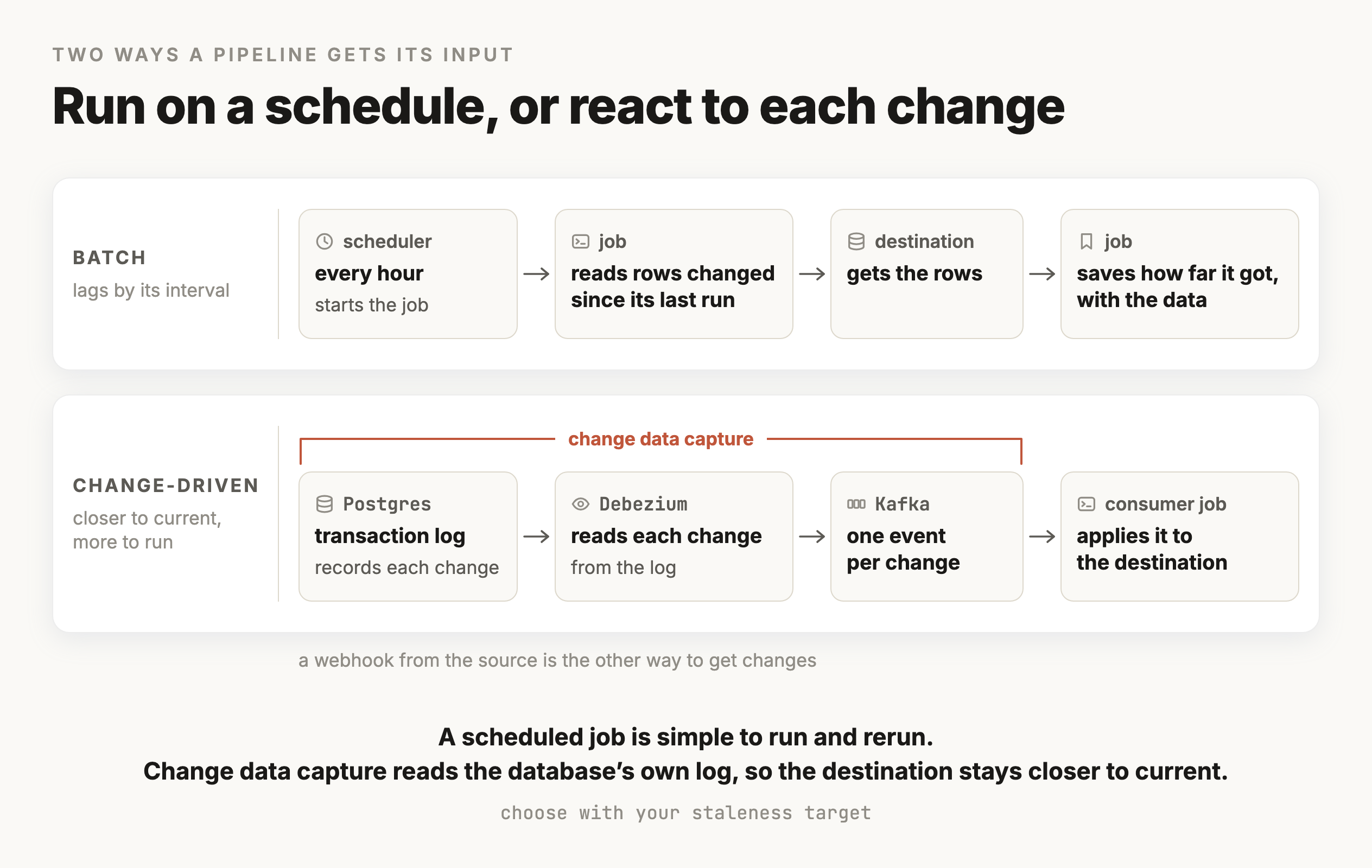
Run on a schedule, or react to each change
Pipelines get their input in one of two ways:
- Batch. The job runs on a schedule and processes whatever changed since its last run. It's simple to build and simple to rerun, and the destination is as far behind as the time between runs.
- Change-driven. The job reacts to each change soon after it happens. The change can arrive by webhook, or through change data capture, which reads the source database's own log of changes. Debezium, for example, reads changes from Postgres's transaction log and publishes each one as an event, commonly into Kafka. The destination stays closer to current, and you have more pieces of infrastructure to keep running.
Pick between them with the staleness target from the last section. If an hour of lag is acceptable, a batch job every hour is the cheaper choice.
Make every run safe to repeat
Pipelines fail partway through and get rerun, so the rule from the refund applies here too. Running a job twice on the same input should leave the destination the same as running it once. Two habits make that true:
- Write by a stable key. Use an upsert, an insert that updates the existing row when its key is already there, so a rerun overwrites what the first attempt wrote. Replacing an article's passages in one transaction, from the last section, has the same effect.
- Record progress only after the data is saved. A scheduled job remembers how far it got, usually the latest
edited_atit has processed, which is called a high-water mark. Save the new high-water mark in the same transaction as the data, so after a crash the job redoes its last batch and never skips one.
INSERT INTO kb_articles (article_id, content_hash, edited_at, synced_at)
VALUES ($1, $2, $3, now())
ON CONFLICT (article_id)
DO UPDATE SET content_hash = EXCLUDED.content_hash,
              edited_at    = EXCLUDED.edited_at,
              synced_at    = now();
Backfills rebuild everything that already exists
A normal run covers recent changes. A backfill runs the pipeline over all the existing data, and you need one whenever you change how the data is processed, for example switching embedding models or changing how articles split into passages. Backfills run for a long time and run into API rate limits, so build them to stop and resume from saved progress, the way the refund run does. Have them write into a new column or table, and switch reads over once the backfill has finished.
The pipeline tools in job postings
Job postings name a handful of tools, and it helps to know what each one is for:
- Airflow schedules jobs and the order they run in. You define a workflow in Python as a DAG, a set of tasks connected by which task has to finish before another starts.
- dbt runs SQL transformations inside a data warehouse like Snowflake or Databricks, and tracks which tables are built from which.
- Kafka carries streams of events between systems, and it's where change data capture usually sends its changes.
- Spark processes data too large for one machine by splitting the work across many machines.
A knowledge base sync for one support team can start as a scheduled Python job that writes to Postgres. These tools become worth adding when the data gets large or your company already runs them.
Putting it together
Putting it together
The lesson started from M3's list, which your code resends on every model call. Behind a web server, a dictionary inside the process lost that list on every restart and split it across workers, so the conversation moved into a store that every worker shares. Each request loads the conversation and builds a bounded context from it with M5's rules. It saves the turn back afterward, and only one turn per session runs at a time.
The support agent turned out to keep five kinds of state, which differ in how they're read and how long they have to last. The order records stay in the order system and are read through tools. Everything else fits in one Postgres database, using indexes designed from the queries they serve and pgvector for the knowledge base embeddings. Redis is an optional cache in front of it, and a separate vector database is a later step you take when you can show that pgvector no longer handles the load.
A run that changes something outside your system needs more than a stored row. A checkpoint after each step lets an interrupted run continue, and an idempotency key makes the refund safe to repeat while the provider still holds the key. Reconciliation catches outcomes the resume logic missed, and leases separate a run that's still going from one whose worker died.
Any copy has to be kept current by your own code. The knowledge base sync replaces an article's passages when it changes and re-embeds everything when the model changes, and it's one example of a data pipeline built to be rerun safely and to meet a staleness target you chose.
Later modules build on this storage. M16, Memory, decides which facts belong in the remembered-facts table. M19, RAG & Retrieval, measures and improves what the knowledge base search returns. M30, Agents, runs longer and less predictable versions of the refund run, where checkpoints and leases matter even more. M11, Production, Deployment & Scale, covers running these workers and stores under real traffic.
Checkpoint · recall · 5 questions
What the module said
- 01
Why does a conversation kept in a Python dictionary break once the app runs several worker processes?
- 02
In the refund run, what does a Postgres transaction guarantee?
- 03
The same refund request is sent twice with the same idempotency key. What does the provider do with the second request?
- 04
Which embeddings have to come from the same embedding model for a pgvector search to work?
- 05
With leases, when does a worker treat a run as abandoned?
0 / 5 answered
Checkpoint · understanding · 5 questions
Reason it through
- 01
A customer double-clicks send. Both requests load the same four-message conversation, and afterward only one of the two new messages is saved. The app stores each conversation as one JSON value. What prevents this?
- 02
The refund call times out, and your code can't tell whether the refund went through. The provider supports idempotency keys and still has the key. What should the retry do?
- 03
A teammate wants to keep conversations in memory and add sticky sessions so each customer always reaches the same machine. What problem is left?
- 04
After adding an HNSW index, a spot check shows the index returns four of exact search's top five passages for most questions. What does that tell you?
- 05
Someone suggests keeping run progress in Redis because its reads are faster. Why is that a poor fit?
0 / 5 answered
Checkpoint · debugging · 4 questions
Debug it
- 01
The help center shortened the refund window from 30 days to 14 yesterday, and the agent still tells customers they have 30 days. The model and prompt haven't changed. Where do you look first?
- 02
The team switched embedding models and embedded new articles with the new model. Now older articles rank strangely for every question. What happened?
- 03
A similarity query with WHERE published and LIMIT 5 returns two rows, even though there are plenty of published passages. What's the likely cause?
- 04
After a deploy, one customer received the same refund twice. The logs show the worker crashed right after the refund call, and the resumed run called the provider again. The refund step creates its idempotency key with uuid4() inside the step. What's wrong?
0 / 4 answered
Go deeper
pgvector README · PostgreSQL: Multicolumn indexes · Redis: Persistence · Stripe: Idempotent requests · LangGraph: Persistence
That's the last one written so far
Pick your next module from the board.