
What it is
It looks at the page, and the layout survives
The simplest way to see what this means is to index something you can go and look at. The figure renders eight pages of this site to images and searches those images.
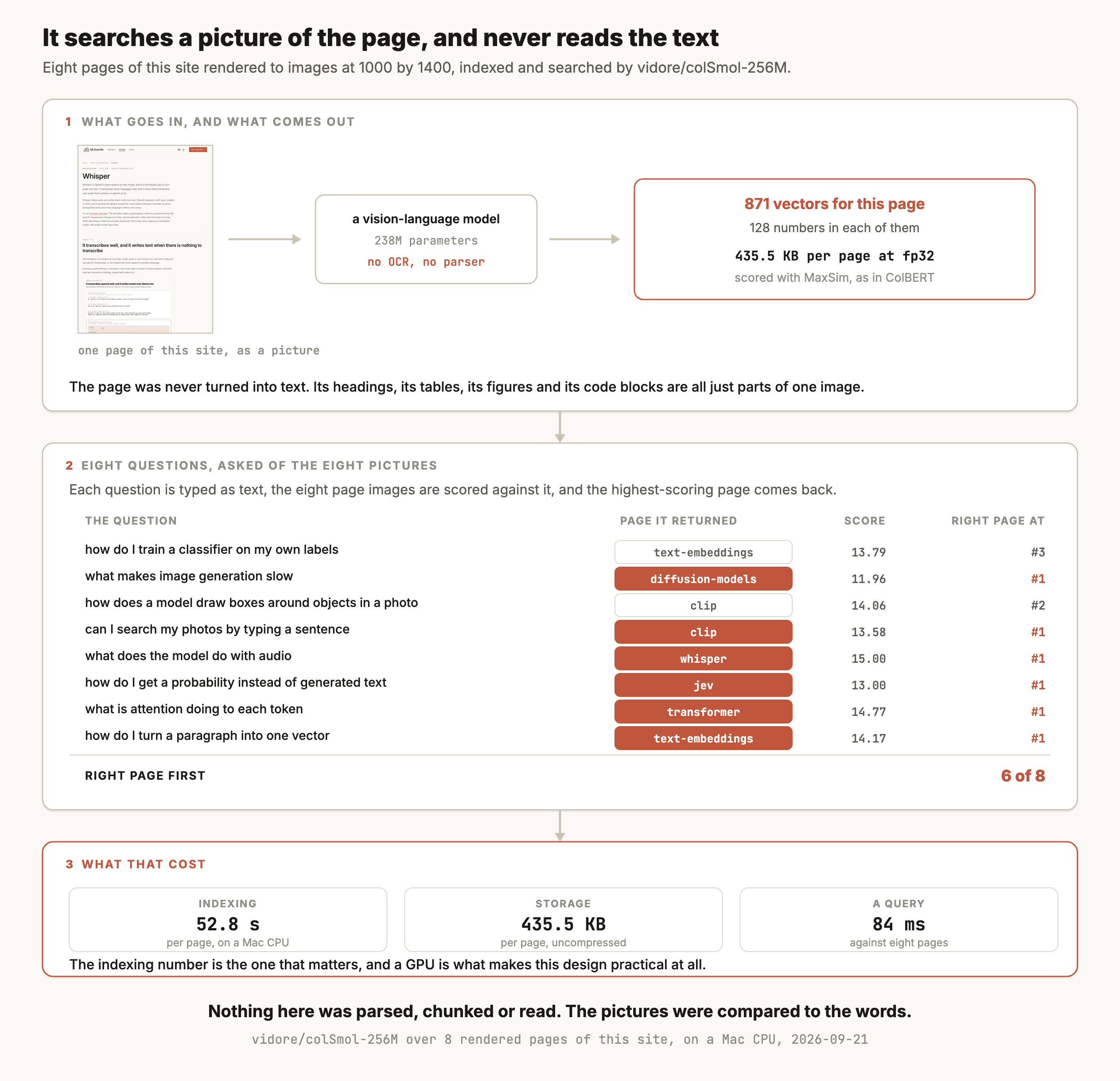
Six of the eight questions came back with the right page. The run used colSmol-256M, which is the smallest model in the family and the only one that fits comfortably on a laptop CPU, so treat the accuracy as a sign that the idea works rather than as a measurement of the approach.
The cost panel is the part worth taking seriously. Indexing took 52.8 seconds per page on a CPU, which is the number that decides whether this design is usable on your collection. A GPU changes it by a large factor, and it is still the expensive half.
Where it shows up
Where ColPali shows up
RAG over PDFs that have tables and charts in them
Financial reports, scientific papers, regulatory filings and datasheets all carry meaning in their layout. A parser that turns a table into a run of words loses the columns, and this design never takes that step.
Slide decks
Slides are close to the worst case for a text pipeline, because the text is short, the layout is the argument and half the content is a diagram. They are close to the best case for indexing the image.
Scanned documents and anything OCR handles badly
Handwriting, stamps, old typefaces and photographed pages all degrade OCR before the retrieval model ever sees them. Skipping the step skips the degradation.
Getting a document search system running quickly
The whole ingestion pipeline collapses into rendering pages to images. That is one library call, and it is the reason the paper describes its own approach as "drastically simpler".
Any collection where the figures carry the answer
A question whose answer is in a chart has nothing to match against in an extracted-text index, unless someone captioned the chart. Here the chart is part of the page vector.
How it works
A VLM for the pages and MaxSim for the scoring
The page becomes patches, and every patch becomes a vector
A vision-language model cuts the page image into patches and produces one vector per patch, which is the same step the VLM article's image-to-tokens figure walks through. ColPali keeps all of them and projects each down to 128 numbers.
The query is encoded by the same model's language side, one vector per token. Scoring a page is then ColBERT's MaxSim, where every query vector takes its best match among the page's vectors and those best matches are added up.
So the retrieval machinery is not new. What changed is that the thing being matched is a picture of a page rather than a passage of text.
Late interaction is where most of the accuracy comes from
The paper's ablation makes that unusually clear. On ViDoRe, its own benchmark of visually rich document retrieval, plain SigLIP scores 51.4 average nDCG@5. Fine-tuning it lifts that to 58.6. Putting a language model on top moves it to 58.8. Adding late interaction takes it to 81.3.
For comparison on the same benchmark, BM25 scores 65.1 and the BGE-M3 text embedding model scores 67.0. Those two baselines had a full text pipeline in front of them, with OCR to extract the words and a vision-language model writing captions for the figures, which is the expensive pipeline ColPali skips. Two contrastive image-text models, Jina-CLIP and Nomic-vision, score 17.7 and 12.9, which is the measurement behind the warning in the multimodal embeddings article.
A page costs about a quarter of a megabyte
The paper reports 257.5 KB per page, which is 1,024 image patches plus six extra text tokens for the phrase "Describe the image", 1,030 vectors of 128 numbers, stored at 16 bits each. The run behind the figure came out at 435.5 KB per page because it stored 32-bit floats. Its 871 vectors at the paper's 16 bits would be 217.8 KB, a little smaller than the paper's page because colSmol cuts the page into fewer patches.
Put that next to a text index at the same 16 bits, where a page might be three passages of 384 numbers each, or about 2.3 KB. A factor of roughly a hundred is the trade this design asks you to accept, and ColBERTv2's compression work is what people apply to bring it down.
Querying is cheap, and indexing is not
Section 5.2 of the paper puts query encoding at about 30 milliseconds for ColPali's language model, against about 22 for a text embedding model on a 15-token query, and the late interaction at roughly 1 millisecond per 1,000 pages. Those are small numbers.
Indexing is where the cost sits, because every page goes through a multi-billion-parameter vision-language model once. On the CPU behind the figure that was 52.8 seconds a page with a 256M model, so plan the ingestion around a GPU and around the fact that re-indexing a large collection is a job rather than a script.
Versions
The checkpoints you'll see, as of September 2026
| Model | Released | License | Downloads a month |
|---|---|---|---|
vidore/colqwen2-v1.0 | November 2024 | Apache-2.0 backbone, MIT adapters | 371K |
vidore/colqwen2.5-v0.2 | January 2025 | MIT | 317K |
vidore/colpali-v1.2 | August 2024 | MIT | 57K |
vidore/colpali-v1.3 | November 2024 | MIT | 36K |
vidore/colSmol-256M | January 2025 | MIT | 4.3K |
The name on the paper is not the checkpoint people run. The two ColQwen2 models together are pulled more than ten times as often as both ColPali checkpoints, because it is built on Qwen2-VL-2B-Instruct and its card says it "takes dynamic image resolutions in input and does not resize them, changing their aspect ratio as in ColPali".
colSmol-256M is the one to reach for when the model has to run somewhere small. It is two orders of magnitude less used than ColQwen2, and it was the only member of the family that would index a page on the laptop behind this article.
Read the ViDoRe leaderboard before choosing on accuracy. It moves, and the numbers in the 2024 paper are a floor rather than a current ranking.
Choosing
Choosing, and when OCR is still right
| The documents | Reach for | Why |
|---|---|---|
| Plain text, already extracted and clean | An embedding model, or hybrid search | Two orders of magnitude cheaper to store and to index |
| PDFs with tables, charts and layout that matters | ColQwen2 | The layout is part of the vector rather than something a parser threw away |
| Slide decks | ColQwen2 | Short text, heavy layout, and diagrams that carry the point |
| Scans, handwriting and photographed pages | ColPali-family | It skips the OCR step that was degrading everything downstream |
| You need the text itself, not just the right page | An OCR or document parsing model | ColPali returns a page image and no words |
| Millions of pages, on a budget | Extracted text first, this second | The index is the constraint, and compression only takes back some of it |
| It has to run on a laptop or a phone | colSmol-256M, measured carefully | Indexing is the slow half, and it is slow enough to notice |
| Exact figures, codes or identifiers | BM25 over extracted text | Exact string matching is a thing this design does not do |
Run both and compare on your own documents. The ViDoRe gap is large on visually rich material and it narrows to nothing on clean text, and which of those you have is the only question that decides this.
Try it
How to try it
Rendering pages to images is the whole ingestion pipeline, and then the model does the rest.
from pdf2image import convert_from_path
from sentence_transformers import MultiVectorEncoder

model = MultiVectorEncoder("vidore/colqwen2-v1.0")     # Apache-2.0
pages = convert_from_path("report.pdf", dpi=150)       # one image per page

doc_vecs = model.encode_document(pages, batch_size=4)  # the whole index
q_vecs = model.encode_query(["what was revenue in Q3"])

scores = model.similarity(q_vecs, doc_vecs)            # MaxSim
best = int(scores[0].argmax())
pages[best].save("answer_page.png")                    # a page, not a paragraph
What comes back is a page image, so something still has to read it. Handing that page to a vision-language model with the original question is the normal second half of the system.
From a PDF to an answer that cites its page
The full system has four steps. The PDF becomes page images, ColQwen2 picks the pages that match the question, a vision-language model reads those pages and writes the answer, and the answer carries the page numbers it came from so a person can check it. The code below extends the one above to do all four, keeping each page's number from the moment it is rendered.
import re
from pdf2image import convert_from_path
from sentence_transformers import MultiVectorEncoder
from transformers import pipeline

retriever = MultiVectorEncoder("vidore/colqwen2-v1.0")
reader = pipeline("image-text-to-text", model="Qwen/Qwen2.5-VL-3B-Instruct")

pages = convert_from_path("report.pdf", dpi=150)
page_no = list(range(1, len(pages) + 1))                   # PDF page numbers, from 1
doc_vecs = retriever.encode_document(pages, batch_size=4)  # index once, keep it

def answer(question, k=2):
    q_vecs = retriever.encode_query([question])
    scores = retriever.similarity(q_vecs, doc_vecs)[0]
    top = scores.argsort(descending=True)[:k].tolist()
    content = []
    for i in top:
        content.append({"type": "text", "text": f"Page {page_no[i]}:"})
        content.append({"type": "image", "image": pages[i]})
    content.append({"type": "text", "text":
        f"Question: {question}\n"
        "Answer only from the pages above. After each fact, cite its page "
        "as (p. N). If the pages do not contain the answer, say so."})
    out = reader(text=[{"role": "user", "content": content}],
                 max_new_tokens=200, return_full_text=False)
    text = out[0]["generated_text"]
    cited = {int(n) for n in re.findall(r"\(p\. (\d+)\)", text)}
    shown = {page_no[i] for i in top}
    return text, sorted(cited), sorted(cited - shown)   # last one should be empty

text, cited, bad = answer("what was revenue in Q3")
The prompt labels each image with its page number, because the model has no other way to know which page it is looking at. A good reply to the revenue question names the figure and ends with a citation such as "(p. 14)", cited holds the pages the answer points to, and bad holds any page it cites that it was never shown, which should be empty. A non-empty bad, or an answer with no citation at all, is a reply to send back or flag.
The check covers only part of the problem. It confirms the model cited a page it was given, and it cannot confirm the model read the number off that page correctly, which is a separate failure for tables and charts. So the interface should put the cited page image next to the answer, where a person can see the number for themselves in a second. Two pages is also a choice. Raising k makes it likelier the answer is in front of the model, and every extra page adds image tokens to the reader's input and time to the reply.
Measure whether visual document retrieval beats my text pipeline on my own PDFs. Take a folder of PDFs and build two retrieval systems over them. The first extracts text with a PDF parser, splits it into passages of at least 25 words, and indexes it with BAAI/bge-small-en-v1.5 plus BM25 fused with reciprocal rank fusion at k of 60. The second renders every page to a 150 dpi image and indexes it with vidore/colqwen2-v1.0 through sentence-transformers. Take a CSV of questions with the page number that answers each one, and report top-1 and top-5 page accuracy for both systems, plus indexing time per page, query time and index size in megabytes. Then split the results by whether the answering page contains a table or a figure, so I can see where the visual system earns its cost.
Limits
What it can't do
- It returns a page, and not an answer. There is no text in the output, so a reading step has to follow, usually a vision-language model call on the retrieved pages. A page citation from that step shows where the answer came from, and a person still has to look at the page to confirm it was read correctly.
- Indexing is expensive. 52.8 seconds a page on a laptop CPU here, and a real vision-language model forward pass per page on any hardware. Re-indexing a large collection is a scheduled job.
- The index is large. The paper reports 257.5 KB a page at 16 bits, and the run here came out at 435.5 KB at 32 bits, against a few kilobytes for extracted text. Compression helps and does not close it.
- It does not do exact matching. A part number or a case reference is the thing BM25 is best at and this is worst at, so a hybrid setup is still the sensible shape.
- Page granularity is coarse. A dense page of text has one vector set for the whole thing, so a long page that mentions your subject once competes on the same footing as one that is about it.
- The measurement here is eight pages and eight questions on the smallest model. It shows the mechanism working. Use the ViDoRe leaderboard and your own documents for anything you plan around.
Go deeper
Faysse et al. (2024): ColPali, efficient document retrieval with vision language models · Khattab and Zaharia (2020): ColBERT, where the late interaction it uses comes from · The ViDoRe leaderboard, which moves week to week · The vidore model collection on Hugging Face
Coming soon
New modules go live as I write them. Get each one in your inbox the day it ships. No spam, just the next lesson.