What it is
It turns the picture into tokens, then writes an answer about them
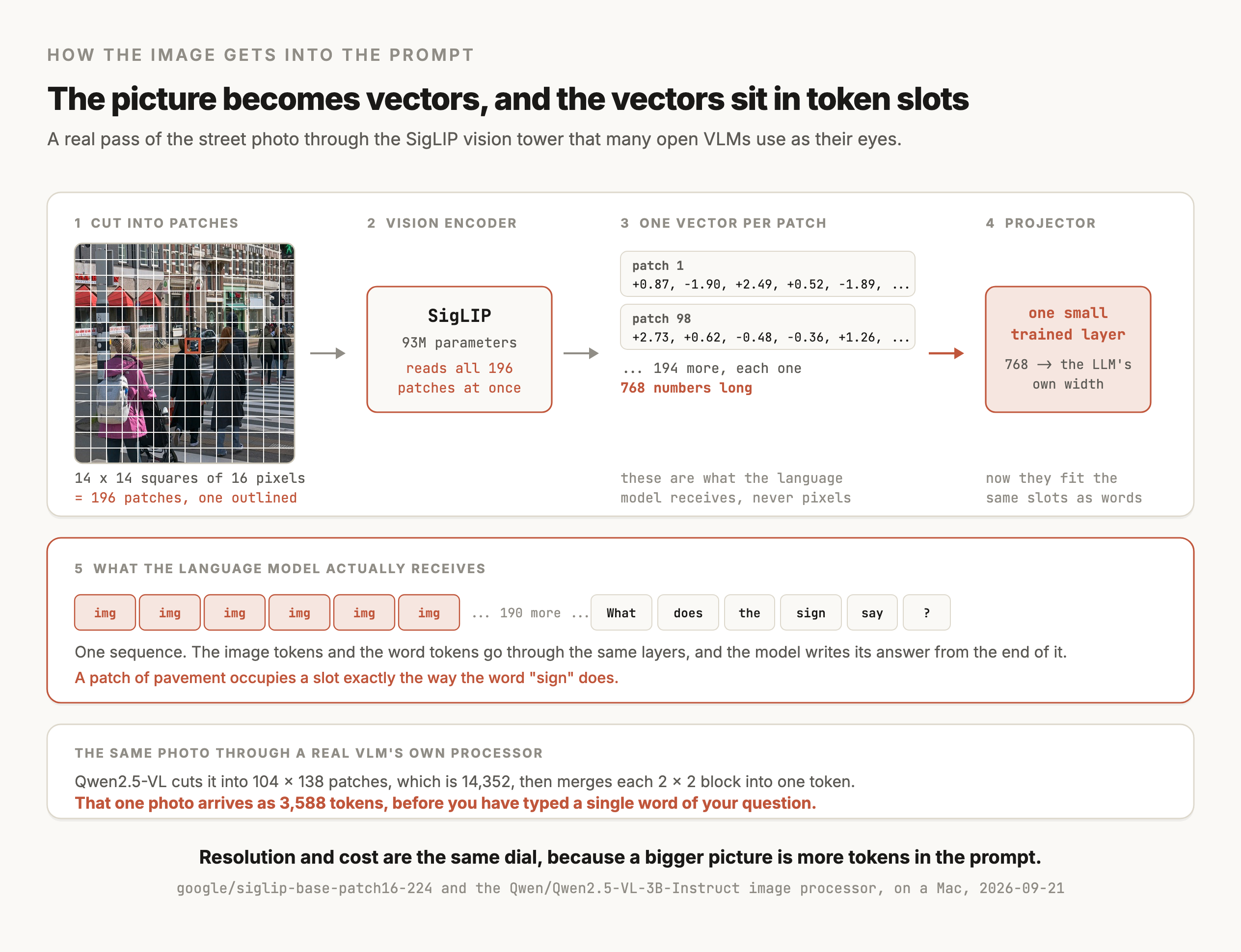
The language model never sees pixels. It sees a sequence of vectors that occupy the same slots its text tokens occupy, so the image becomes, in effect, a few hundred extra tokens at the start of the prompt.
That framing explains most of what follows. Image tokens cost the same as text tokens, a higher-resolution image means more of them, and the model's attention treats a region of the photo the way it treats a word.
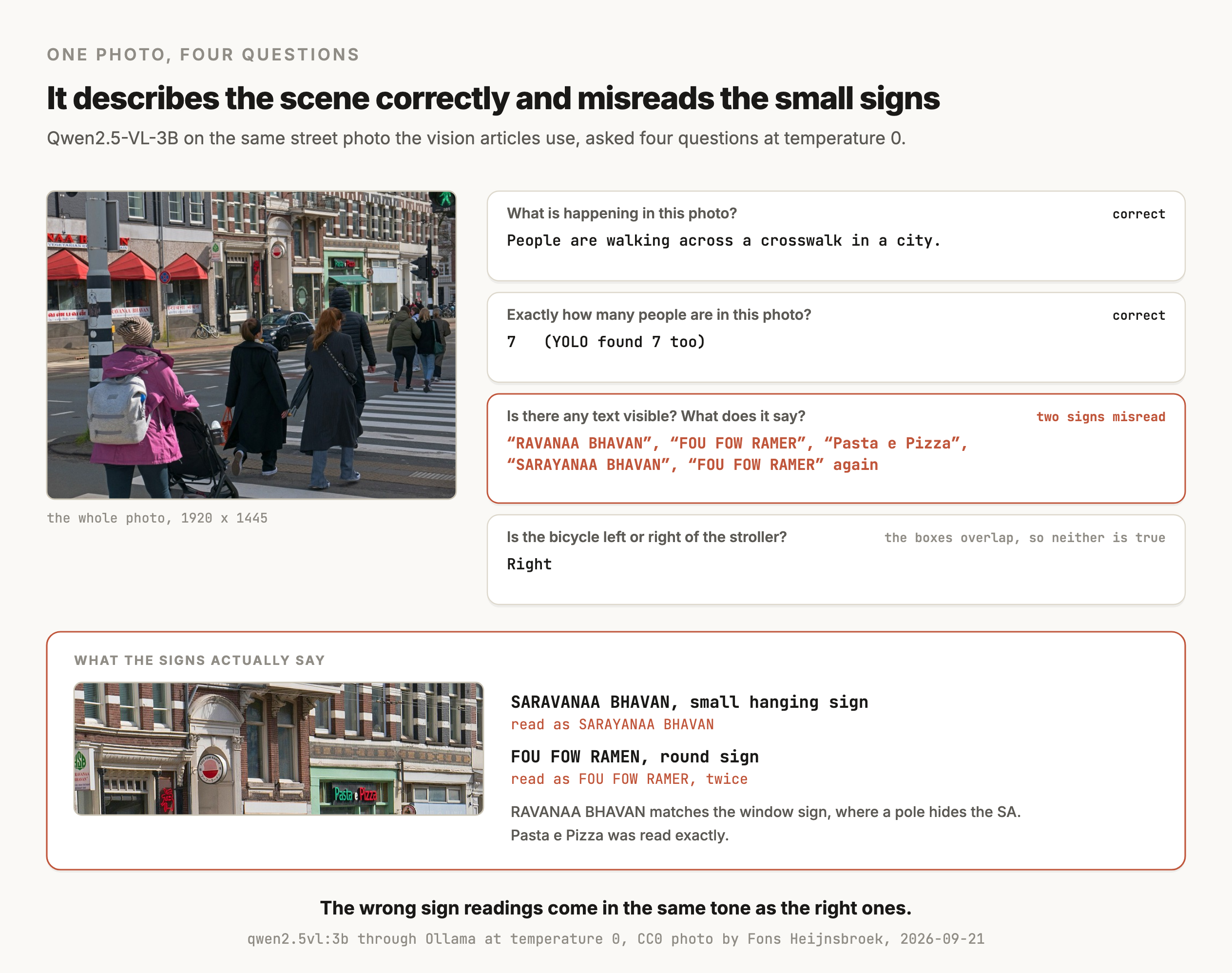
The scene description is right and the count matches what YOLO found on the same photo. It misread two of the signs. It wrote SARAYANAA for the small hanging sign that says SARAVANAA, and turned RAMEN into RAMER twice, in the same even tone as the answers that were correct. Its RAVANAA BHAVAN looks like a third mistake until you check the photo, where a lamp post covers the first two letters of the window sign, so that answer matches what the pixels show.
A rerun of the same question with the same model file on 2026-09-24 read RAMEN correctly and then repeated "FOU FOW RAMEN" dozens of times in a loop. Temperature 0 kept each run on one path, and the two runs still disagreed, so a single run is one sample of what the model does.
Where it shows up
Where VLMs show up
Answering questions about documents and screenshots
Reading an invoice, pulling a total off a receipt, or telling you what an error dialog says. This is the largest commercial use, and it is also where the failure above bites, so the accuracy has to be measured on your own documents.
Describing images at scale
Generating alt text, captioning a product catalogue, or writing the descriptions that a text embedding model then indexes for search.
Charts, diagrams and tables
A VLM will read a bar chart and answer questions about it, which is genuinely useful and genuinely unreliable at the level of exact values.
Agents that see a screen
A model driving a browser or an app needs to read the interface it is acting on. The screenshot goes in, and the next action comes out as text.
Moderation and classification with a written rule
You describe what you are looking for in words, with no labelled examples to collect, which is the same argument Grounding DINO makes for detection.
How it works
Three parts, and one of them is doing the talking
A vision encoder turns the image into vectors
The encoder is usually a Vision Transformer, which cuts the image into square patches and treats each patch the way a language model treats a word. Many open VLMs use a SigLIP encoder for this, which the SigLIP article covers, because it was trained to align images with text in the first place.
A projector reshapes those vectors for the language model
The encoder's vectors are the wrong size and the wrong shape for the language model's input, so a small trained layer maps them across. Liu et al. (2023) showed that this layer can be a single linear projection and still work, which is what made the LLaVA recipe spread so fast.
The language model does everything after that
Once the image vectors sit in the input sequence, the model generates text one token at a time exactly as it would from a text-only prompt. Everything the LLM article says about sampling, context and cost applies unchanged.
Flamingo (Alayrac et al., 2022) is the earlier design worth knowing, where a frozen language model receives image information through added cross-attention layers. The projector approach won on simplicity, and both are still around.
Resolution is a token count, which makes it a cost
A larger image produces more patches, and more patches means more tokens in the context. Qwen2-VL handles images at their native resolution, where earlier models forced every image into a fixed square, which helps on documents where the small text is the point.
This is the setting to check first when a VLM misreads a document. If the image was downscaled before it reached the encoder, the letters were gone before the model saw them.
Diagnosing a misread, one step at a time
When a VLM gets the text in an image wrong, the cause can sit in the photo or in the resizing before the model ever runs, or in the model itself, and each one has a different fix. These steps separate them, and the example is the sign misreads above.
- 01Check the pixels first. Zoom into the source image at the spot the model misread. Its RAVANAA BHAVAN turned out to be correct, because a pole hides the SA. The hanging sign that says SARAVANAA is 75 pixels wide in a 1920-pixel photo, with letters a few pixels tall, so a person zooming in can barely read it either.
- 02Find out what size the model received. Runtimes often resize images before the encoder. Log the prompt token count the server reports, because it tracks the image size the encoder saw. Ollama reported 3,626 prompt tokens for the full photo, close to the 3,588 image tokens the Qwen2.5-VL processor produces for it.
- 03Crop the region and ask again. A crop spends the model's image tokens on the region that holds the answer. Here it didn't help. The hanging-sign crop came back as SARAVAN BHAVAS, and the ramen sign as TOUICOW DAIKAIWA.
- 04Upscale the crop to see whether size is the limit. The same crops at 4 times the size gave SARAVAN BHAVAS again and IOWA, and Ollama reported the same prompt token count as for the small crops, about 1,060 to 1,090, which suggests it resized both to the same input. Upscaling adds no detail that wasn't in the source, so when a crop fails at every size, the fix is a sharper source image.
- 05Run a dedicated OCR model on the same crop. If OCR reads it and the VLM doesn't, the model is the limit, and the pipeline should read text with OCR and hand the text to the VLM or an LLM.
- 06Repeat the question. One run at temperature 0 is one sample, as the rerun above showed. Ask the same question a few times, or across two models, and treat disagreement as a sign the answer isn't readable from that image.
This is one photo and one small model, so it doesn't say how often cropping helps in general. On documents scanned at a readable size, cropping to the field in question is a cheap first thing to try, and the steps above tell you whether it worked.
Versions
The models you'll see, as of September 2026
| Model | Released | License | Downloads a month |
|---|---|---|---|
Qwen/Qwen3-VL-8B-Instruct | October 2025 | Apache-2.0 | 20.0M |
google/gemma-4-26B-A4B-it | March 2026 | Check the card | 10.1M |
Qwen/Qwen3.5-9B | February 2026 | Check the card | 9.3M |
google/gemma-4-31B-it | March 2026 | Check the card | 9.1M |
Qwen/Qwen2.5-VL-7B-Instruct | January 2025 | Apache-2.0 | 6.9M |
Something changed in this category during 2026, and that table is where you can see it. The Gemma 4 family and the current Qwen text models all carry Hugging Face's image-text tag, which means the general-purpose open model now takes images by default. A separate "VL" model is becoming the exception.
The closed frontier models from OpenAI, Anthropic and Google all take image input as standard too, which the LLM article covers in its versions table.
Benchmark numbers for these models move constantly and the ones circulating in blog posts are usually stale or wrong. MMMU, DocVQA, ChartQA and OCRBench are the four names you will see. Take any figure from the model's own card or technical report, and treat a number with no source attached as marketing.
Choosing
Choosing, and when a specialist beats a generalist
| The job | Reach for | Why |
|---|---|---|
| Questions about an image in free-form text | A VLM | Writing the answer is what it does |
| Dense documents, forms and receipts | A document parsing or OCR model first, then a VLM or LLM on the text | The measured failure above is exactly this job |
| Searching a photo library by description | CLIP or SigLIP | Two towers give you an index, and a VLM gives you one answer at a time |
| Boxes around what a phrase names | Grounding DINO | A detector is built to return boxes, and a VLM's boxes need checking on your own images before you rely on them |
| Counting objects reliably | YOLO or another detector | A detector returns one box per object, so counting becomes arithmetic |
| One label on a whole image, at high volume | A fine-tuned image classifier | Far smaller, far cheaper, and it only answers the one question |
| Fixed visual features to build on | DINOv3 | It returns vectors, and a VLM returns sentences |
The pattern repeats from the rest of this index. A VLM is the most general option and usually the most expensive per answer, so the question is whether you need the generality. When the output is a number or a box, a specialist is smaller, cheaper and easier to check.
Try it
How to try it
Ollama runs a small VLM locally, which is what produced the figure.
import base64, json, urllib.request

image = base64.b64encode(open("photo.jpg", "rb").read()).decode()
body = {"model": "qwen2.5vl:3b", "stream": False,
        "prompt": "What does the text in this image say?",
        "images": [image], "options": {"temperature": 0}}

req = urllib.request.Request("http://localhost:11434/api/generate",
        data=json.dumps(body).encode(),
        headers={"Content-Type": "application/json"})
print(json.loads(urllib.request.urlopen(req).read())["response"])
Hosted models take the same shape through their own SDKs, with the image sent as base64 or a URL alongside the text.
Test whether a VLM is accurate enough for my documents before I build on it. Take a folder of images and a CSV giving the correct answer for one specific question about each one, such as the invoice total or the date. Run each image through a local qwen2.5vl:3b via Ollama and through one hosted model I name, both at temperature 0, and record the answer and the latency. Report exact-match accuracy per model, and list every image where the two models disagree so I can look at those myself. Log the prompt token count each call reports, so I can see what image size the model received. Then repeat the whole run with each image downscaled to half its resolution, and once more on a crop around the answer's region from a box column in the CSV, and report the accuracy for each, so I can see how much of the result depends on resolution.
Limits
What it can't do
- It reads text in images unreliably, and it sounds the same when it is wrong. In the run above it misread two of the four signs, and a crop of each sign read no better. Use an OCR or document parsing model when the letters are the point, and check the source pixels before blaming the model.
- Its coordinates are only as good as your evaluation shows. Some VLMs will output boxes, and how close they land depends on the model and the images. Score them against boxes you drew by hand on your own images before relying on them, the same check you would run on a detector.
- Counting is a guess that sometimes lands. It matched a detector's count of 7 on this photo, which is not a method you can rely on.
- Spatial questions get confident answers whether or not they are answerable. Asked whether the bicycle was left or right of the stroller, it said "Right", where the two objects overlap horizontally in the frame.
- Resolution silently decides what it can see. An image downscaled before the encoder loses the small text, and nothing in the answer tells you that happened.
- Images cost tokens. A large image can take more context than the question and the answer combined, so cost and resolution are the same dial.
- Benchmarks are not your documents. MMMU and DocVQA say almost nothing about your invoices, and the only number that settles it is the one you measure on your own files.
Go deeper
Alayrac et al. (2022): Flamingo, a Visual Language Model for Few-Shot Learning · Liu et al. (2023): Visual Instruction Tuning (LLaVA) · Wang et al. (2024): Qwen2-VL, perceiving the world at any resolution · Beyer et al. (2024): PaliGemma, a versatile 3B VLM for transfer · Dosovitskiy et al. (2020): An Image is Worth 16x16 Words, the Vision Transformer
Coming soon
New modules go live as I write them. Get each one in your inbox the day it ships. No spam, just the next lesson.