
What it is
You write the classes in the prompt, and it returns a box for each match
The prompt is a list of phrases separated by periods, like a stroller. a bicycle. a traffic light.. For each detection the model returns a box with a score between 0 and 1, plus the phrase from your prompt that it matched.
In a test run for this page, the smallest model, grounding-dino-tiny, was given the same street photo twice with two different prompts, and it found what each prompt named both times.
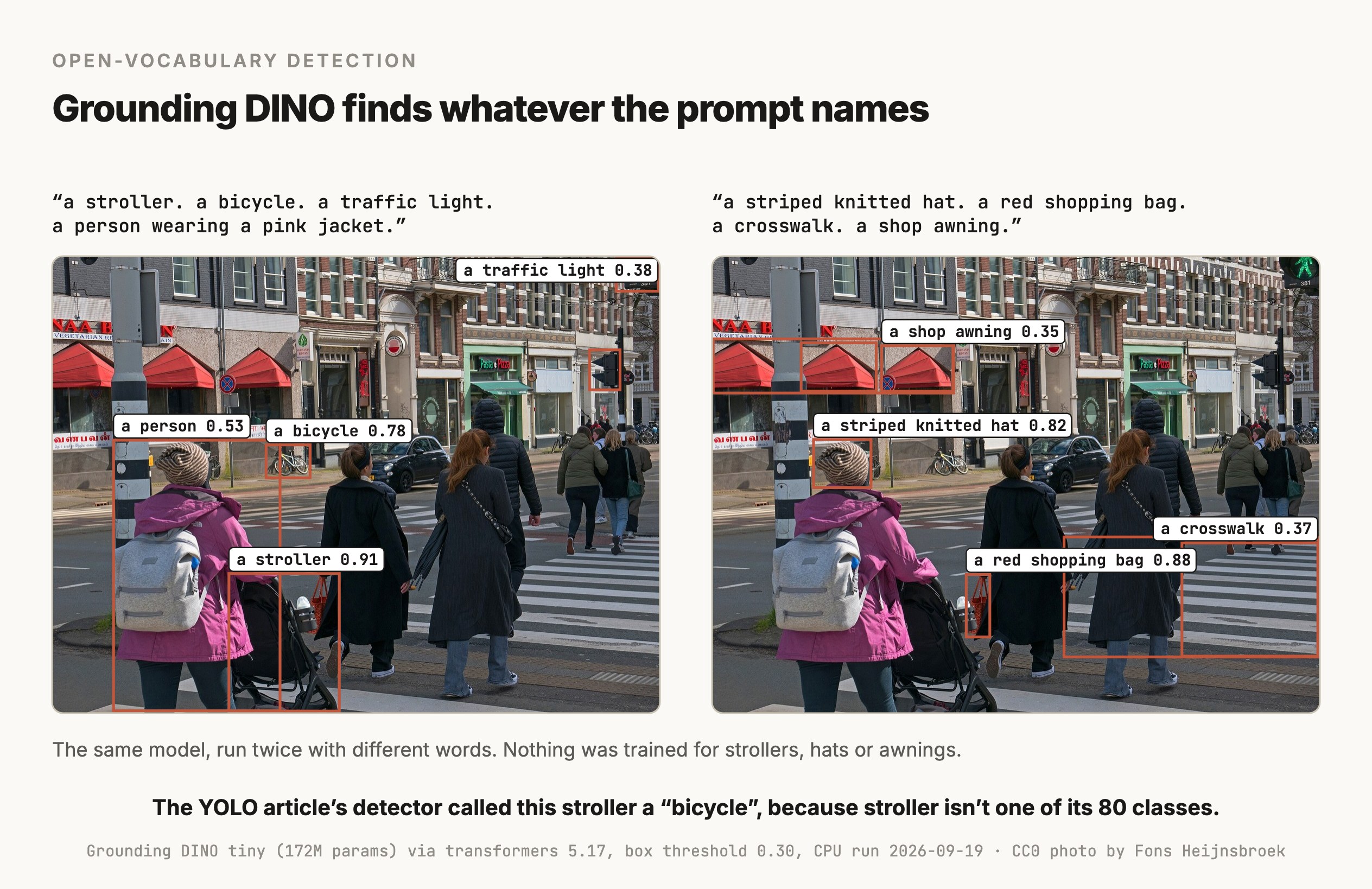
Nobody trained this model for these two prompts, and the class list came from the words alone. The model had still seen strollers and hats before. Its pretraining data includes Objects365, a detection dataset whose 365 classes include Stroller, Hat and Awning, so part of what looks like finding new things is recognizing things it was trained on under a name you chose. A class far from anything in that data, like a particular crack pattern on your product, is the real test, and only your own images can run it.
Where it shows up
It fits jobs where the list of things to find keeps changing
Detecting something you have no labels for
A warehouse camera needs to find "a pallet wrapped in plastic", a quality check needs "a cracked tile". Writing the phrase takes a minute, where training a detector takes labeled images. It's also the fastest way to find out whether a detection idea is worth pursuing at all.
Labeling a dataset so a fast model can learn from it
Run Grounding DINO over your images with a prompt, keep the boxes it's confident about, fix the mistakes by hand, and train a small closed-set detector on the result. That's the idea behind tools like Autodistill, and it pairs a slow model that needs no labels with a fast one that does. Checking the boxes it drew only catches wrong boxes. An object it missed has no box to check, and if the image is dropped for having no detections, the small model learns that the object is background, so the review has to include a sample of images where nothing was found.
Masks, by pairing it with a segmentation model
Grounding DINO returns boxes, and SAM turns a box into a pixel mask. Chaining them gives masks from a text prompt, which is what Grounded SAM (Ren et al., 2024) packages.
Finding a specific object for a robot or an agent
An agent that has to point at or pick up something needs a box for it. A prompt like "the blue mug" turns an instruction into coordinates.
How it works
Inside, a text encoder and an image encoder meet before any box is predicted
Grounding DINO starts from DINO, a DETR-style detector. A DETR-style detector carries a fixed set of learned queries through a transformer decoder, and each query ends up predicting one object, which is why it needs no non-maximum suppression (the YOLO article covers that step). Grounding DINO makes those queries depend on your text.
The paper calls the design "a dual-encoder-single-decoder architecture" and lists four parts:
- An image backbone, a vision model like Swin Transformer, which turns the image into features at several scales.
- A text backbone, a language model like BERT, which turns the prompt into one feature per word.
- A feature enhancer, layers where image features attend to text features and text features attend to image features, so both sides are shaped by the other.
- Language-guided query selection, which picks the image features that best match the prompt and uses them to initialize the decoder's queries, followed by a cross-modality decoder that refines each query against both the image and the text.
Each query ends up predicting a box plus a similarity to every word in the prompt. The label you get back is assembled from the words that score above a text threshold, and the box survives if its score passes a box threshold. Both thresholds are yours to set, and in the run above they were 0.30 and 0.25.
That word-level matching is why the prompt is punctuated the way it is. Periods keep each phrase separate, so "a striped knitted hat" and "a red shopping bag" don't blur into each other. It also explains a quirk in the figure, where the prompt said "a person wearing a pink jacket" and the label came back as "a person", because those were the words whose scores passed the threshold.
The model was pre-trained on detection data, grounding data and captions together. For the tiny checkpoint used on this page, that means Objects365 for detection, GoldG for phrase-to-box grounding and Cap4M, four million captioned images. The paper's headline 52.5 AP on COCO comes from its large model, pre-trained on Objects365, OpenImages and GoldG. It counts as zero-shot because no COCO images were in training, and Objects365 already covers everyday classes like person and bicycle, so the classes themselves weren't new to it. The tiny checkpoint scores 48.4 on the same test. The paper's mean 26.1 AP on ODinW, a benchmark built from 35 datasets in other domains, comes from a large model whose pretraining included COCO.
Versions
The open weights are from 2023, and the newer models are an API
| Version | Released | How you run it | Reported zero-shot COCO |
|---|---|---|---|
| Grounding DINO | March 2023 | Open weights, Apache 2.0, on Hugging Face as tiny and base | 48.4 AP for tiny, and 52.5 AP for the paper's large model, which isn't in IDEA's released checkpoints |
| Grounding DINO 1.5 Pro and Edge | May 2024 | IDEA's API, with a token you request | Pro above 54 AP, Edge tuned for speed |
| Grounding DINO 1.6 Pro | After 1.5, date not given | IDEA's API | 55.4 AP |
| DINO-X Pro | November 2024 | IDEA's API | 56.0 AP |
| Rex-Omni | October 2025 | Open weights, IDEA License 1.0 | Reported comparable to Grounding DINO |
The numbers for 1.5, 1.6 and DINO-X come from IDEA's own repositories, so treat them as vendor claims. DINO-X adds more than boxes, including masks, pose keypoints and region captions, and a prompt-free mode that names what it finds without being asked.
For an open model you can run yourself today, the 2023 release is still the common choice, with grounding-dino-tiny at 172 million parameters and a base version built on a larger backbone. IDEA's repository lists COCO in the base checkpoint's training data, so its COCO score isn't a zero-shot number.
Choosing
Pick it when the class list changes, and a trained detector when it doesn't
| The job | Reach for | Why |
|---|---|---|
| Find objects you can describe in words, with no labeled data | Grounding DINO | The prompt is the class list, so there's nothing to train |
| The same classes, millions of times, in real time | YOLO or another closed-set detector | It's about a hundred times faster per image, and more accurate on classes it was trained for |
| Open-vocabulary detection that still has to run in real time | YOLO-World or YOLOE-26 | YOLO-World's paper reports 35.4 AP on LVIS at 52 frames per second on a V100 |
| Pixel masks from a text prompt | SAM 3, or Grounding DINO chained with SAM | Segmentation models return pixels |
| A question about the whole scene, in words | A vision-language model | It answers in text, where a detector only returns boxes |
| The best open-vocabulary accuracy, budget permitting | DINO-X or Grounding DINO 1.6 through IDEA's API | IDEA reports the highest zero-shot numbers there, and the weights aren't public |
Speed is the trade-off to keep in mind. In the test run for this page, grounding-dino-tiny took about 2.7 to 4.9 seconds per image on a Mac CPU, where YOLO26n on the same machine and the same photo took about 32 milliseconds. A GPU changes the absolute numbers and leaves the gap.
Try it
How to try it
The Hugging Face transformers library has the open model, and this is the code behind the figure.
import torch
from PIL import Image
from transformers import AutoProcessor, AutoModelForZeroShotObjectDetection

model_id = "IDEA-Research/grounding-dino-tiny"
processor = AutoProcessor.from_pretrained(model_id)
model = AutoModelForZeroShotObjectDetection.from_pretrained(model_id).eval()

image = Image.open("street.jpg").convert("RGB")
prompt = "a stroller. a bicycle. a traffic light."      # phrases end with periods

inputs = processor(images=image, text=prompt, return_tensors="pt")
with torch.no_grad():
    outputs = model(**inputs)

result = processor.post_process_grounded_object_detection(
    outputs, inputs.input_ids, threshold=0.3, text_threshold=0.25,
    target_sizes=[image.size[::-1]])[0]

for score, label, box in zip(result["scores"], result["text_labels"], result["boxes"]):
print(f"{label} {score:.2f} {[round(float(v)) for v in box]}")Build a labeling pipeline that turns a folder of photos into a YOLO-format dataset. Use IDEA-Research/grounding-dino-base through transformers with a prompt I supply on the command line, and write one label file per image with the class index and the normalized box. Keep only detections above a score threshold I can set, and skip images where nothing passed. Keep images where nothing passed in their own folder and don't drop them, because some of them contain the object and the model missed it. Then write a review step that saves each image with its boxes drawn and the score printed, sorted from lowest score to highest, so I can check the weakest boxes first, and a second review sheet of 50 random images from the no-detection folder so I can count the objects it missed. Print how many images and boxes survived at thresholds 0.2, 0.3, 0.4 and 0.5 so I can choose one.
Limits
What it can't do
- It answers even when the thing isn't there. In the test run, prompting
a forklift.on this street photo returned a box at 0.71, drawn around the stroller, anda dog.returned 0.55 around a parked bicycle. The scores rank what best matches the words you gave it, so a high score is no proof the object exists. Check a prompt on images you know don't contain the object before trusting a threshold. - The wording changes the result. Wording and punctuation both move the scores, and so do the other phrases in the same prompt, so prompts need testing the way a detector needs evaluating.
- The label you get back can be a fragment of the phrase you wrote, which breaks code that keys off the exact string.
- It's slow next to a trained detector, by roughly two orders of magnitude in the run above, so high-volume or real-time use usually means training a small model on its output.
- The strongest versions aren't downloadable. Grounding DINO 1.5, 1.6 and DINO-X run through IDEA's API with a token and paid quota.
- It returns boxes, and nothing else. Masks and keypoints need another model in the chain.
Go deeper
Liu et al. (2023): Grounding DINO, Marrying DINO with Grounded Pre-Training · Zhang et al. (2022): DINO, DETR with Improved deNoising anchOr boxes · Minderer et al. (2023): Scaling Open-Vocabulary Object Detection (OWLv2) · Cheng et al. (2024): YOLO-World, Real-Time Open-Vocabulary Object Detection · Ren et al. (2024): Grounded SAM, Assembling Open-World Models · Grounding DINO 1.5 and 1.6 API (IDEA Research)
Coming soon
New modules go live as I write them. Get each one in your inbox the day it ships. No spam, just the next lesson.