What it is
DINO turns an image into vectors you can compare, one for the image and one per patch
DINO models are vision transformers. A vision transformer, or ViT, cuts the image into small square patches, 14 × 14 pixels for DINOv2 and 16 × 16 for DINOv3, and treats each patch the way a language model treats a word (the transformer article covers how). For each image, a DINO model returns two things:
- One vector for the whole image, 384 numbers for the small DINOv2 model. Two photos of similar things get vectors that point in similar directions, and you measure that with cosine similarity, which is 1 for vectors pointing the same way and near 0 for unrelated images.
- One vector per patch, which describes that small region in context. These patch features are what segmentation and depth models build on.
No labels are involved at any point. In a test run for this page, the small DINOv2 model gave a mirrored copy of a street photo a cosine similarity of 0.93 with the original, and a crop of just its bottom half 0.69. It had never been told what's in either image.
The patch features also group matching parts of an image on their own. Pick one patch on somebody's coat, color every other patch by how similar its features are, and the other coats in the scene light up.
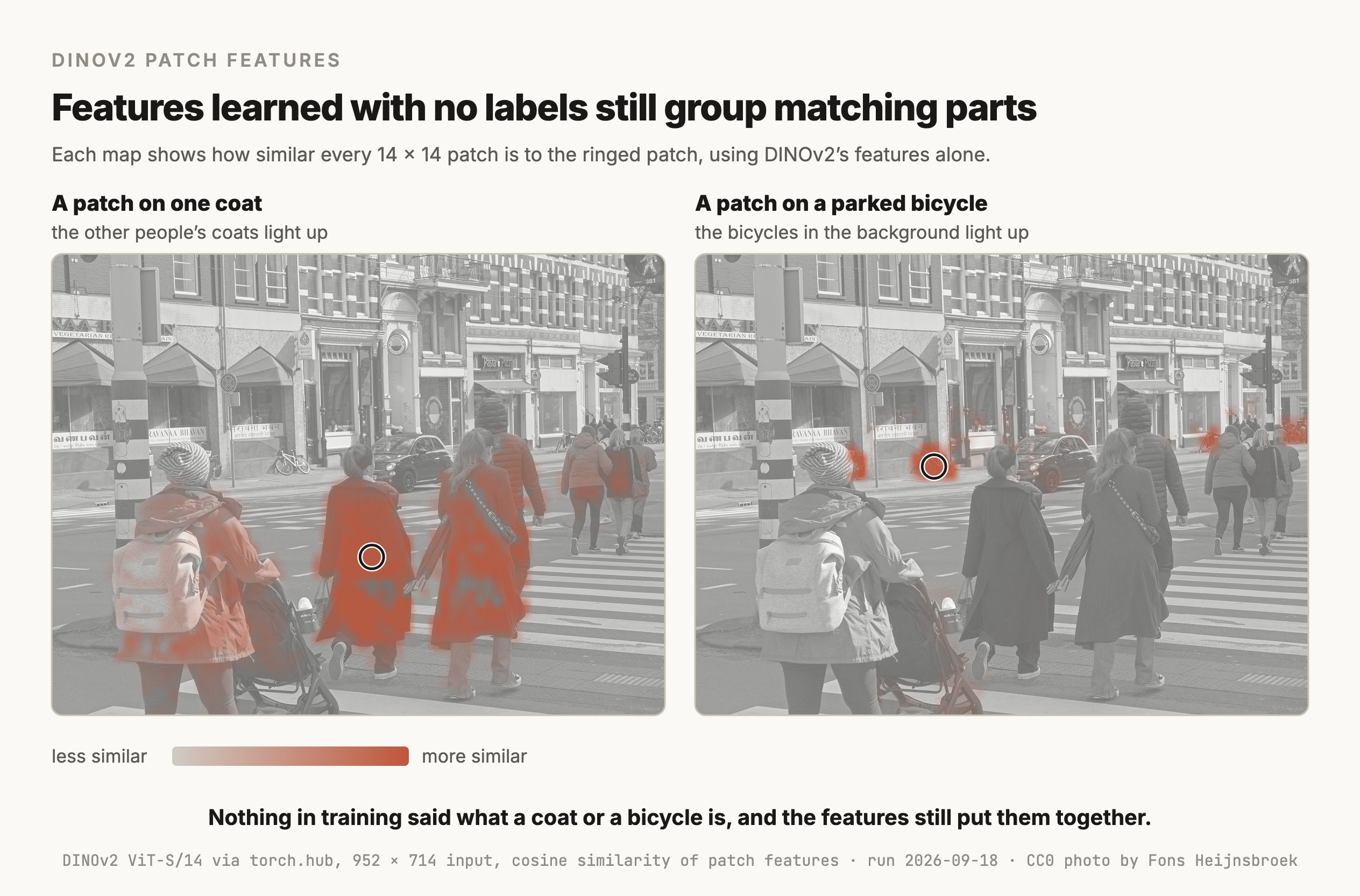
The original paper noticed this in its first sentence of findings. It reported that "self-supervised ViT features contain explicit information about the semantic segmentation of an image, which does not emerge as clearly with supervised ViTs, nor with convnets". So a model trained with labels for classification kept less of this structure than one trained with no labels at all.
Where it shows up
It shows up wherever you need good image features and have few or no labels
Image search and near-duplicate detection
Embed every image in the catalog once and store the vectors, then find the closest vectors to a new photo. That finds the same product photographed from a different angle, or a reposted image with a crop and a filter on it.
Classification with a handful of labels
Because the features already separate kinds of things, a small model on top of them can classify. The simplest is k-nearest neighbors, which labels a new image with the labels of its closest labeled images. The first DINO paper reported 78.3% top-1 accuracy on ImageNet with k-NN on a small ViT, and 80.1% with a linear classifier on ViT-Base, with the backbone frozen both times.
A backbone other vision models build on
Many task models start from DINO features and train only a small head on top. Roboflow's RF-DETR detector is "built on a DINOv2 vision transformer backbone", according to its GitHub page, and the DEIMv2 detector adopts "DINOv3-pretrained or distilled backbones" for its larger sizes, according to its paper. The YOLO article compares RF-DETR with YOLO.
Imagery unlike everyday photos
DINOv3 comes with a second 7-billion-parameter model trained on 493 million satellite images, alongside the one trained on web images, for aerial and mapping work.
How it works
DINO learns by making a student network agree with a slowly updated copy of itself
Self-distillation
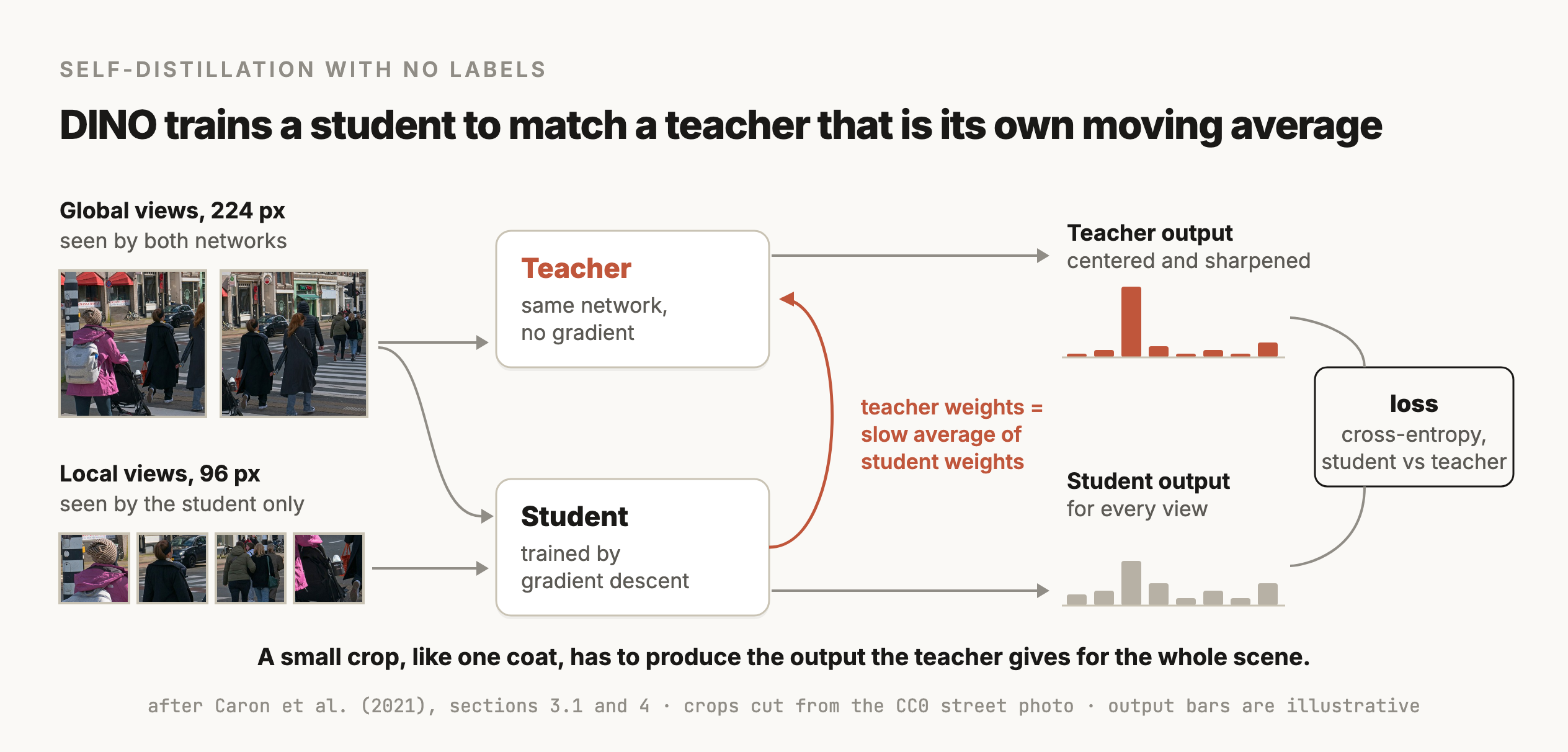
Distillation normally means training a small student model to copy the outputs of a large trained teacher. DINO has no trained teacher to start from. Both networks start from scratch with the same architecture, and the teacher's weights are an exponential moving average of the student's, so the teacher is a slowly updated copy of the student. The paper moves the average weight from 0.996 to 1 during training, so the teacher changes less and less.
For each training image, DINO cuts several crops:
- 2 global views, large crops resized to 224 × 224 pixels, which both networks see.
- Several local views, small crops resized to 96 × 96, which only the student sees.
Each network ends in a softmax that turns its output into a probability distribution. The loss is the cross-entropy between the teacher's distribution for a global view and the student's distribution for every other view. So the student has to produce, from a small crop of one coat, the same output the teacher gives for the whole scene. The paper describes this as encouraging "local-to-global" correspondences, and it's what pushes the features to encode what's in the image.
Centering and sharpening stop the features from collapsing
A student and teacher that only have to agree could both output the same thing for every image, which is called collapse. DINO prevents it with two operations on the teacher's output. Centering subtracts a running average of past teacher outputs, which stops one output dimension from dominating. Sharpening uses a low softmax temperature, which makes the teacher's distribution peaked. The paper explains that centering on its own "encourages collapse to the uniform distribution, while the sharpening has the opposite effect", and applying both balances them.
DINOv2 scaled the data and added a patch-level objective
DINOv2 (Oquab et al., 2023) kept the DINO loss and added the loss from iBOT, which masks some patches in the student's input and asks it to predict the teacher's features for them. That trains the patch features directly. The bigger change was the data. The team built LVD-142M, a curated dataset of 142 million images collected by retrieving images similar to those in trusted datasets from a large uncurated pool. They trained a ViT with about 1 billion parameters on it and distilled that into smaller models, which are the ones most people use.
DINOv3 scaled again and fixed the patch features
DINOv3 (Siméoni et al., 2025) trained a 7-billion-parameter ViT on LVD-1689M, a curated dataset of about 1.7 billion web images. Long training made the patch features worse even as the whole-image features kept improving, which the report calls "the known yet unsolved issue of dense feature maps degrading during long training schedules". Its fix is Gram anchoring, a loss that keeps the similarities between patch features close to those of an earlier checkpoint of the model. The 7B model was then distilled into a family of smaller ViTs and ConvNeXt models, which are convolutional networks.
Versions
The versions you'll see, as of September 18, 2026
| Version | Released | Training data | Sizes | License |
|---|---|---|---|---|
| DINO | April 2021 | ImageNet images, with the labels unused | ViT-S and ViT-B, with 16 × 16 and 8 × 8 patches | Apache 2.0 |
| DINOv2 | April 2023 | LVD-142M, 142 million curated images | 21M, 86M, 300M and 1.1B parameters, 14 × 14 patches | Apache 2.0 |
| DINOv3 | August 2025 | LVD-1689M web images, and SAT-493M satellite images | ViTs from 21M to 6,716M parameters, plus 4 ConvNeXt sizes, 16 × 16 patches | DINOv3 License |
The DINOv3 License is Meta's own. It grants a royalty-free license to use and modify the models, and it bars uses that include military applications and anything subject to US arms export regulations. On Hugging Face, the DINOv3 weights are gated, which means you request access and Meta approves it. DINOv2 is Apache 2.0 and downloads with no request.
DINOv3 also ships dino.txt, a version aligned with text so you can search or segment an image with a written label, and pretrained heads for tasks like depth estimation and segmentation.
Choosing
Pick DINO for pure visual similarity and a strong backbone, and CLIP when words matter
| The job | Reach for | Why |
|---|---|---|
| Find visually similar images, or cluster a photo collection | DINOv2 or DINOv3 | Its features capture what images look like, with no labels or text needed |
| Search images with a text query, or classify with class names you type | CLIP or SigLIP | They're trained on image-text pairs, so text and images share one space |
| Build a detector or a segmenter with limited labels | A DINO backbone with a small trained head | The patch features already carry object and part structure |
| Classify into fixed classes you have lots of labels for | A fine-tuned classifier, which can start from DINO | Training on your labels usually beats frozen features for a fixed task |
| Pixel-exact masks from a click or a box | SAM | It's built for that job and returns masks directly |
| Answer questions about an image | A vision-language model | DINO returns features, and it can't produce text |
The difference between DINO and CLIP comes from how they're trained. CLIP learns from pairs of images and captions, so its features line up with words, and it can match a photo to "a red forklift" with no training. DINO never sees text, so its features capture what things look like, including details a caption would never mention, like the texture of a fabric or the angle of a part. For finding a near-duplicate product photo, that's what you want, and for "find me photos of forklifts" it isn't enough without a labeled example or the dino.txt variant.
Try it
How to try it
DINOv2 loads from PyTorch Hub with no access request. This computes the image vector for two photos and compares them. It's the code behind the 0.93 and 0.69 in the first section.
import torch
from PIL import Image
from torchvision import transforms as T

model = torch.hub.load("facebookresearch/dinov2", "dinov2_vits14").eval()
prep = T.Compose([T.Resize(256), T.CenterCrop(224), T.ToTensor(),
                  T.Normalize((0.485, 0.456, 0.406), (0.229, 0.224, 0.225))])

def embed(path):
    with torch.no_grad():
        return model(prep(Image.open(path).convert("RGB")).unsqueeze(0))[0]

a, b = embed("photo_a.jpg"), embed("photo_b.jpg")   # 384 numbers each
print(torch.nn.functional.cosine_similarity(a, b, dim=0).item())
For DINOv3, request access on its Hugging Face page, and then it loads through the Hugging Face transformers library or from its GitHub repository.
Build a near-duplicate image finder for a folder of product photos. Use DINOv2 ViT-S/14 from PyTorch Hub (facebookresearch/dinov2, dinov2_vits14) to compute one normalized embedding per image, and store them with their file paths in a FAISS inner-product index. Write a function that takes a new image and returns the 10 most similar files with their cosine similarities. Then write a small evaluation: for 50 images I'll list in pairs.csv with their known duplicate, report how often the duplicate is in the top 1 and top 5 results, and print the similarity threshold that best separates duplicates from non-duplicates.
Limits
What it can't do
- It doesn't output labels or boxes, and it can't write text. It returns features, and every task needs something on top of them, even if that's only a nearest-neighbor lookup.
- It can't search by words, apart from the dino.txt variant of DINOv3. Use CLIP or SigLIP for text queries.
- Similar-looking isn't the same identity. Two different people in similar dark coats get similar features, as the figure shows, so DINO features can't replace a face recognition model for telling individuals apart.
- Its feature maps can have artifacts. Darcet et al. (2023) found "high-norm tokens appearing during inference primarily in low-informative background areas" in the feature maps of ViTs including DINOv2, and fixed them by adding extra tokens called registers. Meta publishes DINOv2 variants with registers for this reason.
- The largest models are heavy. The DINOv3 7B model is too big for most real-time uses, so production systems use one of its distilled versions.
- The newest weights are gated and licensed. DINOv3 needs an approved access request and comes with use restrictions, so check them before building a product on it.
Go deeper
Caron et al. (2021): Emerging Properties in Self-Supervised Vision Transformers (DINO) · Oquab et al. (2023): DINOv2, Learning Robust Visual Features without Supervision · Siméoni et al. (2025): DINOv3 · Darcet et al. (2023): Vision Transformers Need Registers · DINOv3 on GitHub (models, license, dino.txt)
Coming soon
New modules go live as I write them. Get each one in your inbox the day it ships. No spam, just the next lesson.